19

I use the following code from this post, to draw dice simulation.

\documentclass[12pt,a4paper]{article}
\usepackage{verbatim}
\usepackage{tikz}
\usetikzlibrary{calc,shapes}
\usepackage{tikz-3dplot}
\begin{document}
\tdplotsetmaincoords{70}{110}
\begin{tikzpicture}[tdplot_main_coords]
 \begin{scope}[canvas is xy plane at z=3]
  \path[draw=none, fill=brown!50!white] (-3,-3) rectangle (3,3);
  \path (0,0) [line cap=round, line join=round, line width=0.9cm, rounded corners=0.9cm, inner color=green!70!black, outer color=green!70!black, rotate=18+90,transform shape] circle (2.cm);
 \end{scope}
 \begin{scope}[canvas is xz plane at y=3]
  \path[draw=none, fill=brown!70!white] (-3,-3) rectangle (3,3);
  \path (0,0) [line cap=round, line join=round, line width=0.9cm, rounded corners=0.9cm, inner color=yellow, outer color=yellow, rotate=18,transform shape] circle (2.cm);
 \end{scope}
 \begin{scope}[canvas is yz plane at x=3]
  \path[draw=none, fill=brown!80!white] (-3,-3) rectangle (3,3);
  \path (0,0) [line cap=round, line join=round, line width=0.9cm, rounded corners=0.9cm, inner color=red, outer color=red, rotate=18,transform shape] circle (2.cm);
 \end{scope}
\end{tikzpicture}
\end{document}

enter image description here

How can I put this code in a style, to be repeated in different locations of the document, with different rotation angles.

Also how can I make this cube looks like a die, with controllable rounded corners.

enter image description here

Hany
  • 4,709

2 Answers2

21

I only made it, so that the angles work with the sides in the same order, but it could be made conditional dependent on the angle.

\documentclass[tikz, border=1cm]{standalone}
\usepackage{tikz-3dplot}
\begin{document}
\begin{tikzpicture}
\newcommand{\dice}[5]{
\tdplotsetmaincoords{#3}{#4}
\begin{scope}[shift={(#1,#2)}, tdplot_main_coords, rounded corners=#5, fill=brown!50!white]
\begin{scope}[canvas is xy plane at z=-1]
\filldraw (-1,-1) rectangle (1,1);
\end{scope}
\begin{scope}[canvas is xz plane at y=-1]
\filldraw (-1,-1) rectangle (1,1);
\end{scope}
\begin{scope}[canvas is yz plane at x=-1]
\filldraw (-1,-1) rectangle (1,1);
\end{scope}
\begin{scope}[canvas is xy plane at z=1]
\filldraw (-1,-1) rectangle (1,1);
\fill[green!70!black] circle[radius=2/3];
\end{scope}
\begin{scope}[canvas is xz plane at y=1]
\filldraw (-1,-1) rectangle (1,1);
\fill[yellow] circle[radius=2/3];
\end{scope}
\begin{scope}[canvas is yz plane at x=1]
\filldraw (-1,-1) rectangle (1,1);
\fill[red] circle[radius=2/3];
\end{scope}
\end{scope}
}
\dice{0}{0}{70}{110}{0.3cm};
\dice{2}{2}{70}{110}{0.5cm};
\dice{5}{3}{40}{130}{0.3cm};
\dice{5}{-1}{40}{160}{0.6cm};
\end{tikzpicture}
\end{document}

Dices with color sides

  • Thank you hpekristiansen very much for your solution. It gave me what I had in mind. This is what I have done after editing some options in your code. https://i.stack.imgur.com/o0Ky7.png – Hany Jan 14 '22 at 08:03
16

Here is an approach using the pst-solides3d package. In comparison to the approach using tikz-3dplot, it produces in a CAD-like manner a real solid, not just 6 single faces combined to a non-closed surface. Moreover it provides a light source and shading.

Note: the code must be compiled with XeLaTeX.

Chamfered edges

With viewpoint=x y z you can change the point of view of the output, trunccoeff=... controls the size of the chamfers.

\documentclass{standalone}
\usepackage[svgnames]{pstricks}
\usepackage{pst-solides3d}

\begin{document}

\psset{viewpoint=50 65 40 rtp2xyz, Decran=40, lightsrc=viewpoint, lightintensity=1.5}

\begin{pspicture}(-2.5,-2.75)(2.5,2.75) \psset{unit=0.5} \psset{solidmemory} \psSolid[object=cube, a=8, action=draw**, trunccoeff=.22, trunc=all, name=dice, linecolor=black, fillcolor=Beige]

% define planes to draw circles on \psSolid[object=plan, action=none, definition=solidface, args=dice 0, name=plane0] \psSolid[object=plan, action=none, definition=solidface, args=dice 4, name=plane1] \psSolid[object=plan, action=none, definition=solidface, args=dice 1, name=plane2]

% draw yellow circle \psset{plan=plane0} \psProjectionobject=point, action=none, name=yellowPoint \psProjection[object=cercle, args=yellowPoint 2, linecolor=black, fillstyle=solid, fillcolor=Yellow]

% draw blue circle \psset{plan=plane1} \psProjectionobject=point, name=bluePoint, action=none \psProjection[object=cercle, args=bluePoint 2, linecolor=black, fillstyle=solid, fillcolor=CornflowerBlue]

% draw red circle \psset{plan=plane2} \psProjectionobject=point, action=none, name=redPoint \psProjection[object=cercle, args=redPoint 2, linecolor=black, fillstyle=solid, fillcolor=Red]

\end{pspicture} \end{document}
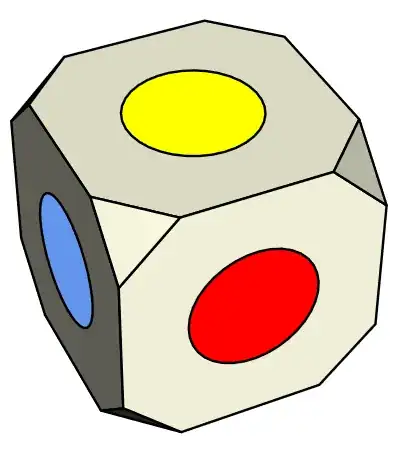
enter image description here

Round edges

Here is an addition to my first answer, implementing rounded edges instead of chamfered ones. It should be noted that pst3d-solides is based on a grid-based approach, which is where the facets come from. Their number can be adjusted via the variable ngrid=x y. The compile time increases strongly with increasing grid numbers.

\documentclass{standalone}
\usepackage[svgnames]{pstricks}
\usepackage{pst-solides3d}
\psset{viewpoint=50 65 40 rtp2xyz, Decran=30, lightsrc=viewpoint, lightintensity=1.5}

\begin{document} \begin{pspicture}(-2.0,-2.5)(2.5,2.5) \psset{solidmemory, fillcolor=Beige, lightsrc=viewpoint} \codejps{/coeff 0.75 def /rO 4 def /OH coeff rO mul neg def}

% create sphere object and cut with planes for each side of the dice \psSolid[object=sphere, r=rO, ngrid=18 27, plansepare={[1 0 0 OH]}, name=sphere, action=none] \psSolid[object=load, load=sphere1, plansepare={[-1 0 0 OH]}, action=none, name=sphere] \psSolid[object=load, load=sphere1, plansepare={[0 1 0 OH]}, action=none, name=sphere] \psSolid[object=load, load=sphere1, plansepare={[0 -1 0 OH]}, action=none, name=sphere] \psSolid[object=load, load=sphere1, plansepare={[0 0 1 OH]}, action=none, name=sphere] \psSolid[object=load, load=sphere1, plansepare={[0 0 -1 OH]}, action=none, name=sphere] \psSolidobject=load, load=sphere1, name=dice

% define planes to draw circles on \psSolid[object=plan, definition=equation, args={[1 0 0 OH] 90}, action=none, name=plane0] \psSolid[object=plan, definition=equation, args={[0 0 1 OH] 90}, action=none, name=plane1] \psSolid[object=plan, definition=equation, args={[0 1 0 OH] 90}, action=none, name=plane2]

% draw blue circle \psset{plan=plane0} \psProjectionobject=point, action=none, name=yellowPoint \psProjection[object=cercle, args=yellowPoint 1.5, linecolor=black, fillstyle=solid, fillcolor=CornflowerBlue]

% draw yellow circle \psset{plan=plane1} \psProjectionobject=point, name=bluePoint, action=none \psProjection[object=cercle, args=bluePoint 1.5, linecolor=black, fillstyle=solid, fillcolor=Yellow]

% draw red circle \psset{plan=plane2} \psProjectionobject=point, action=none, name=redPoint \psProjection[object=cercle, args=redPoint 1.5, linecolor=black, fillstyle=solid, fillcolor=Red] \composeSolid \end{pspicture}

\end{document}
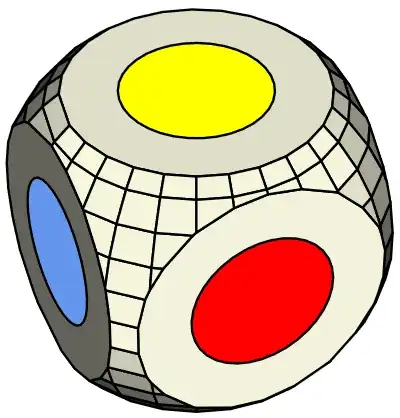
enter image description here

Nico
  • 1,694
  • Thank you for your answer. How can the lines between the faces look beveled as in the die drawing in my post. – Hany Jan 12 '22 at 04:27
  • See my updated answer. – Nico Jan 12 '22 at 10:30
  • @– Nico Thank you for your update. This drawing is inserted in several locations in a document that contains many text, tables, and graphics. Does compiling with XeLaTeX affect the settings of these other objects! If it does, can the output of your code, compiled in a separate file, be inserted in my original document compiled with pdfLatex! – Hany Jan 12 '22 at 14:24
  • It depends on the used documentclass and loaded packages of your document, if there is a difference between the outputs. You can run your main document with both engines and compare the outputs. Of course it is also possible to import the pdf-output of a seperate document in your main document. You could just use my code and produce the output pdf (with XeLaTeX). Then import the produced pdf-File using \includegraphics[width=value]{outputFromOtherDocument.pdf} in your main document and compile it with pdfLaTeX. You will need \usepackage{graphicx} to be loaded in your main document for that – Nico Jan 12 '22 at 14:40
  • LuaLaTeX can be used as well, thanks to M. Krüger's PostScript interpreter implemented in Lua. Though it is much slower (by eight times) than the Ghostscript-based routes (XeLaTeX or LaTeX+dvips+ps2pdf). – AlexG Jan 12 '22 at 15:46
  • @– Nico Thank you for your comment. I will try it. – Hany Jan 13 '22 at 03:28
  • @Nico: Add the grid option to remove the solid black lines showing the faces. It might provide a more smooth view on things. – Werner Jan 14 '22 at 00:11
  • @– Werner Thank you for your comment. Where is the grid option added to remove the black lines? – Hany Jan 14 '22 at 04:24
  • @– Nico Thank you very much for your answer. I have no experience in using pstricks. I will try to learn it and understand your code to be able to edit and use it. – Hany Jan 14 '22 at 07:59