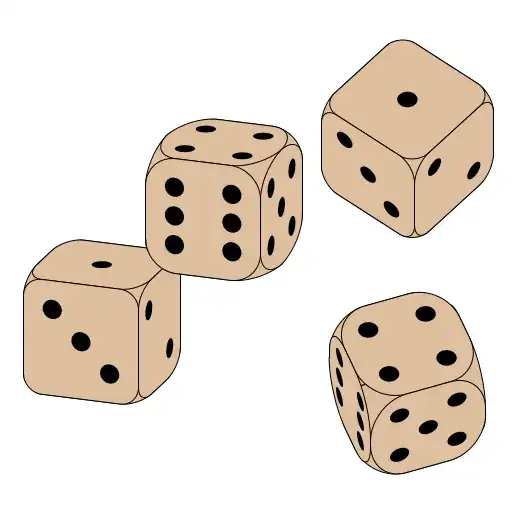
You can draw the dice faces yourself on the 3d canvasses as small circles with radius 1/6, using the following coordinates:
( 0.5, 0.5) top left
(-0.5, 0.5) top right
( 0.5, 0.0) middle left
( 0.0, 0.0) center
(-0.5, 0.0) middle right
( 0.5,-0.5) bottom left
(-0.5,-0.5) bottom right
Then you can do some arithmetic to find out which numbers need which dots.
The code below steps the numbers from 1-6 repeatedly using a counter, of course you can just use regular numbers as argument to \dicenum.
\documentclass[tikz, border=1cm]{standalone}
\usepackage{tikz-3dplot}
\begin{document}
\newcommand{\dicenum}[1]{%
\pgfmathparse{#1==2 || #1==4 || #1==5 || #1==6}\ifnum\pgfmathresult>0\relax%
\fill[black] (0.5,0.5) circle[radius=1/6];    % top left
\fill[black] (-0.5,-0.5) circle[radius=1/6];\fi % bottom right
\pgfmathparse{#1==3 || #1==4 || #1==5 || #1==6}\ifnum\pgfmathresult>0\relax%
\fill[black] (-0.5,0.5) circle[radius=1/6];    % top right
\fill[black] (0.5,-0.5) circle[radius=1/6];\fi % bottom left
\pgfmathparse{#1==1 || #1==3 || #1==5}\ifnum\pgfmathresult>0\relax%
\fill[black] (0,0) circle[radius=1/6]; \fi % center
\ifnum#1=6\relax%
\fill[black] (0.5,0) circle[radius=1/6];     % middle left
\fill[black] (-0.5,0) circle[radius=1/6];\fi % middle right
}
\newcounter{currnum}
\setcounter{currnum}{1}
\begin{tikzpicture}
\newcommand{\dice}[5]{
\tdplotsetmaincoords{#3}{#4}
\begin{scope}[shift={(#1,#2)}, tdplot_main_coords, rounded corners=#5, fill=brown!50!white]
\begin{scope}[canvas is xy plane at z=-1]
\filldraw (-1,-1) rectangle (1,1);
\end{scope}
\begin{scope}[canvas is xz plane at y=-1]
\filldraw (-1,-1) rectangle (1,1);
\end{scope}
\begin{scope}[canvas is yz plane at x=-1]
\filldraw (-1,-1) rectangle (1,1);
\end{scope}
\begin{scope}[canvas is xy plane at z=1]
\filldraw (-1,-1) rectangle (1,1);
\dicenum{\value{currnum}}
\stepcounter{currnum}
\ifnum\value{currnum}>6\relax\setcounter{currnum}{1}\fi
\end{scope}
\begin{scope}[canvas is xz plane at y=1]
\filldraw (-1,-1) rectangle (1,1);
\dicenum{\value{currnum}}
\stepcounter{currnum}
\ifnum\value{currnum}>6\relax\setcounter{currnum}{1}\fi
\end{scope}
\begin{scope}[canvas is yz plane at x=1]
\filldraw (-1,-1) rectangle (1,1);
\dicenum{\value{currnum}}
\stepcounter{currnum}
\ifnum\value{currnum}>6\relax\setcounter{currnum}{1}\fi
\end{scope}
\end{scope}
}
\dice{0}{0}{70}{110}{0.3cm};
\dice{2}{2}{70}{110}{0.5cm};
\dice{5}{3}{40}{130}{0.3cm};
\dice{5}{-1}{40}{160}{0.6cm};
\end{tikzpicture}
\end{document}
Result: