Basic use
In TeXstudio, the left structure menu display all LABELS in each file. You may easily navigate between labels by just clicking on the label. This example uses equation, but it applies to any label as far as I've used.
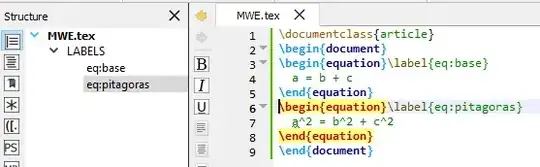
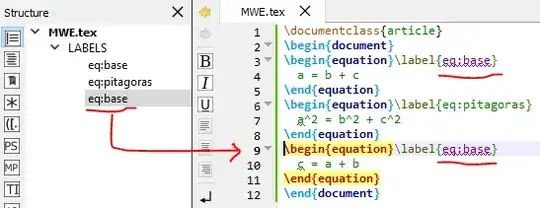
When a second identical label is inserted, both get purple.
Side Note for newcommands
A side note I should add after remember some not good practices others colleagues did. Avoid using \label inside \newcommand. It is not impossible to do, but it will demand a little bit more effort than the necessary, since TeXstudio will note identify them at first.
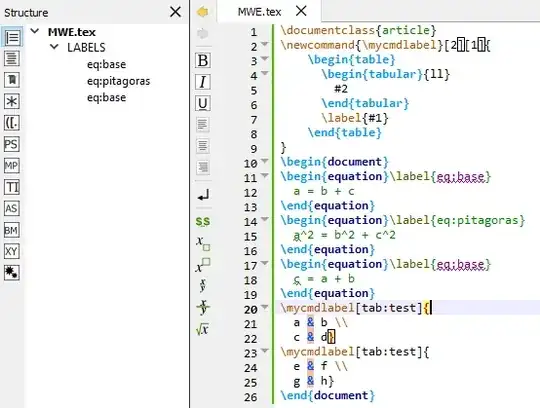
And the autocomplete tool will not work properly without some extra trickery.
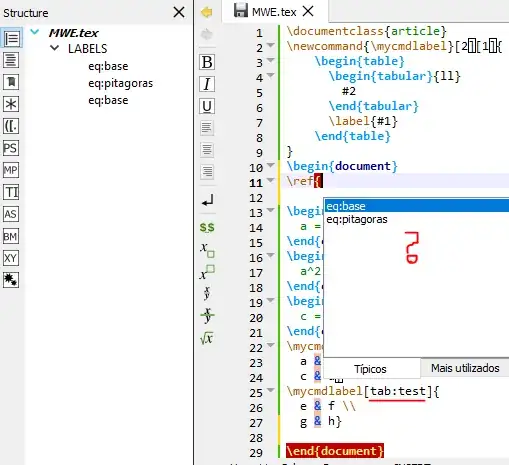
Please, also notice while creating newcommands the formatting might vary.
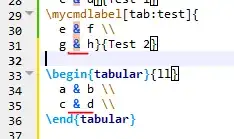
To the correct identification, you will need to created your own cwl-files and take care with other possibles resources you might want in your document such as hyperref/cleverref. The basic suggestion is if you are not creating a long and complex document where you need to use many times the same set of instructions with labels, therefore a newcommand, just avoid anything more complex than the necessary.
Links
The following links might be useful:
MWE for conference
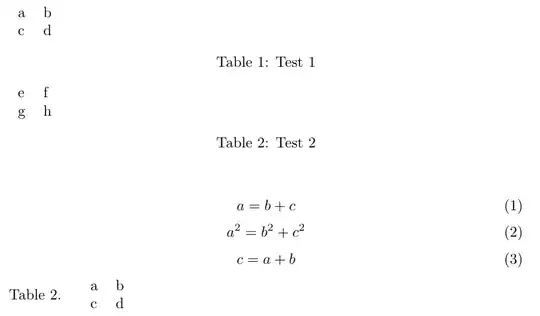
\documentclass{article}
\newcommand{\mycmdlabel}[3][1]{
    \begin{table}
      \begin{tabular}{ll}
        #2
      \end{tabular}
      \caption{#3}
      \label{#1}
    \end{table}
}
\begin{document}
\begin{equation}\label{eq:base}
  a = b + c
\end{equation}
\begin{equation}\label{eq:pitagoras}
  a^2 = b^2 + c^2
\end{equation}
\begin{equation}\label{eq:base} % repeated label
  c = a + b
\end{equation}
Table~\ref{tab:test}.
\mycmdlabel[tab:test]{
  a & b \\
  c & d}{Test 1}
\mycmdlabel[tab:test]{ % repeated label
  e & f \\
  g & h}{Test 2}
\begin{tabular}{ll}
  a & b \\
  c & d \\
\end{tabular}
\end{document}