1

I wish to create a plot of data stored in different files and make an animation of it. But I am getting a Missing \endcsname inserted error. Since I'm using "non-text" components in a field where only text is expected, I get the error, which I understand. I am not able to figure out a workaround. Any help is appreciated.

MWE:

\documentclass[]{standalone}

\usepackage{animate} \usepackage{pgfplots,tikz}

\pgfplotsset{width=7cm,compat=newest,height=7cm}

\begin{document}

\begin{animateinline}[autoplay,loop]{5}
    \multiframe{10}{iX=2+1}{
        \begin{tikzpicture}[scale=1.5]
            \begin{axis}[scaled ticks=false,xmin=0,ymin=0,ymax=1,legend entries= {$n= \iX$},legend pos=north west, legend style = {font=\scriptsize}]
                \addplot[color=blue,ultra thick] table {data/n\iX.dat};
            \end{axis}
        \end{tikzpicture}
    }
\end{animateinline}


\end{document}

2 Answers2

2

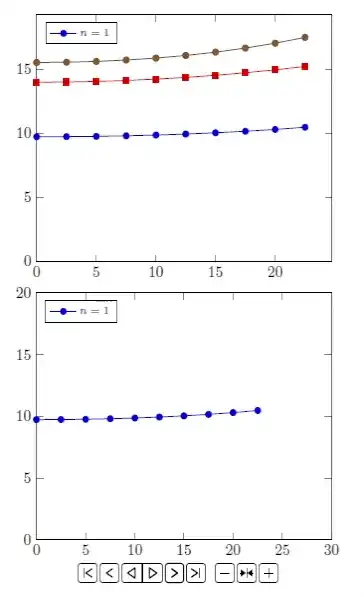
This solution presents the approach you wanted with multiple files.

I split each data from each y column into a different file and removed some lines.

The main option is \addplot table {Fre\i.dat};. A MWE follows.

\documentclass{article} 
\usepackage{tikz,pgfplots}
\usepackage{animate}

\usepackage{filecontents} \begin{filecontents}{Fre1.dat} 0.0000000e+00 9.7322390e+00 2.5000000e+00 9.7404206e+00 5.0000000e+00 9.7651029e+00 7.5000000e+00 9.8067018e+00 1.0000000e+01 9.8659247e+00 1.2500000e+01 9.9437917e+00 1.5000000e+01 1.0041667e+01 1.7500000e+01 1.0161304e+01 2.0000000e+01 1.0304897e+01 2.2500000e+01 1.0475157e+01 \end{filecontents} \begin{filecontents}{Fre2.dat} 0.0000000e+00 1.3985949e+01 2.5000000e+00 1.4001132e+01 5.0000000e+00 1.4046619e+01 7.5000000e+00 1.4122249e+01 1.0000000e+01 1.4227833e+01 1.2500000e+01 1.4363269e+01 1.5000000e+01 1.4528713e+01 1.7500000e+01 1.4724777e+01 2.0000000e+01 1.4952727e+01 2.2500000e+01 1.5214662e+01 \end{filecontents} \begin{filecontents}{Fre3.dat} 0.0000000e+00 1.5525350e+01 2.5000000e+00 1.5546305e+01 5.0000000e+00 1.5609681e+01 7.5000000e+00 1.5717003e+01 1.0000000e+01 1.5870771e+01 1.2500000e+01 1.6074399e+01 1.5000000e+01 1.6332129e+01 1.7500000e+01 1.6648943e+01 2.0000000e+01 1.7030511e+01 2.2500000e+01 1.7483207e+01 \end{filecontents}

\begin{document} \begin{tikzpicture} \begin{axis}[scaled ticks=false,xmin=0,ymin=0, legend entries={$n=1$}, legend pos=north west, legend style = {font=\scriptsize}] \addplot table {Fre1.dat}; \addplot table {Fre2.dat}; \addplot table {Fre3.dat}; \end{axis} \end{tikzpicture}

\begin{animateinline}[controls,loop,bb=0 0 250 250]{1} \multiframe{3}{i=1+1}{% \begin{tikzpicture} \begin{axis}[scaled ticks=false, xmin=0,ymin=0, xmax=30,ymax=20, legend entries={$n=\i$}, legend pos=north west, legend style = {font=\scriptsize}] \addplot table {Fre\i.dat}; \end{axis} \end{tikzpicture} } \end{animateinline} \end{document}

The animation is presented alongside the base graph.
enter image description here

FHZ
  • 3,939
  • @Dhruv Thakkar, does this fit your needs? I don't know exactly how this will behave along files with multiple columns, but that's a good start point. – FHZ Apr 29 '22 at 21:05
  • yes it does. Can you please tell me how it's different from my approach? I mean apart from the inline definition of the file. Isn't it the same? – Dhruv Thakkar Apr 29 '22 at 21:06
  • I think you had an issue with standalone, I saw this and then I changed it to article. I also changed \iX to \i but that's was not the cause. – FHZ Apr 29 '22 at 21:10
  • I copied your code and replaced "Fre" with "n" to access my files, while keeping all of it the same, I still get the error. Also, I noted something interesting that if I remove animateinline environment and add \def\iX{9} I don't get the error. – Dhruv Thakkar Apr 29 '22 at 21:15
  • More precisely. The code I gave works with standalone. It seems to be some issue with ymax=1. – FHZ Apr 29 '22 at 21:15
1

This solution presents a slight different approach to your issue. It animates dates from a single file with multiple columns.

I used:

The main option is y index=\i. A MWE follows.

\documentclass{article} 
\usepackage{tikz,pgfplots}
\usepackage{animate}

\usepackage{filecontents} \begin{filecontents}{Fre.dat} 0.0000000e+00 9.7322390e+00 1.3985949e+01 1.5525350e+01 2.5000000e+00 9.7404206e+00 1.4001132e+01 1.5546305e+01 5.0000000e+00 9.7651029e+00 1.4046619e+01 1.5609681e+01 7.5000000e+00 9.8067018e+00 1.4122249e+01 1.5717003e+01 1.0000000e+01 9.8659247e+00 1.4227833e+01 1.5870771e+01 1.2500000e+01 9.9437917e+00 1.4363269e+01 1.6074399e+01 1.5000000e+01 1.0041667e+01 1.4528713e+01 1.6332129e+01 1.7500000e+01 1.0161304e+01 1.4724777e+01 1.6648943e+01 2.0000000e+01 1.0304897e+01 1.4952727e+01 1.7030511e+01 2.2500000e+01 1.0475157e+01 1.5214662e+01 1.7483207e+01 2.5000000e+01 1.0675401e+01 1.5513636e+01 1.8014219e+01 2.7500000e+01 1.0909671e+01 1.5853762e+01 1.8631749e+01 3.0000000e+01 1.1182876e+01 1.6240296e+01 1.9345313e+01 3.2500000e+01 1.1500982e+01 1.6679755e+01 2.0166108e+01 3.5000000e+01 1.1871246e+01 1.7180085e+01 2.1107451e+01 3.7500000e+01 1.2302522e+01 1.7750913e+01 2.2185310e+01 4.0000000e+01 1.2805653e+01 1.8403905e+01 2.3418947e+01 4.2500000e+01 1.3393986e+01 1.9153253e+01 2.4831704e+01 4.5000000e+01 1.4084049e+01 2.0016348e+01 2.6045676e+01 4.7500000e+01 1.4896463e+01 2.1014686e+01 2.7132868e+01 5.0000000e+01 1.5857171e+01 2.2175104e+01 2.8395420e+01 5.2500000e+01 1.6999148e+01 2.3531505e+01 2.9867785e+01 5.5000000e+01 1.8364789e+01 2.5127277e+01 3.1594083e+01 5.7500000e+01 2.0009352e+01 2.7018776e+01 3.3631631e+01 6.0000000e+01 2.2006006e+01 2.9280464e+01 3.6056144e+01 \end{filecontents}

\begin{document} \begin{tikzpicture} \begin{axis}[scaled ticks=false,xmin=0,ymin=0, legend entries={$n=1$}, legend pos=north west, legend style = {font=\scriptsize}] \addplot table [x index=0,y index=1] {Fre.dat}; \end{axis} \end{tikzpicture}

\begin{animateinline}[controls,loop,bb=0 0 250 250]{1} \multiframe{3}{i=1+1}{% \begin{tikzpicture} \begin{axis}[scaled ticks=false, xmin=0,ymin=0, xmax=70,ymax=40, legend entries={$n=\i$}, legend pos=north west, legend style = {font=\scriptsize}] \addplot table [x index=0,y index=\i] {Fre.dat}; \end{axis} \end{tikzpicture} } \end{animateinline} \end{document}

The animation is presented alongside the base graph.

enter image description here

FHZ
  • 3,939
  • Thank you for your suggestion. But the problem is that I have files with a different number of rows and multiple columns(one for x, changes in each file, and one for y). Any thoughts on how I can circumvent it? – Dhruv Thakkar Apr 29 '22 at 21:01
  • Indeed, when you were writing I was editing another answer with data from a file. – FHZ Apr 29 '22 at 21:02