With no option, standalone uses horizontal mode: basically you have to think that the document body is typeset in a \mbox.
Indeed, your code produces errors. First error, \[ is taken as argument to \textcolor, which wants two arguments. Second error: ! Missing $ inserted. which is typical for \[...\] inside \mbox.
You can use $\displaystyle...$ instead.
If you want the formula to be bold, don't use \bm nor \pmb (the latter makes for very dubious output). Simply issue \boldmath. The summation symbol would not be bold, though.
You can fix it by declaring the bold version for cmex.
\documentclass{standalone}
\usepackage{amsfonts}
\usepackage{amsmath}
\usepackage{xcolor}
\usepackage{pagecolor}
\definecolor{byellow}{RGB}{255, 255, 0}
\DeclareFontShape{OMX}{cmex}{b}{n}{<-> cmexb10}{}
\SetSymbolFont{largesymbols}{bold}{OMX}{cmex}{b}{n}
\begin{document}
\pagecolor{black}%<--- don't forget
\color{byellow}%<--- don't forget
\boldmath
$\displaystyle\zeta(s) = \sum_{n = 1}^{\infty} \frac{1}{n^{s}}$
\end{document}
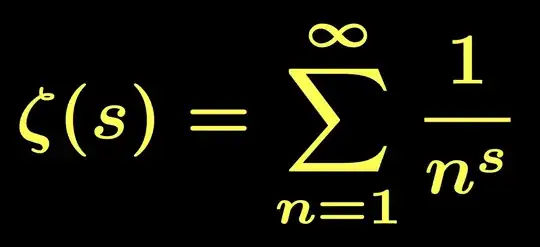
Without the two font declarations you'd get
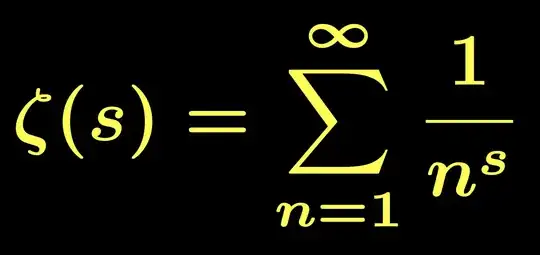
so you see that in the previous image the summation symbol is indeed bold.
For a further comparison, here's the output if \boldmath is omitted.
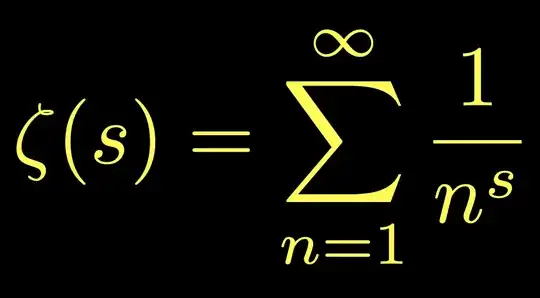
And also the output of the summation without the font declarations and using \pmb: not really what I'd like to see in my document.

Note that I removed several parts from your code: mainly \left and \right that only add unwanted space; also some braces that ruin the typesetting. And s instead of z.
 However, my code currently produces.
 My code is as follows.


\sum? Also, \displaystyle is not necessary in a displayed equation. – Bernard Jun 20 '22 at 20:53displaystyle. See my answer. – Daria Bogatova Jun 20 '22 at 21:04\sum\limits_{n=1}^{\infty}. – Bernard Jun 20 '22 at 21:08\zeta(s)instead of\zeta(z),sis the variable inside thesumovern. I know bothzandsare used as complex variables, but I must immediately ask when I see some inconsistency. Sorry for pointing it out. – FHZ Jun 20 '22 at 21:37