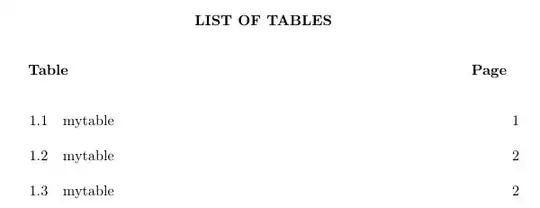
1

I am trying to edit the cls file from my university, specifically to change the toc macros. What I have (the macros):

\renewcommand*\l@chapter[2]{%
\ifnum \c@tocdepth >\m@ne
\setcounter{secnumdepth}{3}%
\setcounter{tocdepth}{2} %   
\addpenalty{-\@highpenalty}%
\vskip .1cm \@plus \p@ %{the v-distance between the headings in the contents}
\setlength\@tempdima{0.5cm}% %{the distance between the number of the chapter and its title}
\begingroup
\parindent\z@ \rightskip \@pnumwidth
\parfillskip -\@pnumwidth
\leavevmode
\advance \leftskip \@tempdima 
\hskip  -\leftskip 
\etchapterheadstyle{#1}\nobreak
% CCW: The following 3 lines add dots to the chapter TOC listings
\leaders\hbox{$\m@th
    \mkern \@dotsep mu\hbox{.}\mkern \@dotsep
    mu$}\hfill
\hfil \nobreak\hb@xt@\@pnumwidth{\hss #2}\par
\penalty\@highpenalty
\endgroup
\fi}

Which produces something like this TOC in my thesis:

enter image description here

for example the abstract is added in the main tex file as such:

\pagenumbering{roman}{
  \newgeometry{left=33mm,right=25mm,top=25mm,bottom=25mm} 
  \addcontentsline{toc}{chapter}{\textbf{ABSTRACT}}
  \include{AbstractV2_B5}
}

What I need is a TOC in my thesis like this:

enter image description here

Using other packages like tocleft messes with the existing TOC so much, I'd rather just deal with existing available commands without additional packages.

Currently I managed to achiev this but there is still a bit of patch work to do:

enter image description here

and the appendix:

enter image description here

My question is:

  1. Can someone help me to achieve the desired TOC? Either with macro editing in the cls file, or a \renewcommand to achieve the TOC in my main tex.

a) The page number needs to be center aligned.

b) The word "CHAPTER" needs to be slightly pushed to the right, and raised by a singlespace.

c) Whenever I indent the "INTRODUCTION" and the rest of the chapter through this command:

\makeatletter
%\renewcommand{\@tocrmarg}{4em}                     
\renewcommand{\@pnumwidth}{3em}
\renewcommand{\l@chapter}{\@dottedtocline{1}{2.35em}{5.5em}}
\renewcommand{\l@section}{\@dottedtocline{2}{7.8em}{2.6em}}
\renewcommand{\l@subsection}{\@dottedtocline{3}{10.4em}{3.6em}}
\renewcommand{\l@subsubsection}{\@dottedtocline{4}{7.4em}{4.5em}}
\makeatother

I also indented the "ABSTRACT" which is not desired like this like in the figure above

d) Im using the following in the main tex to add my appendices:

\renewcommand\appendixname{APPENDICES}
\addtocontents{toc}{\protect\vskip-2\baselineskip}
\addtocontents{toc}{\addvspace{-2\baselineskip}}  
\appendix
\include{AppendixA_A4} % Appendix A: Title of the appendix %
\include{AppendixB_A4} % Appendix B: Title of the appendix %

but it ended up with some alignment issue as seen in the figure above. How do I incorporate \appendix to the desired TOC so that it matches ?

  1. Can someone please break the macros down for me, I know it is a lot, I appreciate it though, a rough breakdown would do.

I try my best to come out with the MWE. Im not sure what to do with the include files, so i created a dummy everything and put it in a zip file:

the dummy \include files and cls file and MWE.tex

user21872
  • 23
  • 4
  • Welcome to TexSE. Editing .cls files are always trick. We must separate your content from what the cls does. Create a new file only with \chapters, \sections and so on. You don't need any text to edit what you want, it speeds up the process and focus on the real issue. Now the trick .cls, it seems you identified the region to edit spacing, try to edit in the .cls as much as you can, makeatletter shall be your last resource. To help you, we gonna need the cls file (a link maybe) and the basic tex to reproduce you table of contents. – FHZ Jul 27 '22 at 11:23
  • Hi I reduce the main.tex into a simpler codes, clean the cls file, and create dummy include files to reproduce the toc all in a zip file in the given link. I hope that is ok since the main tex has \include{file} command, I couldnt reproduce the toc without adding external tex file. – user21872 Jul 27 '22 at 14:11

1 Answers1

3

It was, as always is, a little bit difficult to find and understand what another person changed in the cls file.

Personally, I find unacceptable ask students to use a given class file, but also ask them to change something. When I provide a cls file, it is my obligation to provide a class file that students don't need to edit in order to achieve a request I also ask them to do.

To make things simple, I will present your contents separatedly.

thesis.tex

This is your main file, you should add your contents here, preferably using \include and/or \input. I replaced your packages into another file, since I didn't need to edit them. The file input_titletoc will be discussed in the last section, it contains the commands to format your table of contents as you want.

\documentclass[b5paper,twoside,openany,tocchapterhead,10pt]{TheClass}

\input{input_packages} \input{input_titletoc}

\begin{document}

\addcontentsline{toc}{chapter}{\textbf{ABSTRACT}} \addcontentsline{toc}{chapter}{\textbf{ACKNOWLEDGEMENTS}}

\tableofcontents

\listoftables

\listoffigures

\addcontentsline{toc}{chapter}{\textbf{LIST OF ALGORITHMS}}

\mainmatter %%%%%%%%%%%%%%%%%%%%%%%%%%%%%%%%%%%%%%%%%%%%%%%%%%%%%%%%%%%%%%%%%%%%%%%%%%%%%%%%%%%%%%%%%%%

\chapter{my first chapter} \section{my first section} \section{my second section} \subsection{my first subsection} \subsection{my second subsection} \subsubsection{my first subsubsection} \subsubsection{my second subsubsection} \section{my third section}

\begin{table} \caption{mytable} \end{table} \begin{table} \caption{mytable} \end{table} \begin{table} \caption{mytable} \end{table}

\chapter{my second chapter} \section{my first section} \section{my second section} \subsection{my first subsection} \subsection{my second subsection} \subsubsection{my first subsubsection} \subsubsection{my second subsubsection} \section{my third section}

\begin{figure} \caption{myfigure} \end{figure} \begin{figure} \caption{myfigure} \end{figure} \begin{figure} \caption{myfigure} \end{figure}

\renewcommand\appendixname{APPENDICES} \appendix

\chapter{my appendice} \section{my first section} \section{my second section} \subsection{my first subsection} \subsection{my second subsection} \subsubsection{my first subsubsection} \subsubsection{my second subsubsection} \section{my third section}

\chapter{my appendice} \section{my first section} \section{my second section} \subsection{my first subsection} \subsection{my second subsection} \subsubsection{my first subsubsection} \subsubsection{my second subsubsection} \section{my third section}

\end{document}

TheClass.cls

As this file a 200+ lines long and you provided it through a link, I will inform only where you need to update.

At line 160, change update the command iftocflag with the following lines:

\iftocflag
  \let\old@chapter = \@chapter
  \def\@chapter[#1]#2{
    \ifnum\c@chapter=0%
      \addtocontents{toc}{\protect\contentsline{part}%
        {\hspace{15pt}\normalsize\etchapterheadstyle{\@chapapp}}{}\\
      }
    \fi%
    \old@chapter[#1]{#2}
  }
\fi

Instruction ifnum\c@chapter=0 is responsable for writing CHAPTER above the chapters numbers and only before chapters, \hspace{15pt} corrects its displacement horizontally.

Personal note: At lines 227--235, there are a few \newtheorems. I would not define them inside a class file, but in a style file. But this kind of implemetation is more a preference than a rule.

input_packages.tex

I just separated your packages into a file. They don't interfere with your main question.

I think the package geometry is useless. Your class is constructed over the report class and load b5paper. I compiled your file without geometry and it didn't change a thing, but I can say for sure because there might be something hidden which I didn't identify.

\usepackage{titlesec}
\usepackage[english]{babel}
\usepackage{geometry}
\usepackage{tikz}
\usepackage[font=bf]{caption}
\usepackage{array}
\usepackage{booktabs} 
%%%%%%%%%%%%%%%%%%%%%%%%%%%%%%%%%%%%%%%%%%%%%%%%%%%%%%%%%%%%%%%%%%%%%%%%%%%%%%%%
\newcolumntype{L}[1]{>{\raggedright\let\newline\\\arraybackslash\hspace{0.25pt}}m{#1}}
\newcolumntype{C}[1]{>{\centering\let\newline\\\arraybackslash\hspace{0.0cm}}m{#1}}
\newcolumntype{R}[1]{>{\raggedleft\let\newline\\\arraybackslash\hspace{0pt}}m{#1}}

\titleformat{\section} {\normalfont\fontsize{10}{15}\rmfamily\bfseries} {\thesection} {1em} {}

\titleformat{\subsection} {\normalfont\fontsize{10}{15} \rmfamily\bfseries} {\thesubsection} {1em} {}

\titleformat{\subsubsection} {\normalfont\fontsize{10}{15}\rmfamily\bfseries} {\thesubsubsection} {1em} {}

\addto\captionsenglish{ \renewcommand{\contentsname}{\bfseries Table of Contents}% }

\setlength{\parskip}{1\baselineskip}

input_titletoc.tex

The main file to edit the apperance of your table of contents. My answer uses code from How can I edit the table of contents? based on CTAN titletoc and from List of Figures/Tables - eliminate dots? -- actually your have already used it to remove dots in list of tables and figures.

Each \titlecontents{...} formats an object. I edited numbers in order to align the contents as in our example. Line {\contentslabel[\thecontentslabel]{3.0em}\textsc} is responsable for changing the appearence of your chapters' name.

Suggestion: This file with the instructions with titletoc could be inside the class file (.cls) or in a style file (.sty). To learn more about it, please check Style/class tutorials and Writing your own package.

\usepackage{titletoc}

% Remove dots in list of tables and figures \makeatletter \renewcommand{@dotsep}{10000} \makeatother

\titlecontents{chapter} [7.0em] %5.3 {\bigskip} {\contentslabel[\thecontentslabel]{3.0em}\textsc} {\hspace{-5.5em}\textbf}% unnumbered chapters {\titlerule[1pc]{ }\contentspage}[\smallskip]%

\titlecontents{section} [7.0em] % i {\smallskip} {\thecontentslabel\enspace}%\thecontentslabel {\hspace{-5.5em}} {\titlerule[1pc]{ }\contentspage}%]

\titlecontents{subsection} [9.0em] % {\smallskip} {\thecontentslabel\enspace}%\thecontentslabel {\hspace{7.12em}} {\titlerule[1pc]{ }\contentspage}

Results

Finally, your table of contents looks like you wanted, including appendices.
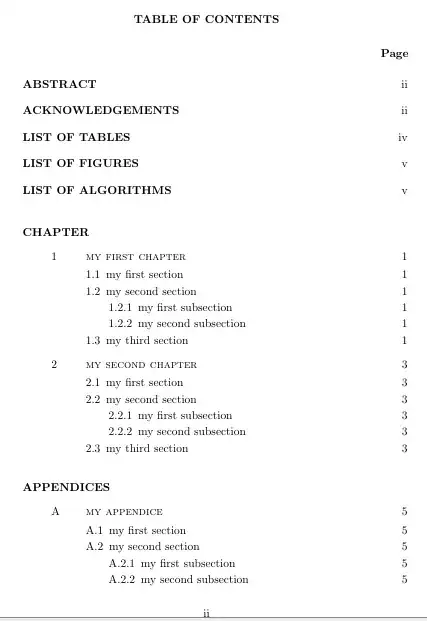
enter image description here

enter image description here

enter image description here

FHZ
  • 3,939
  • @user21872, I hope this answer provides the results you need for your thesis. Sorry for taking some time to answer it. – FHZ Jul 29 '22 at 05:32
  • wow i cant thank you enough, truly, I would need to digest this a bit and see if I can get the same output myself. In any case I truly appreciate this ! Thank you, there is hope after all ! (I tried to upvote but as a newbie apparently i need 15 reputation to cast one. ) – user21872 Jul 29 '22 at 17:57
  • You're welcome. I think, you still may select this as accepted answer. Anyhow, try to reproduce without your contents, keep in mind to separate content and formatting. Any issues, make a comment here and/or ask a new question. ;) – FHZ Jul 29 '22 at 18:38
  • Hi @FHZ so to summarize wht I need to do: 1) replace in the cls file line 160 on "iftocflag", 2) create the input_titletoc.tex file with code as you shown, 3) compile the main.tex. I tried this with the files I provided in the link and receive 2 error: line 18: There's no line here to end. \contentsline line 29: There's no line here to end. \contentsline. Thanks ! – user21872 Jul 29 '22 at 23:32
  • to add: This time I created new tex files exactly as you code it, the Main.tex, input_packages.tex and input_titletoc.tex plus the amended cls file at line 160, but still received the same error. Also is it possible to make the numbers under "Page" center align ? As in the (question example). Other than that I think I can do some tweaking the rest. Thanks ! – user21872 Jul 30 '22 at 00:02
  • Which file did you get erros in lines 18 and 29? Did you compile twice? If you compile over an old aux file, there might occur some errors at the first compilation. "No line to end here" may refer to some \\ I added, for example here: {\hspace{15pt}\normalsize\etchapterheadstyle{\@chapapp}}{}\\. Unfortunately I could not reproduce this error. – FHZ Jul 30 '22 at 01:26
  • I'll check about the positioning of number under Page. At first glance, we could move changing \addtocontents{toc}{\hspace{11.5cm}\textbf{Page}} and others alike in the cls file, but it would move Page beyond the right margin. I'll look for changing where the number are displaced. – FHZ Jul 30 '22 at 01:28
  • I see thank for your quick reply @FHZ. I tried compilling more than twice. The error occur at three attempts: with My real thesis files, my MWE files posted here and when I create the the 3 files fresh as your answer. I would have ignored the error since the output looks good except I think it mess with the bibliography list. But ill have a look at this too :) thanks as always, appreciate it – user21872 Jul 30 '22 at 02:31
  • Use: \hspace*{0.1cm} in each {\titlerule*[1pc]{}\contentspage\hspace*{0.1cm}}[\smallskip] to control the distance between number and the right margin under Page at the input_titletoc. Unfortunately, it won't work at the list of tables and figures. I'd say a good strategy would be trying to create your table of contents style independently from your class, then removing the messy parts the interferes. – FHZ Jul 31 '22 at 23:01
  • I think you also will need this to write Page not only at the first page, but over every page of your lists. – FHZ Jul 31 '22 at 23:03
  • 1
    Hi FHZ, thanks for this. If I put this command: '\renewcommand{\contentspage}[1][\thecontentspage]{\hb@xt@@pnumwidth{\hfil #1\hfil}\hspace*{-@pnumwidth}}' in preamble of input_titletoc I got the center aligned page number. I also solve the error by deleting the '\' in '{\hspace{15pt}\normalsize\etchapterheadstyle{@chapapp}}{}\' in the cls file (the part with your update codes). I also repeat the same body of \titlecontents for both list of tables and list of figures. Just trying to work this out also for the list of algorithms, which I havent manage to yet. – user21872 Jul 31 '22 at 23:19
  • 1
    Next I need to raise the word "Chapter" under abbrev otherwise everything seems to be in order, many thanks to you :) – user21872 Jul 31 '22 at 23:19