LaTeX is a powerful typesetting program but it wasn't designed to do mathematics. And LaTeX programming is also a bit dated as well. What would make your life easier is if you could access a CAS (computer algebra system) for mathematics and a stronger programming language.
Luckily, you can with the sagetex package. It gives you Sage which is the open source CAS similar to Mathematica, except it's free. So while people like using Lua for more precise calculations, Sage gives you that plus derivatives, integration, matrices, graph theory, and a lot more. You also get the Python programming language which is not only easier to read/understand but it's easy to find code that can solve your problem.
I noticed you had an earlier question on automating a quadratic equation. The answers involved lots of programming along with some warnings. With Sage, solving the quadratic formula is built in which would allow you to quickly get the answers with better accuracy--it's just a matter of getting used to how to get Sage answers into LaTeX documents. For the question you've asked above, try the following code:
\documentclass[border=1cm]{article}
\usepackage{sagetex,tikz}
\begin{document}
\begin{sagesilent}
p = 3.14
r = randint(1,10)
output = r""
output += r"\begin{tikzpicture}"
output += r"\draw[fill=none](0,0) circle (1.0) node [black,yshift=-1.5cm] {};"
output += r"\draw[fill=black](0,0) circle (1 pt) node [above] {\tiny o};"
output += r"\draw[](0,0) -- (1,0) node [midway,above] {%s};"%(r)
output += r"\end{tikzpicture}"
\end{sagesilent}
\sagestr{output}
\noindent Circumference = $2\times \pi \times r = 2\pi(\sage{r})$.
Using the approximation of $\pi \approx \sage{p.n(digits=3)}$ we get a decimal answer
of $\sage{(2pr).n(digits=4)}$ units.
\end{document}
The result running in Cocalc is:

Some basic information in understanding what's going on: first, there is a 3 step compilation process. First, LaTeX must run without errors, then Sage is run to do the calculations followed by LaTeX running on the final document (which includes LaTeX plus Sage calculations). As a result, your tikz code, which relies on the Sage calculation, cannot exist on the first LaTeX compilation. It will be created on the second step of compilation (in Sage) and be put into the final document for the 3rd step in the process. This is different than the calculation of the circumference. By putting \sage{} into the LaTeX document, LaTeX will fill in the unknown content after Sage has run. This can (and does) exist on the first compilation. Second, r"" is a raw string which allows it to handle problematic content such as \. Third, the sagesilent environment is where the "scratchwork" is done. After creating a random integer, r, for the radius, we get it into the code in the line: output += r"\draw[](0,0) -- (1,0) node [midway,above] {%s};"%(r). The %s is for string data. The %() is telling us what fills it, which is r. The raw string (your tikzpicture code) is placed into the LaTeX document with sagestr{} (after sagesilent has ended). Finally note that Sage can help with your calculations. This numerical data should be inserted while you are in math mode. The code \sage{p.n(digits=3)} sets the significant figures. See here in the Sage documentation.
Between LaTeX, Python, and a CAS you have 3 incredibly powerful tools for creating your documents. The downside is that Sage is not part of your LaTex distribution. You can either 1. open up a free Cocalc account (I use mine whenever my document requires Sage/Python) or 2. Download Sage onto your computer and get it to cooperate with your LaTeX distribution. This can be problematic depending on your computer and computer skills.
Using Sage gives you access to a lot of sophisticated mathematics that will prevent you from having to reinvent the wheel. It has a bit of a learning curve but there are lots of examples on this site to illustrate its power and utility. See, for example, here, here, here, here, here,here.
EDIT: (To answer questions in comment below)
The confusion is usually over the 3 step process. In Cocalc, everything has been automated for ease of use. In LaTex, it isn't unless you set up your system to make things run just as easily.
You indicate you've run the code successfully in Cocalc.
See the picture below.
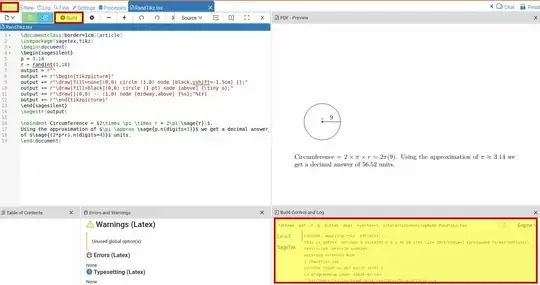
Pressing the "Build", shown at top, resulted in processing your code with LaTeX, shown in the rectangle on the bottom right followed by processing with Sage, followed by by processing again with LaTeX. That's why the speed is slower than you might have expected; pressing "Build" accomplished all 3 steps. What you might not have noticed is all the files that you now have. Click the file button shown (top left) and see what you have:
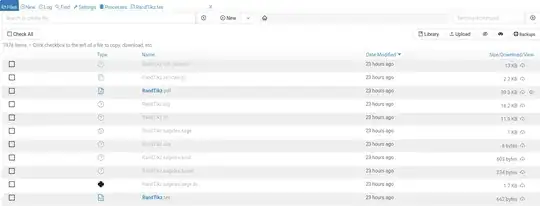
You'll see files you're used to from LaTex, such as the log file along with strange files like as.sagetex.sage file (from processing with Sage). Note that if you are happy with the output you can select the box with the .pdf file and download it to your computer and you're done.
You said "but I can't seem to get Tex to run it," which indicates that you want to run sagetex on your computer without using Cocalc. In this case you must first download and install Sage to your computer. If you run LaTeX on your .tex file then you've only performed the first of the 3 required steps. It will have created the .sagetex.sage file which you must now process with Sage. I've got it explained here; it involves opening up the terminal, changing to the directory with your .tex file, and loading the .sagetex.sage file. That finishes the second step. You must now process your LaTeX file again (3rd step). It now has the results from Sage and puts them into your document. It's as tedious as it sounds unless you configure your IDE to do them with 1 click (like Cocalc does). For example, I explain here how to configure TeXmaker to chain the commands together so that 1 click of a button will work.
By not using Cocalc, you have to make sure that as versions of LaTeX and Sage evolve they communicate properly. This page explains some of the issues.
I used to run sagetex locally on my computer but, over the years, the communication breaks down and you have to figure out why. As a result, now I only use Cocalc when I want to use sagetex in my documents. Less headaches.


\Circas a node text does not do anything. The assignments from\pgfmathsetmacroare local. You need to use\Circbefore the TikZpicture (at which point you can use it after the TikZpicture, too). Though, it is a bad idea to overwrite\pi(which typesets π in math-mode) and\r(which typesets a small circle above letters). – Qrrbrbirlbel Aug 13 '22 at 15:28