As mentioned in the comments, TikZ-CD sets \scriptstyle for the so called labels (i.e. nodes along arrows). The first subscript gets \scriptscriptstyle … and that's it.
If you want your labels set in the same size as normal math you could just tell TikZ-CD that by setting the font of those label to \textstyle – or \displaystyle but that doesn't do anything in this example.
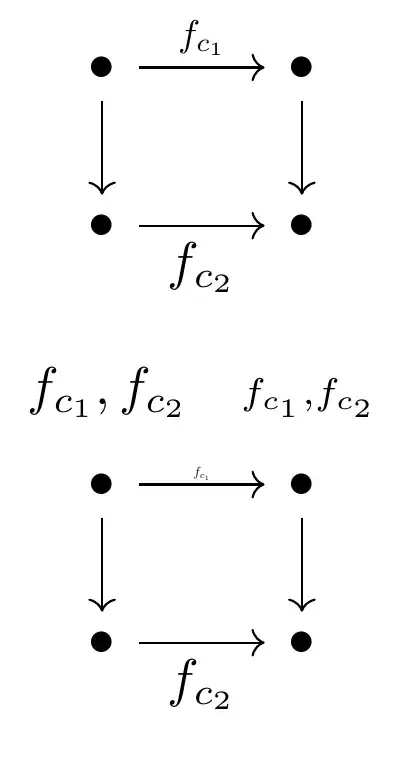
I've also added an option to scale these labels down again using scale which keeps the math styles and just scales down the whole node, similar on how \scalebox would do.
By default, every label gets the style default label scaling with scale = 0.7. You'd need to use scale = 1/.7 to revert that which to me is uncomfortable because TeX/TikZ might not revert is properly due to imprecisions. You could also use shift only in front of scale={#1} to reset any rotating, slanting and scaling but that might mess with labels that are sloped.
Instead, the scale labels key simply overwrites default label scaling with a no-op ands adds the desired scaling.
However, this can only be done once as the second example shows, here they stack again.
Though, I don't think this should be a problem because diagrams with differently scaled labels are going to be ugly anyway.
Code
\documentclass{article}
\usepackage{tikz-cd}
\tikzcdset{
  default label scaling/.style={scale=.7},
  labels={default label scaling},
  labels in textstyle/.style={
    labels={font=\everymath\expandafter{\the\everymath\textstyle},
    inner sep=+0.7ex}},
  scale labels/.style={
    default label scaling/.code=, % disable default scaling
    labels={scale={#1}}}}
% \usepackage{kpfonts-otf}
% \usepackage{newpxmath}
% \usepackage{ebgaramond-maths}
\begin{document}
\[
\begin{tikzcd}[labels in textstyle]
    \bullet & \bullet \\
    \bullet & \bullet
    \arrow[from=1-1, to=2-1]
    \arrow[from=1-2, to=2-2]
    \arrow["{f_{c_1}}", from=1-1, to=1-2]
    \arrow["{f_{c_2}}"', scale labels=1, from=2-1, to=2-2] % removes scale=.7
\end{tikzcd}
\]
\[
    f_{c_1}, f_{c_2} \quad \scriptstyle f_{c_1}, f_{c_2}
\]
\[
\begin{tikzcd}[labels in textstyle, scale labels=.5] % .5, not .7 * .5
    \bullet & \bullet \\
    \bullet & \bullet
    \arrow[from=1-1, to=2-1]
    \arrow[from=1-2, to=2-2]
    % the following keep scale = .5 from the environment's setting
    \arrow["{f_{c_1}}" , scale labels= .5, from=1-1, to=1-2] % .5 *  .5
    \arrow["{f_{c_2}}"', scale labels=2,   from=2-1, to=2-2] % .5 * 2
\end{tikzcd}
\]
\end{document}
Output


\scriptsize, and that probably makes the subindex and its index having the same font size. – mickep Dec 01 '22 at 20:31\tiny? – Werner Dec 01 '22 at 20:49