11

I want to create an arc which automatically calculates the distance (AB). Inspired by page 58 at pgf manual. But the code block % \draw (H) ++arc (15:60: $ (A) ! - ! (B) $); does not help much.

Namely I want one arc that passes from (B) having a center on (A). Any idea?

These answer actually gives a lot of useful information but I can not figure out. How can I compute the distance between two coordinates in TikZ? and TikZ: Drawing an arc between two coordinates?

enter image description here

 \documentclass[b5paper,11pt]{book}

\usepackage{tikz} 
\usetikzlibrary{decorations.markings,calc,intersections,through,backgrounds}

\begin{document}

\begin{center}
  \begin{tikzpicture}[scale=1.25]%,cap=round,>=latex]

    \draw[step=.5cm,gray,very thin] (-2.0cm,-2.0cm) grid (2.cm,2.0cm);

    \coordinate [label=left:$A$] (A) at (-1.5cm,-1.cm);
    \coordinate [label=right:$C$] (C) at (1.5cm,-1.0cm);
    \coordinate [label=above:$B$] (B) at (1.5cm,1.0cm);
    \draw (A) -- node[above] {$g$} (B) -- node[right] {$a$} (C) -- node[below] {$b$} (A);

    \filldraw [ color = green!10!white, draw=green!10!black] (1.25cm,-1.0cm) rectangle (1.5cm,-0.75cm);

%     \draw (H)  ++arc (15:60: $ (A) ! - ! (B) $);

        \draw  (5:2cm) arc(15:60:2cm);


  \end{tikzpicture}
\end{center}
\end{document}

Αs a final result I want to create something like this

enter image description here

karathan
  • 2,138
  • 2
  • 17
  • 32

3 Answers3

13

First you can use the calc library to make the dashed hypotenuse a little rotated via using the angle argument of ($(node1)!fraction!angle:(node2)$) syntax. It means that the path is going to be drawn from A to B but then it's going to be rotated angle degrees.

Then, you can use a let operation and compute the distance and the angle. Then you can use it for forming an arc that necessarily passes from (B) and rotated (B).

\documentclass[b5paper,11pt]{book}
\usepackage{tikz} 
\usetikzlibrary{decorations.markings,calc,intersections,through,backgrounds}

\begin{document}

\begin{center}
  \begin{tikzpicture}[scale=1.25]%,cap=round,>=latex]

    \draw[step=.5cm,gray!50,very thin] (-2.0cm,-2.0cm) grid (2.cm,2.0cm);

    \coordinate [label=left:$A$] (A) at (-1.5cm,-1.cm);
    \coordinate [label=below right:$C$] (C) at (1.5cm,-1.0cm);
    \coordinate [label=above:$B$] (B) at (1.5cm,1.0cm);
    \draw (A) -- node[above] {$g$} (B) -- node[right] {$a$} (C) -- node[below] {$b$} (A);

    \filldraw [fill = green!10!white, 
               draw=green!10!black] (1.25cm,-1.0cm) rectangle (1.5cm,-0.75cm);

    \draw[dashed] (A)--  ($ (A)!1!-10:(B)$) |- (A);
    \draw let                        % We initiate a let operation inside a path
            \p1=($(B)-(A)$),         % Declare a vector from A to B
            \n1={veclen(\x1,\y1)},   % Compute it's length, let's call it "l"
            \n2={atan2(\x1,\y1)}     % Compute it's angle with respect to A, say theta
          in                         % finish off the \p and \n register declaration
            (A) ++(\n2-15:\n1)       % Move from A to a point in polar form (theta-15:l)
                 arc (\n2-15:\n2+15:\n1)  % Draw an arc from that point that covers 
                                          % 30 degrees with a start angle of theta-15
             (A) ++(5mm,0) arc (0:\n2:5mm) % goes back to A and moves horizontally
                                           % to start an arc theta angle
             (A) node at ++(\n2/2:7mm) {$\theta$};  % goes again to (A) and places label
  \end{tikzpicture}
\end{center}
\end{document}

enter image description here

percusse
  • 157,807
  • Extremely simple solution. It's easy to explain the command? \draw let \p1=($(B)-(A)$),\n1={veclen(\x1,\y1)},\n2={atan2(\x1,\y1)} in (A) ++(\n2-15:\n1) arc (\n2-15:\n2+15:\n1); – karathan Mar 12 '13 at 12:22
  • @karathan Sure, in a bit, I'll add some more info. – percusse Mar 12 '13 at 12:26
  • @karathan Does it make it a little clearer? – percusse Mar 12 '13 at 12:40
  • Yes, your explanations are that I needed :) – karathan Mar 12 '13 at 15:46
  • Ιs easy with the current angle \n2 to create the arc of the \theta angle? – karathan Mar 12 '13 at 16:52
  • @karathan Sorry, I don't get what you asked, – percusse Mar 12 '13 at 17:02
  • I wonder if I can construct the angle θ \theta at point A using the \n2 – karathan Mar 12 '13 at 17:14
  • @karathan See the edit. The last label placement is not needed and can be placed later too. I just wanted to use \n2 while it is available. – percusse Mar 12 '13 at 17:24
  • For some reason does not work the last edit with angle the message is: ...Undefined control sequence (A) ++(5mm,0) arc (0:\n2:5mm)... – karathan Mar 12 '13 at 17:52
  • @karathan My mistake forgot a semicolon before the addition – percusse Mar 12 '13 at 17:53
  • Now everything is working :) – karathan Mar 12 '13 at 18:02
  • Could you explain me the meaning of this order \draw[dashed] (A)-- ($ (A)!1!-10:(B)$) |- (A); . I have seen the manual of pgf but i didn't fully understand the meaning of the ! in the code – karathan Mar 18 '13 at 21:40
  • @karathan It's the first paragraph basically. Which part is the problem? – percusse Mar 18 '13 at 22:03
  • I try to understand this part ($(Α)!-10:(Β)$) – karathan Mar 18 '13 at 22:20
  • I see but what exactly is the problem? I don't have enough space here for the full story – percusse Mar 18 '13 at 22:25
  • no problem relate to this question. just trying to decode the command to use it elsewhere. One inline comment perhaps within the question it was enough, if you have the time. – karathan Mar 18 '13 at 22:34
  • 1
    @karathan Try this : \usetikzlibrary{calc} \begin{tikzpicture} \node (a) at (0,0) {A}; \node (b) at (2,0) {B}; \draw (a) -- ($(a)!0.7!(b)$); \end{tikzpicture} and play with 0.7 with different numbers to see how fraction modifies the length. 1 is the full length 0.5 is the halfway – percusse Mar 18 '13 at 22:34
  • I think I understand. When using polar coordinates, ie : then do not put ! at the right, or I get it wrong? – karathan Mar 18 '13 at 22:49
  • 1
    After that example now adding \draw (a) -- ($(a)!0.7!10:(b)$); makes the path rotated 10 degrees after it has been calculated. Start with 0 degrees which is equal to not putting an angle and gradually increase the angle and you'll see what I mean. – percusse Mar 18 '13 at 22:55
  • okay. Now clarifying, thank you very much :) – karathan Mar 18 '13 at 23:03
7

With PSTricks:

Method 1 (with Curved Abscissa)

enter image description here

\documentclass[pstricks,border=12pt]{standalone}
\usepackage{pst-eucl}
\addtopsstyle{gridstyle}{gridlabels=0pt,griddots=0}
\begin{document}
\begin{pspicture}[showgrid](-2,-2)(2,2)
    \pstGeonode[PosAngle={180,45,-90}]
        (-1.5,-1){A}
        (1.5,1){B}
        (1.5,-1){C}
    \pstRightAngle[RightAngleSize=0.2,fillstyle=solid,fillcolor=green!50]{A}{C}{B}
    \pstArcOAB[arcsepB=-1,arcsepA=-2.5]{A}{B}{B}
    \pstCurvAbsNode[CurvAbsNeg=true,PointName=none]{A}{B}{D}{\pstDistVal{.75}}
    \psline[linestyle=dashed](A)(D)(D|C)(C)
    \psset{shortput=nab,labelsep=-3pt}
    \ncline{A}{B}^{$g$}
    \ncline{B}{C}^{$a$}
    \ncline{C}{A}^{$b$}
\end{pspicture}
\end{document}

Method 2 (with PostScript Pyth2 operator)

enter image description here

\documentclass[pstricks,border=12pt]{standalone}
\usepackage{pst-eucl}
\addtopsstyle{gridstyle}{gridlabels=0pt,griddots=0}
\psset{saveNodeCoors}
\begin{document}
\begin{pspicture}[showgrid](-2,-2)(2,2)
    \pstGeonode[PosAngle={180,45,-90}]
        (-1.5,-1){A}
        (1.5,1){B}
        (1.5,-1){C}
    \pstRightAngle[RightAngleSize=0.2,fillstyle=solid,fillcolor=green!50]{A}{C}{B}
        \pstVerb{/Dist {N-A.x N-A.y N-B.x N-B.y Pyth2} def}%
        \pnode[A](!Dist 21 PtoC){D}\psdots(D)
    \psarc[origin={A},arcsep=-1](A){!Dist}{(D)}{(B)}
    \psline[linestyle=dashed](A)(D)(D|C)(C)
    \psset{shortput=nab,labelsep=-3pt}
    \ncline{A}{B}^{$g$}
    \ncline{B}{C}^{$a$}
    \ncline{C}{A}^{$b$}
\end{pspicture}
\end{document}

Method 3 (with rotation)

enter image description here

\documentclass[pstricks,border=12pt]{standalone}
\usepackage{pst-eucl}
\addtopsstyle{gridstyle}{gridlabels=0pt,griddots=0}
\begin{document}
\begin{pspicture}[showgrid](-2,-2)(2,2)
    \pstGeonode[PosAngle={180,45,-90}]
        (-1.5,-1){A}
        (1.5,1){B}
        (1.5,-1){C}
    \pstRightAngle[RightAngleSize=0.2,fillstyle=solid,fillcolor=green!50]{A}{C}{B}
        \pstRotation[PointName=none,RotAngle=-12]{A}{B}[D]
    \pstArcOAB[arcsep=-1]{A}{D}{B}    
    \psline[linestyle=dashed](A)(D)(D|C)(C)
    \psset{shortput=nab,labelsep=-3pt}
    \ncline{A}{B}^{$g$}
    \ncline{B}{C}^{$a$}
    \ncline{C}{A}^{$b$}
\end{pspicture}
\end{document}

Method 4 (with intersection)

enter image description here

\documentclass[pstricks,border=12pt]{standalone}
\usepackage{pst-eucl}
\addtopsstyle{gridstyle}{gridlabels=0pt,griddots=0}
\begin{document}
\begin{pspicture}[showgrid](-2,-2)(2,2)
    \pstGeonode[PosAngle={180,45,-90}]
        (-1.5,-1){A}
        (1.5,1){B}
        (1.5,-1){C}
    \pstRightAngle[RightAngleSize=0.2,fillstyle=solid,fillcolor=green!50]{A}{C}{B}
        \pnode[A](1;21){D'}
        \pstInterLC{A}{D'}{A}{B}{E}{D}% E is not used but we have to provide a name for it!
    \pstArcOAB[arcsep=-1]{A}{D}{B}    
    \psline[linestyle=dashed](A)(D)(D|C)(C)
    \psset{shortput=nab,labelsep=-3pt}
    \ncline{A}{B}^{$g$}
    \ncline{B}{C}^{$a$}
    \ncline{C}{A}^{$b$}
\end{pspicture}
\end{document}

Red alert: For the sake of simplicity, I left the nodes D in the given methods slightly different. It is not difficult to make them identical.

7

A good job for tkz-euclide with several possibilities.

First \draw[dashed] (A)-- ($ (A)!1!-10:(B)$) |- (C); is preferable (C instead of A) With tkz-euclide the mark for the right angle is obtained with \tkzMarkRightAngle[fill=green!20](A,C,B)

We can get the arc with \tkzCompasss[color = blue,delta = 15](A,B). We draw an arc with center A through B 15 degrees before and after B

\documentclass[11pt]{article}
\usepackage{tkz-euclide}
\usetkzobj{all} 
\usetikzlibrary{decorations.markings,calc,intersections,through,backgrounds}

\begin{document}

\begin{center}
  \begin{tikzpicture}[scale=1.25]

    \draw[step=.5cm,gray!50,very thin] (-2.0cm,-2.0cm) grid (2.cm,2.0cm);

    \coordinate [label=left:$A$] (A) at (-1.5cm,-1.cm);
    \coordinate [label=below right:$C$] (C) at (1.5cm,-1.0cm);
    \coordinate [label=above:$B$] (B) at (1.5cm,1.0cm);
    \draw (A) -- node[above](g) {$g$} (B) 
              -- node[right] {$a$} (C) 
              -- node[below] {$b$} (A);

    \tkzMarkRightAngle[fill=green!20](A,C,B)
    \draw[dashed] (A)--  ($ (A)!1!-10:(B)$) |- (C);
    % \tkzCompasss[color  = orange,length = 2](A,B)
    \tkzCompasss[color  = blue,delta = 15](A,B)
    % \tkzDrawArc[delta=15](A,B)(B)

    % \tkzCalcLength[cm](A,B)\tkzGetLength{rAB}
    % \node [above=0.5cm,font=\small] at (g)  { \rAB cm};
  \end{tikzpicture}
\end{center}
\end{document}

enter image description here

With

  \tkzCompasss[color  = orange,length = 2](A,B)

I defined the length of the arc

enter image description here

Another possibility is to use the more general macro \tkzDrawArc

\tkzDrawArc[delta=15](A,B)(B)

this is a special use of the macro because I draw an arc with center A from B to B but I define delta = 15 to extend the arc.

enter image description here

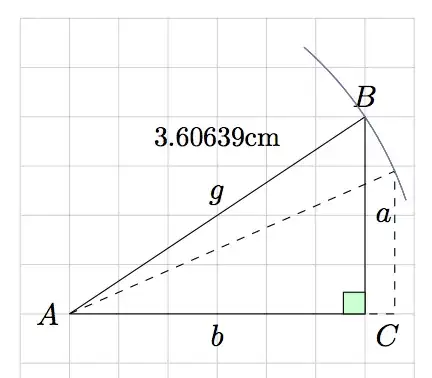
Now each of these macros calculates the length AB. It's possible to know this length with :

     \tkzCalcLength[cm](A,B)\tkzGetLength{rAB}
     \node [above=0.5cm,font=\small] at (g)  { \rAB cm};

enter image description here

Alain Matthes
  • 95,075
  • very good job, but now I'm confused .... if you want have a look here ... http://tex.stackexchange.com/questions/102232/let-operation-vs-tkz-euclide-vs-pstricks – karathan Mar 13 '13 at 07:16