32

I am up with the following:

Using the code given at the bottom.

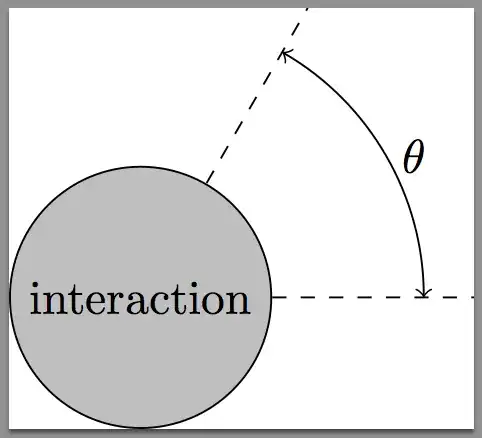
Suffice to say, I don't really like the result: I wanted to draw this picture without explicitly calculating the circle and the lines going into and out of it. However, I just don't know how to draw that part-circle to the right (with $\theta$ in it), such that I...

  • get an arc which is shaped like a circle,
  • have it intersect the shown without actually crossing them, and
  • have $\theta$ placed between the middle of the actually drawn arc and its center.

How could I achieve this?

\begin{tikzpicture}

\coordinate (a) at (-3,0.5);
\coordinate (b) at (-1,0.5);

\draw[solid,-latex] (a) -- (b) coordinate[at start] (p);

\draw[thin,solid,latex-latex] (p) -- node[left] {$p$} ++(270:0.5);

\draw[thin,dashed] (-3,0) -- (3,0) coordinate[very near end] (angleStart);

\node (interaction) [circle through=(b)
                    , solid
                    , draw
                    , fill=lightgray
                    ]  at (0,0) {interaction};

\draw[solid,-latex] (interaction.north east)  -- ++(45:2) coordinate[near end] (angleEnd);

\draw (angleStart) to[out=50,in=-20] node[below left=2pt] {$\theta$} (angleEnd);
\end{tikzpicture}
percusse
  • 157,807
mSSM
  • 3,152
  • 1
    While code snippets are useful in explanations, it is always best to compose a fully compilable MWE that illustrates the problem including the \documentclass and the appropriate packages so that those trying to help don't have to recreate it. Especially with tikz since there are numerous libraries that could be used. – Peter Grill May 02 '12 at 21:03
  • Are the coordinates of (a) and (b) given? Actually what are the given data and what do you want to automate exactly? – percusse May 02 '12 at 21:19
  • @PeterGrill: Thank you, I will keep that in mind. – mSSM May 02 '12 at 21:47
  • @percusse: Nothing as complicated as that. I think, my question was already answered below. – mSSM May 02 '12 at 21:48

4 Answers4

24

I suggest that you base everything on the center of the circle in which case the calculations can easily be automated with the additional TikZ library: \usetikzlibrary{calc}

enter image description here

You can set the angle and radius you want via:

\newcommand*{\ArcAngle}{60}%
\newcommand*{\ArcRadius}{2.0}%

Everything else is computed based on these. You can adjust these to get the specific result you desire.

Two other tweaks that I have defined below are to adjust how far the dashed lines extend past the arc, and how far past the arc the label is placed (as percentages):

\newcommand*{\LineExtend}{1.25}%
\newcommand*{\LableExtend}{1.10}%

Code:

\documentclass{standalone}
\usepackage{tikz}
\usetikzlibrary{calc}

\newcommand*{\ArcAngle}{60}%
\newcommand*{\ArcRadius}{2.0}%
\newcommand*{\LineExtend}{1.25}%
\newcommand*{\LableExtend}{1.10}%

\begin{document}
\begin{tikzpicture}
\pgfmathsetmacro{\XValueArc}{\ArcRadius*cos(\ArcAngle)}%
\pgfmathsetmacro{\YValueArc}{\ArcRadius*sin(\ArcAngle)}%

\pgfmathsetmacro{\XValueLabel}{\ArcRadius*cos(\ArcAngle/2)}%
\pgfmathsetmacro{\YValueLabel}{\ArcRadius*sin(\ArcAngle/2)}%

\coordinate (Origin) at (0,0);

\draw [thin, dashed] (Origin) -- ($(\LineExtend*\ArcRadius,0)$);% Horizontal

% Extend this past the (\XValue,\YValue)
\draw [thin, dashed] (Origin) -- ($\LineExtend*(\XValueArc,\YValueArc)$);

\node (interaction) [circle, solid, draw, fill=lightgray]  
    at (Origin) {interaction};

\draw [<->] ($(Origin)+(\ArcRadius,0)$) 
    arc (0:\ArcAngle:\ArcRadius);

\node at ($\LableExtend*(\XValueLabel,\YValueLabel)$) {$\theta$};
\end{tikzpicture}
\end{document}
Peter Grill
  • 223,288
  • Thanks, I will have a look at that. I already like that picture you put there much better than what I did... – mSSM May 02 '12 at 21:49
18

With pgf 2.1 cvs for the node \theta

\documentclass{standalone}
\usepackage{tikz}

\begin{document}
\begin{tikzpicture}

\coordinate (Origin) at (0,0);
\node (interaction) [circle, draw, 
                     fill = lightgray] at (Origin) {interaction};    

\draw [thin, dashed] (interaction.0) -- ++(0:1.5) 
                     (interaction.60)   -- ++(60:1.5) ;

\draw [<->] (0:2.1)  arc (0:60:2.1) node [right,pos=0.5] {$\theta$};
\end{tikzpicture}
\end{document} 

enter image description here

Alain Matthes
  • 95,075
3

Just for fun.

enter image description here

\documentclass[pstricks,border=12pt]{standalone}
\usepackage{pst-eucl,pstricks-add}

\begin{document}
\begin{pspicture}[showgrid=false](-3,-1)(3,3)
    \psset{PointName=none,PointSymbol=none}
    \pstGeonode
        (-2.5,+0.0){A}
        (-2.5,+0.5){B}
        (-0.5,+0.5){C}
        (+0.0,+0.0){D}
        (+2.0,+2.0){E}
        (+1.5,+0.0){F}
    \pstLineAB[nodesepB=-1,linestyle=dashed]{A}{F}
    \pstLineAB[arrows=->]{B}{C}
    \pstLineAB[linestyle=dashed,arrows=->]{D}{E}
    \pstMarkAngle[LabelSep=1.15,MarkAngleRadius=1.5,arrows=->]{F}{D}{E}{$\theta$}
    \pstCircleOA[fillstyle=solid,fillcolor=gray]{D}{C}
    \rput(D){\tiny Interaction}
    \ncline[offset=2pt]{<->}{A}{B}\naput{$p$}
\end{pspicture}
\end{document}
  • Yes, you can do an ellipse arc, as mentioned in the first example in the tikz documentation (description is somewhat missing in "the arc operation"-section). you specify the xradius and the yradius in the last argument, connected by ' and '. \draw (\CENTERx,\CENTERy) ++( 45 : 1 ) arc ( 45:0:1 and 2); –  Dec 14 '12 at 17:07
1

The easiest way to draw an arc from the center is

\draw (\CENTERx,\CENTERy) ++( 45 : 1 ) arc ( 45:0:1 );

Draws an arc on a circle of radius 1 centered at (\CENTERx,\CENTERy), from (45 degrees) to (0 degrees).

See here for an example

bobobobo
  • 4,396
  • Can you draw an elliptic arc with your method above? – kiss my armpit Aug 09 '12 at 18:42
  • I cannot. The first parameter defines the center (\CENTERx, \CENTERy), then what point on the circle to start and what radius that circle is ++(45:1), that it is an arc, and degstart:degEnd:radius of the actual arc to draw. I would be interested to know if it is possible though. – bobobobo Aug 09 '12 at 19:01
  • 1
    Maybe with some coordinates scaling (different scales for the different directions) this can be achieved. I didn't try... – Dror Aug 09 '12 at 19:10