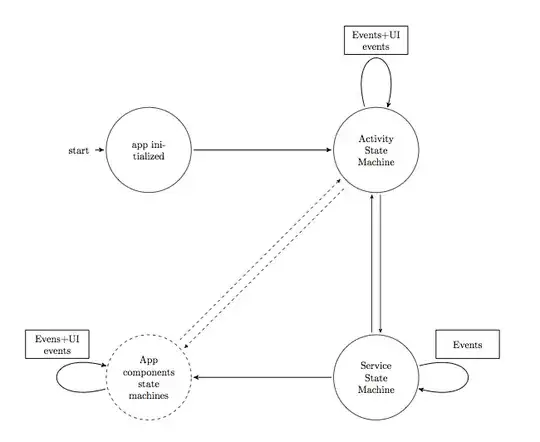
I want to draw something like this. I have three difficulties:
- How to draw bigger circular states and dashed circular state?
- How to draw multiple arrows between states? (Ex. In the state "App components state machines", there are multiple incoming and outgoing arrows.)
- How to get that surrounded box around transition labels?

This is my code:
\documentclass{article}
\usepackage{tikz}
\usepackage[margin=15mm]{geometry}
\usepackage{calc}
\usetikzlibrary{matrix,arrows}
\usetikzlibrary{positioning,arrows}
\usetikzlibrary{shapes,arrows,fit,calc,positioning,automata}


    \begin{document}


    \begin{tikzpicture}[>=stealth',shorten >=1pt,auto,node distance=9 cm]
    %  \tikzstyle{every state}=[fill=white,draw=none,text=black]

        \node[initial,state] (A)                                    {app initialized};
        \node[state]         (B) [right of=A]                       {Activity State Machine};
        \node[state]         (C) [below of=B]                       {Service State Machine};
        \node[state]         (D) [below of=A]                       {App components state machines};

      \path[->]
            (A) edge []     node [below,align=center]           {} (B)
            (C) edge []     node [pos=0.75,left,align=center]           {} (D)
            (C) edge []     node [pos=0.75,left,align=center]           {} (B);


    \end{tikzpicture}

    \end{document}
Output is something like this: (I want all states of uniform size and new line character within the states)



right ofand so one are deprecated and don’t work with thepositioninglibrary: Difference between "right of=" and "right=of" in PGF/TikZ. There also exist keys likedashedanddotted. The same applied for edge nodes. – Qrrbrbirlbel Jun 30 '13 at 20:02