2

with the following settings how can I add space between columns or just move them in the middle as they're positioned on the left side? The table looks great but I do not find a way to move column or just add space. I tried some of your suggestion but doesn't seem to work in my case! New user: sorry. Many thanks for your help!

{
\def\sym#1{\ifmmode^{#1}\else\(^{#1}\)\fi}
\begin{tabular*}{1.0\textwidth}{l*{2}{cc}}
\toprule
                    &\multicolumn{3}{c}{Test table}                                  \\\cmidrule(lr){2-4}
                    &\multicolumn{1}{c}{(1)}         &\multicolumn{1}{c}{(2)}         &\multicolumn{1}{c}{(3)}         \\
\midrule
Treatment         &       -0.06         &       -0.03         &        0.00         \\
                    &      (0.07)         &      (0.05)         &      (0.03)         \\
\addlinespace
Controls           &          No         &          Sí         &          Sí         \\
\midrule
Observaciones       &        2446         &        2445         &        2417         \\
\end{tabular*}
}

enter image description here

user46589
  • 165

3 Answers3

1

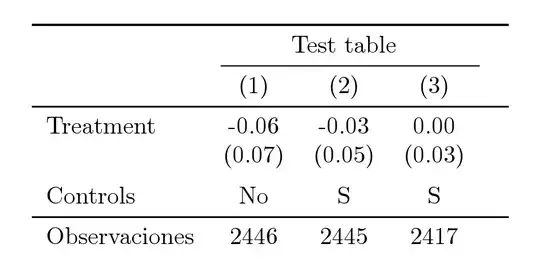
To get your table centered place it between \begin{center} en \end{center}:

\documentclass{article}
\usepackage{booktabs}

\begin{document}

    \begin{center}
        \begin{tabular}{lccc}
            \toprule
            & \multicolumn{3}{c}{Test table} \\ 
            \cmidrule{2-4}
            & (1) & (2) & (3) \\ 
            \midrule
            Treatment & -0.06 & -0.03 & 0.00\\
            & (0.07) & (0.05) & (0.03) \\
            Controls & No & S & S \\
            \midrule
            Observations & 2446 & 2445 & 2417\\
        \end{tabular}
    \end{center}

\end{document}

If you want to increase the column margins, take a look at: Column and row padding in tables

1

Would this be close to what you need?

The first table is generated after correcting your column number by adding one more & to the last column and this is what you should get

enter image description here

However the second table below is use of tabularx so that the X column will determine its width and automatically span the whole text width.

enter image description here

Code

\documentclass[border=10pt]{standalone}
\usepackage{tabularx}


\newcolumntype{L}{>{\raggedright\arraybackslash}X}
\newcolumntype{R}{>{\centering\arraybackslash}X}


\begin{document}
%{\def\sym#1{\ifmmode^{#1}\else\(^{#1}\)\fi}
\begin{tabularx}{1\textwidth}{LRRR}
\toprule
             &\multicolumn{3}{c}{Test table}                     \\ \cmidrule(ll){2-4}
             &\multicolumn{1}{c}{(1)} &\multicolumn{1}{c}{(2)    &\multicolumn{1}{c}{(3)}         \\
\midrule
Treatment    &   -0.06          &       -0.03         &       0.00         \\
             &      (0.07)      &      (0.05)         &      0.03)         \\
\addlinespace
Controls     &          No      &          Sí         &          Sí         \\
\midrule
Observaciones&        2446      &        2445         &        2417         \\
\end{tabularx}
%}
\end{document}
Jesse
  • 29,686
1

Please always post complete documents showing all packages used.

If you specify a target width using tabular* then you need to add stretchable space using \extracolsep to allow the columns to move apart:

\documentclass{article}
\usepackage{booktabs}

\begin{document}

    \begin{center}
        \begin{tabular*}{\linewidth}{@{\extracolsep{\fill}}lccc@{}}
            \toprule
            & \multicolumn{3}{c}{Test table} \\ 
            \cmidrule{2-4}
            & (1) & (2) & (3) \\ 
            \midrule
            Treatment & -0.06 & -0.03 & 0.00\\
            & (0.07) & (0.05) & (0.03) \\
            Controls & No & S & S \\
            \midrule
            Observations & 2446 & 2445 & 2417\\
        \end{tabular*}
    \end{center}

\end{document}

enter image description here

Although actually I wouldn't stretch the table like this and would set it natural width, as in Maarten's answer.

David Carlisle
  • 757,742