The following suggestions are applicable to tabular- and array-like structures and for the most past applies to both text and math mode, including *matrix environments.
Vertical padding
Vertical padding is possible in a global way using @Herbert's answer. That is, to redefine the array stretch factor <factor> using
\renewcommand{\arraystretch}{<factor>}
However, as the name suggests, this is a factor and not a length. So, it would be difficult to provide an adequate factor that would add (say) 15pt above/below each row. There are other options available for this.
Vertical padding is also possible in a manual way or on a per-row basis using the optional parameter to end a tabular line; \\[<len>] where <len> is any familiar TeX length. A final alternative is to use the set the length \extrarowheight provided by the array package.
Here's an example showing the above three possibilities:
\documentclass{article}
\usepackage[landscape]{geometry}
\usepackage{array}
\begin{document}
% =========== FACTOR approach ===========
{\renewcommand{\arraystretch}{2}%
\begin{tabular}{|l|l|}
  \hline
  column 1 & column 2 \
  \hline
  I really would like this less & crammed \
  \hline
\end{tabular}} \quad
% =========== LENGTH approaches ===========
\begin{tabular}{|l|l|}
  \hline
  column 1 & column 2 \[4ex]
  \hline
  I really would like this less & crammed \[5pt]
  \hline
\end{tabular} \quad
{\setlength{\extrarowheight}{20pt}%
\begin{tabular}{|l|l|}
  \hline
  column 1 & column 2 \
  \hline
  I really would like this less & crammed \
  \hline
\end{tabular}}
\end{document}

Note how the "factor" approach is more evenly distributed than the "length" approaches. This is to be expected. However, these techniques can also be combined, if needed. Also, the use of \\[<len>] provides "bottom padding", while setting \extrarowheight adds "top padding". Finally, note the grouping within the example: \renewcommand and \setlength are made local by putting is inside {...}. That is, the value/length of \arraystretch/\extrarowheight revert back to the original value before resetting it at the end of the group.
Horizontal padding
Similar approach to horizontal padding of columns exist. The use of tabularx or tabulary might be considered factor-based, as well as using \extracolsep{\fill}. However, these all pertain to fixed-width tables, with the first being addressed in @cmhughes' answer. Here is a description of tabulary usage, taken from the TeX FAQ entry on Fixed-width tables:
The tabulary package ... provides a way of "balancing" the space
taken by the columns of a table. The package defines column
specifications C, L, R and J, giving, respectively, centred,
left, right and fully-justified versions of space-sharing columns. The
package examines how long each column would be "naturally" (i.e., on a
piece of paper of unlimited width), and allocates space to each column
accordingly.
A length-based approach could include a per-column addition of a separate length using the @{...} "column specifier". Also, modifying the length \tabcolsep (or \arraycolsep if you're working with an array) would do this for all columns, and is therefore more generic. Finally, the array package also provides a means for insert stuff before a column entry and after it using >{<before>} and <{<after>}. Here are some examples:
\documentclass{article}
\usepackage[landscape]{geometry}
\usepackage{array}
\begin{document}
% =========== FACTOR approach ===========
\begin{tabular}{500pt}{@{\extracolsep{\fill}}|l|l|}
  \hline
  column 1 & column 2 \
  \hline
  I really would like this less & crammed \
  \hline
\end{tabular}
\bigskip
% =========== LENGTH approaches ===========
\begin{tabular}{|@{\hspace{2em}}l@{}|l@{\qquad}|}
  \hline
  column 1 & column 2 \
  \hline
  I really would like this less & crammed \
  \hline
\end{tabular} \quad
{\setlength{\tabcolsep}{2em}
\begin{tabular}{|l|l|}
  \hline
  column 1 & column 2 \
  \hline
  I really would like this less & crammed \
  \hline
\end{tabular}}
\medskip
\begin{tabular}{|>{\hspace{1pc}}l|l<{\hspace{-2pt}}|}
  \hline
  column 1 & column 2 \
  \hline
  I really would like this less & crammed \
  \hline
\end{tabular}
\end{document}
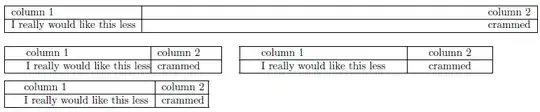
Of course, if all columns should have the same specifier, using the "multiple column specifier" *{<num>}{<col spec>} is a better choice.
In the above examples, geometry was loaded to adjust for a possibly wide display.
Alternative padding approaches
Another way of regulating vertical padding would be to insert so-called (vertical) struts in the form of a zero-width rule (say). For example, using \rule{0pt}{2em}stuff inserts a 2em strut before stuff, thereby increasing the vertical height of the cell containing stuff. Similarly, padding below a cell could be achieved using \rule[-1em]{0pt}{1em}stuff which drops the strut 1em below the baseline.
The same goes for horizontal padding via zero-height struts.





booktabs? If might be easier if you post a minimal working example (MWE) that illustrates your problem. – Martin Scharrer Oct 15 '11 at 19:03tabularenvironments are typeset, as long as one doesn't use the new commands provided by the package: vertical rules will touch the horizontal ones input as\hlineor\cline. – egreg Oct 15 '11 at 19:43
– Andrestand Jan 30 '14 at 11:03\begin{tabular}{| c | c |}\hline \raisebox{8pt}{\phantom{M}}$\vec{p}=m_i\vec{v}$\raisebox{-8pt}{\phantom{M}} & \raisebox{8pt}{\phantom{M}}$\vec{L}=I\vec{\omega}$\raisebox{-8pt}{\phantom{M}}\\\hline\raisebox{8pt}{\phantom{M}}$\vec{F}=\frac{d}{dt}\vec{p}$\raisebox{-8pt}{\phantom{M}} & \raisebox{8pt}{\phantom{M}}$\vec{\tau}=\frac{d}{dt}\vec{L}$\raisebox{-8pt}{\phantom{M}}\\\hline\end{tabular}