I am trying to extend the results from Parametrize shading in table through TikZ
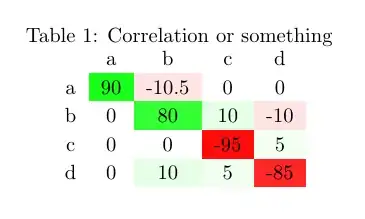
for negative values. I searched extensively for the absolute value function but could not find one. I tried abs(), but it does not work. The code with edits for negative values:
\documentclass{article}
\usepackage[table]{xcolor}
\usepackage{pgfplotstable}
\usepackage{calc}

\pgfplotstableset{
    color cells/.style={
        col sep=comma,
        string type,
        postproc cell content/.code={%
                \pgfkeysalso{@cell content=\rule{0cm}{2.4ex}\ifnum ##1 < 0 {\cellcolor{red!abs(##1)} \pgfmathtruncatemacro\number{##1}\ifnum\number>50\color{white}\fi##1}\else\
                {\cellcolor{green!##1}\pgfmathtruncatemacro\number{##1}\ifnum\number>50\color{white}\fi##1}\fi
                }%
                },
        columns/x/.style={
            column name={},
            postproc cell content/.code={}
        }
    }
}


\begin{document}
\begin{table}\caption{Correlation or something}
\centering
\pgfplotstabletypeset[color cells]{
x,a,b,c,d
a,90,-10.5,0,0
b,0,80,10,-10
c,0,0,-95,5
d,0,10,5,-85
}
\end{table}
\end{document}
Please let me know how to extend it for negative values, thanks




– Silence Dogood Mar 12 '14 at 18:05