I am having hard time finding the correct way to typeset this: I need to have code as verbatim on one side of the page, and show the output (an image) on the right side of the page.
I have tried using minipage, but that did not work well. I am now trying using a table with 2 columns. I put the verbatim text in the left column, then the image in the right column. The problem is that the alignment is not coming out right. I tried all the tricks I know about which are \raisebox{-.5\height} or using m for column specification.
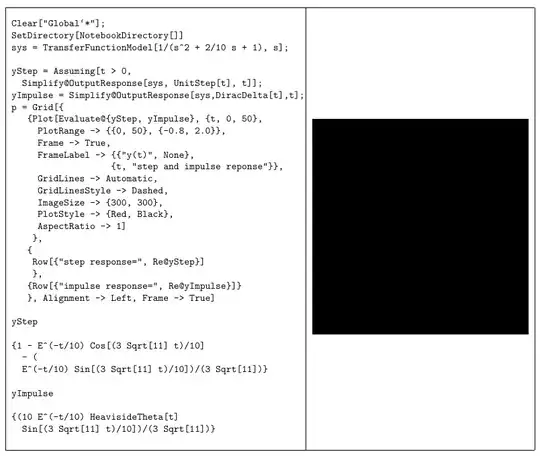
Here is the output from a MWE:

I'd like it to show up as follows (This was drawn manually using cut/paste) with the help of Visio and paint.exe

Here is the code (using demo option for Graphics so it works as is)
\documentclass[11pt,notitlepage]{article}%
\usepackage{verbatim}
\usepackage{fancyvrb}
\usepackage[demo]{graphicx}
\usepackage{epstopdf}%
\usepackage[margin={2cm}]{geometry}%
\usepackage{array}%for m option

\begin{document}

\begin{tabular}[c]{|p{4in}|p{3in}|}\hline
%   \begin{tabular}{|p{4in}|m{3in}|}\hline    %also tried this, same problem
\begin{Verbatim}[fontsize=\small]
Clear["Global`*"];
SetDirectory[NotebookDirectory[]]
sys = TransferFunctionModel[1/(s^2 + 2/10 s + 1), s];

yStep = Assuming[t > 0,
  Simplify@OutputResponse[sys, UnitStep[t], t]];
yImpulse = Simplify@OutputResponse[sys,DiracDelta[t],t];
p = Grid[{
   {Plot[Evaluate@{yStep, yImpulse}, {t, 0, 50},
     PlotRange -> {{0, 50}, {-0.8, 2.0}},
     Frame -> True,
     FrameLabel -> {{"y(t)", None},
                   {t, "step and impulse reponse"}},
     GridLines -> Automatic,
     GridLinesStyle -> Dashed,
     ImageSize -> {300, 300},
     PlotStyle -> {Red, Black},
     AspectRatio -> 1]
    },
   {
    Row[{"step response=", Re@yStep}]
    },
   {Row[{"impulse response=", Re@yImpulse}]}
   }, Alignment -> Left, Frame -> True]

yStep

{1 - E^(-t/10) Cos[(3 Sqrt[11] t)/10]
  - (
  E^(-t/10) Sin[(3 Sqrt[11] t)/10])/(3 Sqrt[11])}

yImpulse

{(10 E^(-t/10) HeavisideTheta[t]
  Sin[(3 Sqrt[11] t)/10])/(3 Sqrt[11])}
\end{Verbatim}
&
\raisebox{-.5\height}{\includegraphics[width=3in,height=3in]{whatever}}
\\\hline
\end{tabular}

\end{document}
TexLive 2013, Linux



\raisebox{-\height}{...}instead of\raisebox{-.5\height}{...}it seems to work better. – Peter Grill May 20 '14 at 23:04\raisebox{-\height}{\includegraphics[width=3in,height=3in]{whatever}}– Nasser May 20 '14 at 23:06\begin{tabular}[c]{|m{4in}|m{3in}|}without the\raisebox? This gives you vertically centred objects. – Gonzalo Medina May 20 '14 at 23:11