Ok, I gave up on this. This is the problem. I'd like to center an image in table columns.
There are solutions for this, for example here but this does not work when I use p for column specifications. Another solution I know that works is using m for all the columns, as shown here but this uses m and I need to use p because I need to use tex4ht to also generate these tables. I just tried makecell package. I can get it to center the image horizontally, (which also works with tex4ht) but do not know how to use this package to center vertically also. Package documentation not clear to me.
The problem is tex4ht does not support m and it ignores the column width. So have to use p but I do not know how center the image using p
So I am looking for solution to center images in columns, but without using m and must be able to use p. This is what I tried (MWE)
\documentclass{article}

\usepackage{mwe}
\usepackage{longtable}
\usepackage{hyperref}
\usepackage{array}
\usepackage{makecell} %for makecell
%\usepackage{blindtext}
\newcommand{\mytext}{bla bla bla bla bla bla bla bla bla bla bla bla
  bla bla bla bla bla bla bla bla bla bla bla bla bla bla bla bla
  bla bla bla bla bla bla bla bla bla bla bla bla bla bla bla bla}
\begin{document}

\begin{longtable}{|p{1in}|p{1in}|p{2in}|}\hline
\mytext&\mytext&
\raisebox{-.5\height}{\includegraphics[scale=0.25]{example-image}}
\\\hline
\end{longtable}

\begin{longtable}{|p{1in}|p{1in}|p{2in}|}\hline
\mytext&\mytext&
\makecell[cc]{\includegraphics[scale=0.25]{example-image}}
           %centered ok, but only horizonatlly, how to make it center vertically?
%\makecell[{{m{2in}}}]{\includegraphics[scale=0.25]{example-image}} %not working
\\\hline
\end{longtable}

\begin{longtable}{|m{1in}|m{1in}|m{2in}|}\hline
\mytext&\mytext&
\includegraphics[scale=0.25]{example-image}
\\\hline
\end{longtable}
\end{document}
pdflatex output

So the m solution works in pdflatex (but not with tex4ht). The \raisebox{-.5\height} works if one does not use p but I need to use p else table will be too wide.
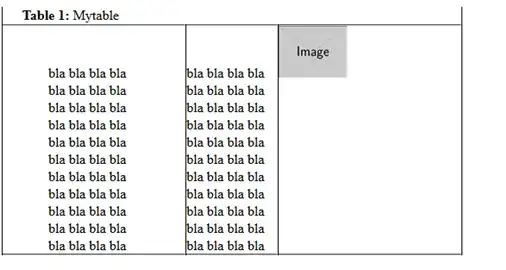
Here is the output from tex4ht (must use p-width option, else tex4ht will ignore p)
htlatex foo.tex "htm,p-width"
One can see the p worked, but the image is not aligned in center. WIth makecell it is aligned ok, but only horizontally, and With m the image is aligned, but lost the width specification. (isn't Latex fun?)


 You can try that yourself, tex4ht is part of standard latex distribution, so you should have it along with pdflatex in your distribution?
makecellpackage. Its\makecelldefines, by default, cell whose content is horizontally andverticallycentred. I don't know if it' compatible with tex4ht, but you might give a try. – Bernard Jun 14 '14 at 22:14cspecifier for the image column, and just type\makecell{\includegraphics{…}}. – Bernard Jun 14 '14 at 22:58\makecell[cc]{image}but the doc is bit confusing, may be it needs something more....\makecell{\includegraphics{…}}also only center it horizontally. Not vertically. Vertically centered is more important for me actually. – Nasser Jun 14 '14 at 23:01