19

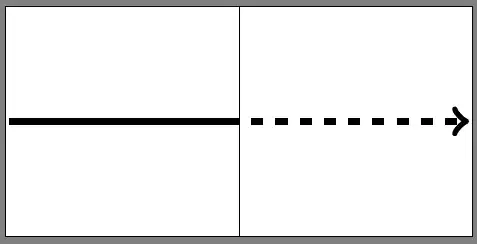
I often draw vectors, that are half full and half dashed (the other part of vector is "invisible" (see MWE below). Usually I draw two lines separately (I don't know any other method).

\documentclass{standalone}
\usepackage{tikz}
\begin{document}
\begin{tikzpicture}

\draw[very thin] (0,-1) -- (0,1);
\draw[ultra thick] (-2,0) -- (0,0);
\draw[ultra thick,dashed,->] (0,0) -- (2,0);

\end{tikzpicture}
\end{document}

The problem is that the second part always starts with line and I would like it to start with space. How can I do that? I tried to define new style with \tikzset{mydashed/.style={dash pattern=off 3pt on 3pt}}, but it does not work.

Please tell me, what to do?

enter image description here

Pygmalion
  • 6,387
  • 4
  • 34
  • 68

4 Answers4

17

You can shift the dash pattern such that it skips the first on part. For the definition of the dash patterns you can search the tikz.code.tex file. For quick reference;

\tikzstyle{dashed}=                  [dash pattern=on 3pt off 3pt]
\tikzstyle{densely dashed}=          [dash pattern=on 3pt off 2pt]
\tikzstyle{loosely dashed}=          [dash pattern=on 3pt off 6pt]

So to start with off you need to shift the dash pattern either 3pt or -3pt or multiples of them. Then you can create your own mydashed via

\documentclass[tikz]{standalone}
\begin{document}
\begin{tikzpicture}[mydashed/.style={dashed,dash phase=3pt}]
\draw[very thin] (0,-1) -- (0,1);
\draw[ultra thick] (-2,0) -- (0,0);
\draw[ultra thick,mydashed,->] (0,0) -- (2,0);
\draw[solid,mydashed,->] (0,-0.5) -- (2,-0.5);
\draw[ultra thin,mydashed,->] (0,-0.25) -- (2,-0.25);
\end{tikzpicture}
\end{document}

enter image description here

To draw the combined vector in one go, depending on what you need, you can use a decoration. If it is always a known portion of the vector is dashed (in terms of percentage etc.) it is relatively easy. Otherwise it might need some work.

percusse
  • 157,807
  • Thanks for the answer. Please, could you also elaborate on the decoration method? I also came across that idea, but never managed to realise it. – Pygmalion Sep 28 '14 at 11:02
  • @Pygmalion Is it always equal length of dashed and nondashed parts? Can you include more use cases? Or if you will, make another question with possible uses and others can chip in too. – percusse Sep 28 '14 at 11:18
  • Generally, the lengths are not equal, but I could calculate from case to case. I propose that you make simplest possible example (say 40% is dashed) and I will use your solution as MWE for new question. – Pygmalion Sep 28 '14 at 11:48
  • I have opened new question as you have requested: http://tex.stackexchange.com/questions/205149/draw-partially-dashed-vector-using-decoration/205247. Can you please provide your solution? – Pygmalion Oct 10 '14 at 18:54
  • @Pygmalion I thought Ignasi handled it? Not satisfactory? – percusse Oct 10 '14 at 20:31
  • Oh well, it does the trick, but it also uses half a dozen of tikz libraries. If this is what you had in your mind, it is fine. Thanks for responding. – Pygmalion Oct 10 '14 at 21:03
  • @Pygmalion Last three libs are not needed anyway (I think). I'll come back to that some time later. – percusse Oct 10 '14 at 21:11
  • Ok, I'll keep the question open. Regards. – Pygmalion Oct 10 '14 at 21:14
13

You can use shorten <=<length> so that the line will start to be drawn after the specified length:

\documentclass{standalone}
\usepackage{tikz}
\begin{document}
\begin{tikzpicture}

\draw[very thin] (0,-1) -- (0,1);
\draw[ultra thick] (-2,0) -- (0,0);
\draw[ultra thick,dashed,->,shorten <=3] (0,0) -- (2,0);

\end{tikzpicture}
\end{document}

enter image description here

d-cmst
  • 23,095
8

Some tweek with dash pattern:

\documentclass{standalone}
\usepackage{tikz}
\begin{document}
\begin{tikzpicture}

\draw[very thin] (0,-1) -- (0,1);
\draw[ultra thick] (-2,0) -- (0,0);
\draw[ultra thick,dash pattern=on 0pt off 3pt on 3pt off -1pt,->] (0,0) -- (2,0);

\end{tikzpicture}
\end{document}

enter image description here

5

There's a key exactly for this purposes, the dash phase. It simply shifts the dash pattern with the given value. The example from the Manual:

\begin{scope}[dash pattern=on 20pt off 10pt]
\draw[dash phase=0pt] (0pt,3pt) -- (3.5cm,3pt);
\draw[dash phase=10pt] (0pt,0pt) -- (3.5cm,0pt);
\end{scope}

Example taken from the TikZ manual

Applied to this MWE:

\documentclass[tikz]{standalone}

\begin{document}
 \begin{tikzpicture}
  \draw[very thin] (0,-1) -- (0,1);
  \draw[ultra thick] (-2,0) -- (0,0);
  \draw[ultra thick,dashed,->, dash phase=3pt] (0,0) -- (2,0);
 \end{tikzpicture}
\end{document}

Applied dash phase to the MWE