13

This question is sequel to this question

Dash pattern that starts with space
enter image description here

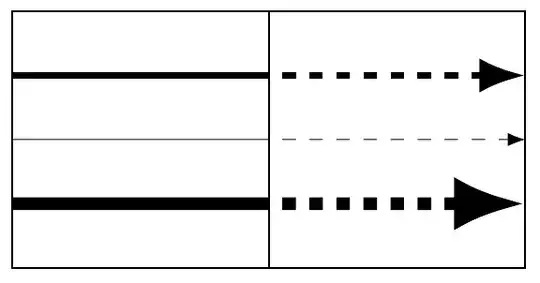
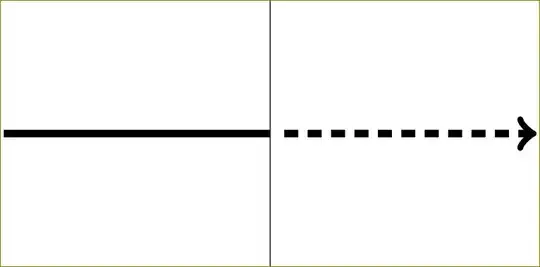
The idea is how to draw a vector that is, say 50% full line and 50% dashed line. percusse suggested this solution

\documentclass[tikz]{standalone}
\begin{document}
\begin{tikzpicture}[mydashed/.style={dashed,dash phase=3pt}]
\draw[very thin] (0,-1) -- (0,1);
\draw[ultra thick] (-2,0) -- (0,0);
\draw[ultra thick,mydashed,->] (0,0) -- (2,0);
\end{tikzpicture}
\end{document}

but he also mentioned that "to draw the combined vector in one go, one can use a decoration". I have read manual and find no answer how to do that. Can someone show me how to do that?

Dashed part must start with white part.

Pygmalion
  • 6,387
  • 4
  • 34
  • 68

2 Answers2

8

You can start with next code. Using show path construction decoration was stolen from Mark Wibrow's answer to Complicated tikz vector diagram (Approximate Miss Distance Produced by Turns)

I hope you'll improve how line width and arrow are set in decoration.

\documentclass[tikz, border=5]{standalone}
\usetikzlibrary{decorations.pathreplacing,calc,arrows.meta}
\tikzset{%
  half dashed/.style={
    decoration={show path construction, 
      lineto code={
          \draw[#1] (\tikzinputsegmentfirst) --($(\tikzinputsegmentfirst)!.5!(\tikzinputsegmentlast)$);,
          \draw[dashed, dash phase=3pt,->,#1] ($(\tikzinputsegmentfirst)!.5!(\tikzinputsegmentlast)$)--(\tikzinputsegmentlast);,
      }
    },
    decorate
  },
}
\begin{document}

\begin{tikzpicture}[>=LaTeX]

\draw (0,0) rectangle (2,2);
\draw (2,0) rectangle (4,2);

\draw [half dashed={very thin}] (0,1)--(4,1);
\draw [half dashed={ultra thick}] (0,1.5)--(4,1.5);
\draw [half dashed={line width=1mm}] (0,0.5)--(4,0.5);
\end{tikzpicture}

\end{document}

enter image description here

Ignasi
  • 136,588
1

On https://tex.stackexchange.com/users/3235/percusse's suggestion I made up this low-level solution:

\documentclass{standalone}
\usepackage{tikz}
\begin{document}
\usetikzlibrary{decorations}

\makeatletter
\pgfdeclaredecoration{halffull}{initial}{%
\state{initial}[width=0.5*\pgfdecoratedpathlength,next state=final]{%
\pgfsetlinewidth{\pgflinewidth}
\pgfpathmoveto{\pgfpoint{0}{0}}
\pgfpathlineto{\pgfpoint{0.5*\pgfdecoratedpathlength}{0}}
\pgfusepathqstroke
\pgfsetlinewidth{\tikzscope@linewidth}}
\state{final}{%
\pgfpathmoveto{\pgfpoint{0}{0}}
\pgfpathlineto{\pgfpoint{0.5*\pgfdecoratedpathlength}{0}}}}
\makeatother

\begin{tikzpicture}
\draw[ultra thick,dashed,dash phase=3pt,decorate,decoration=halffull,->] (-2,0) -- (2,0);
\draw[very thin] (0,-1) -- (0,1);
\end{tikzpicture}

\end{document}

enter image description here

Pygmalion
  • 6,387
  • 4
  • 34
  • 68