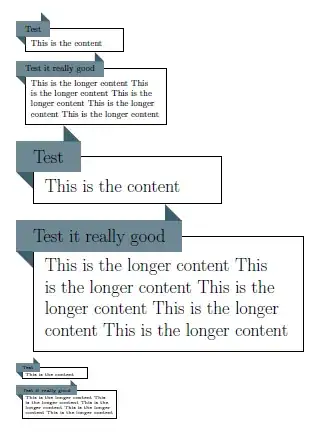
I made this with TikZ :
\usetikzlibrary{calc}
\def\banlen{3}
\xdefinecolor{mycolor}{RGB}{62,96,111} % Neutral Blue
\def\bancolor{mycolor}
\begin{tikzpicture}
\draw (0.25,0.25) rectangle (5,-2); %
\fill[\bancolor](0,0) -- (0.25,-0.25) -- (0.25,0); % Coin bas-gauche
\fill[\bancolor](\banlen,0.5) -- (\banlen-0.25,0.75) -- (\banlen-0.25,0.5); %Coin haut-droit
\fill[\bancolor!75] (0,0) rectangle (\banlen,0.5); % Rectangle (banner)
\draw (\banlen/2,0.25) node {Box name};
\end{tikzpicture}

How to add text in, adjust the banlen value with the Boxname text and adjust the box size ? And how to make a environment with a color parameter ?
I have some difficult with the coordinates :s
Thanks.




\def\bancolor{mycolor} .. \fill[\bancolor]but\tikzset{bancolor/.style={mycolor}} .. \fill[bancolor]or even better\colorlet{bancolor}{mycolor} .. \fill[bancolor]. – Martin Scharrer Jul 05 '11 at 18:02