6

Apologies for the slightly strange title, I struggled to come up with something else.

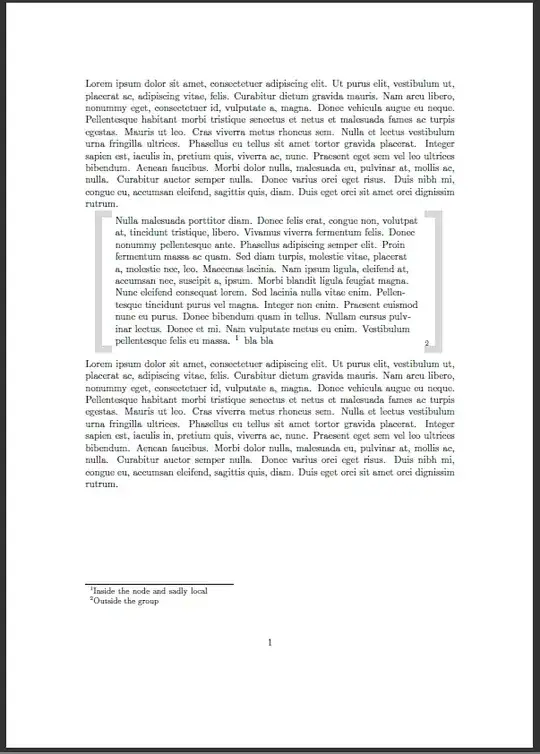
I have defined my own quote environment with brackets around the quote. In order to do that I use tikz and the quote content is put in a node. If I now use a \footnote in this node it is but directly under the quote. I'd rather have the footnote at the end of the page, so how can I "break out" of the local group the tikz node seems to create?

\documentclass[parskip=half]{scrartcl}

\usepackage{tikz}
\usetikzlibrary{calc}
\usepackage{environ,xcolor}
\usepackage{lipsum}

\NewEnviron{bquote}{%
\noindent%
\par%
\addmargin{30pt}
\begin{tikzpicture}%
\node[text width=0.97\linewidth](q){\BODY};%
\draw[ultra thick,line width=7pt,overlay,gray!30] (q.north west) -- ($(q.north
west) - (15pt,0)$) -- ($(q.south west) - (15pt,0)$) -- (q.south west);%
\draw[ultra thick, line width=7pt,overlay,gray!30] (q.north east) -- ($(q.north
east) + (15pt,0)$) -- ($(q.south east) + (15pt,0)$) -- (q.south east);% 
\end{tikzpicture}%
\footnote{Outside the group}%just a test
\par%
}%

\begin{document}
 \lipsum[1]
\begin{bquote}
\lipsum[3]\footnote{Inside the node and sadly local}
\end{bquote}
\lipsum[1]
\end{document}

enter image description here

Caramdir
  • 89,023
  • 26
  • 255
  • 291
Martin H
  • 18,164
  • This seems to be the common issue with footnote inside boxes like minipage and tabular. See the TeX FAQ entry for it: http://www.tex.ac.uk/cgi-bin/texfaq2html?label=footintab – Martin Scharrer Jul 06 '11 at 16:49
  • Note that you also can use a normal environment (not a so called pseudo-environment provided by environ; which is a great package) as shown e.g. in How to make a textbox with this TikZ code ? and How to resize a line with the text height with TikZ? (also a quote). This is just a general node and won't help you with the footnotes. It would allow verbatim etc. content. – Martin Scharrer Jul 06 '11 at 16:51
  • @Martin. Actually only with Environ the bracket size calculation works. I guess that the normal \newenvironment does not expand the argument #1. Well I know you know all about the expand-trickery of environ and could tell my what the difference is but that might be a different question – Martin H Jul 06 '11 at 16:57
  • Not sure what you mean with argument #1 here, but it works fine with small changes. See my answer. – Martin Scharrer Jul 06 '11 at 17:03
  • Some other smaller tips: It should be \par\noindent not \noindent\par. And you can use ([shift={(-15pt,0)}]q.south west) instead of ($(q.south west) - (15pt,0)$). Then you don't even need the calc library. – Martin Scharrer Jul 06 '11 at 17:05
  • I accepted your solution. Previously when I tried to use \newenvironment the grey brackets size was not calculated correctly. This however might have been another problem and the change to environ did not fix it also I thought it did. At first I thought that with using \newenvironment at the time the size calculation is done for the brackets the size of the node is yet unknown. You proved me wrong here. – Martin H Jul 06 '11 at 17:11
  • Mmmm, the choice of environment shouldn't influence the node size. There might have simply be some other issue. Note that there is the special current bounding box node which can be used to access the (current) whole size of the tikzpicture. – Martin Scharrer Jul 06 '11 at 17:14
  • Good hint to get rid of calc. I was searching through the pgfmanual but this function escaped me and is exactly what I was looking for in the first place – Martin H Jul 06 '11 at 17:21
  • It hides in plain sight :-) pgfmanual (v2.10) Section 13 "Specifying Coordinates", p.123: "The general syntax is ([<options>]<coordinate specification>)." But it takes a little to figure that <options> can be used for shifts! – Martin Scharrer Jul 06 '11 at 17:26

2 Answers2

11

You can use the footnote package and wrap the tikzpicture in a savenotes environment. This stores all internal footnotes which otherwise are collected by the internal minipage TikZ uses for \node [text width=<length>].

Here the code with some other improvements:

\documentclass[parskip=half]{scrartcl}

\usepackage{tikz}
\usetikzlibrary{calc}
\usepackage{xcolor}
\usepackage{footnote}
\usepackage{lipsum}

\newenvironment{bquote}{%
\par%
\noindent%
\addmargin{30pt}%
\begin{savenotes}%
\begin{tikzpicture}%
\node[text width=0.97\linewidth](q)\bgroup
}{%
\egroup;%
\draw[ultra thick,line width=7pt,overlay,gray!30] (q.north west) -- ($(q.north
west) - (15pt,0)$) -- ($(q.south west) - (15pt,0)$) -- (q.south west);%
\draw[ultra thick, line width=7pt,overlay,gray!30] (q.north east) -- ($(q.north
east) + (15pt,0)$) -- ($(q.south east) + (15pt,0)$) -- (q.south east);% 
\end{tikzpicture}%
\end{savenotes}%
\footnote{Outside the group}%just a test
\par%
}%

\begin{document}
 \lipsum[1]
\begin{bquote}
\lipsum*[3]\footnote{Inside the node and sadly local} bla bla
\end{bquote}
\lipsum[1]
\end{document}

Image

Martin Scharrer
  • 262,582
3

As I understand it from other questions, TikZ creates a minipage for nodes, so that explains why the footnote gets put inside the node. To get the other behavior you want, you can try using \footnotemark at the point you want the footnote to appear, then use \footnotetext{the text of the note} outside the environment so that it appears at the bottom of the page.

You could also try automating the process:

\def\pendingfootnotes{}
\let\ex\expandafter
\newcommand\externfootnote[1]{%
  \ex\global\ex\def\ex\pendingfootnotes\ex{\ex\pendingfootnotes\footnotetext{#1}}%
  \footnotemark%
}

and at the very end of your environment add

\pendingfootnotes
\global\def\pendingfootnotes{}

to insert them at the end. I use "externfootnote" so that if you still want the "normal" \footnote behavior, it's still available. I think you need the \global to ensure the changes propagate outside the TikZ environment, but I may be wrong...

Ben Lerner
  • 7,082
  • +1 sound idea. The footnote package (basically) does that for you. Note that the code accumulation can be done using \g@addto@macro or with the macros like \gappto provided by etoolbox. – Martin Scharrer Jul 06 '11 at 17:11
  • good hint, thank you. Martin created his solution around my example code so I accepted his answer. – Martin H Jul 06 '11 at 17:14
  • @Martin, thanks for the pointer to \g@addto@macro; I knew such a thing existed and I could never remember what it was called... :) – Ben Lerner Jul 06 '11 at 18:04