Here's a solution using tikz and tocloft. It places hidden nodes in the tocloft formatting commands for part and then uses the overlay function of tikz to draw the box.
\documentclass{book}
\usepackage{tocloft}
\usepackage[svgnames]{xcolor}
\usepackage{tikz}
% command to make a hidden node
\newcommand*{\hnode}[1]{%
    \tikz[remember picture] \node[minimum size=0pt,inner sep=0pt,outer sep=5pt] (#1) {};}
% create a node at the beginning of the part entry
\renewcommand{\cftpartfont}{\hnode{P1}\bfseries\Large}
\renewcommand{\cftpartpagefont}{\bfseries}
% create a node at the end of the part page number and draw the gray box
\renewcommand{\cftpartafterpnum}{%
  \hnode{P2}\tikz[remember picture,overlay]
  \draw (P1.north west)  [line width={25pt}, gray,opacity=.2] -- (P2.north east);}
\begin{document}
\tableofcontents

\part{First part}
\chapter{A chapter}
\section{A section}
\part{Second Part}
\chapter{Another chapter}
\end{document}
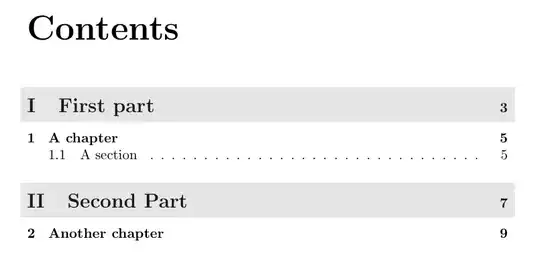
Note that you need to compile your document twice to have the overlay align correctly.


titletoc. Just wondered whether there was a way doing it withtocloft. – elsvene Jul 09 '11 at 11:37