How simple/hard would it be to add text to the front face (the red colored face in this example) of the cubes found at http://www.texample.net/tikz/examples/plane-partition/? I have seen examples like this (where text is placed on face of 3d cube) using \node, but I'm not sure where to begin with this particular code.
Here is the code:
% Plane partition
% Author: Jang Soo Kim
\documentclass{minimal}
\usepackage{tikz}
% Three counters
\newcounter{x}
\newcounter{y}
\newcounter{z}

% The angles of x,y,z-axes
\newcommand\xaxis{210}
\newcommand\yaxis{-30}
\newcommand\zaxis{90}

% The top side of a cube
\newcommand\topside[3]{
  \fill[fill=yellow, draw=black,shift={(\xaxis:#1)},shift={(\yaxis:#2)},
  shift={(\zaxis:#3)}] (0,0) -- (30:1) -- (0,1) --(150:1)--(0,0);
}

% The left side of a cube
\newcommand\leftside[3]{
  \fill[fill=red, draw=black,shift={(\xaxis:#1)},shift={(\yaxis:#2)},
  shift={(\zaxis:#3)}] (0,0) -- (0,-1) -- (210:1) --(150:1)--(0,0);
}

% The right side of a cube
\newcommand\rightside[3]{
  \fill[fill=blue, draw=black,shift={(\xaxis:#1)},shift={(\yaxis:#2)},
  shift={(\zaxis:#3)}] (0,0) -- (30:1) -- (-30:1) --(0,-1)--(0,0);
}

% The cube
\newcommand\cube[3]{
  \topside{#1}{#2}{#3} \leftside{#1}{#2}{#3} \rightside{#1}{#2}{#3}
}

% Definition of \planepartition
% To draw the following plane partition, just write \planepartition{ {a, b, c}, {d,e} }.
%  a b c
%  d e
\newcommand\planepartition[1]{
 \setcounter{x}{-1}
  \foreach \a in {#1} {
    \addtocounter{x}{1}
    \setcounter{y}{-1}
    \foreach \b in \a {
      \addtocounter{y}{1}
      \setcounter{z}{-1}
      \foreach \c in {1,...,\b} {
        \addtocounter{z}{1}
        \cube{\value{x}}{\value{y}}{\value{z}}
      }
    }
  }
}

\begin{document}

\begin{tikzpicture}
\planepartition{{5,3,2,2},{4,2,2,1},{2,1},{1}}
\end{tikzpicture}

\end{document}
EDIT: I didn't think to search for the name of the code's author before, but it turned up this related post: TikZ: Plane partitions with labeled faces
It appears that it is still partly unresolved as the text needs to be slanted.
EDIT 2: @AboAmmar Thank you! this is a great start, however even when i slant it properly, it does not seem like it flows with the face. In other words, it doesn't look flush with the face, but more forward facing.
For example:
\node [rotate=-29.9]at (\x+0.5, \y, \n-1.4) {\n}; \fi
Would produce:

EDIT 3:
So it seems you can add xslant and yslant to adjust this. It's just a matter of how to fine-tune it to look right.
EDIT 4:
\node [xslant=-.01, yslant=-0.8]at (\x+0.5, \y, \n-1.4) {\n}; \fi
Which produces:
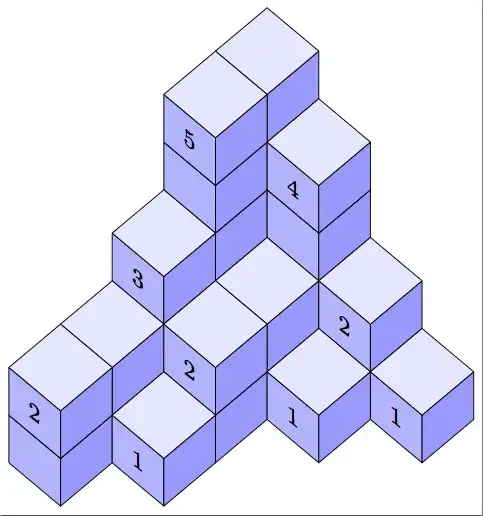


\node [rotate=45]at (\x+0.5, \y, \n-1.5) {\n};You will get the slanted text on the required front faces. – AboAmmar Jul 06 '15 at 20:13minimalfor examples.articleorstandaloneare better choices. (minimalis not designed for this use and can give weird errors for unobvious reasons.) – cfr Jul 07 '15 at 02:38