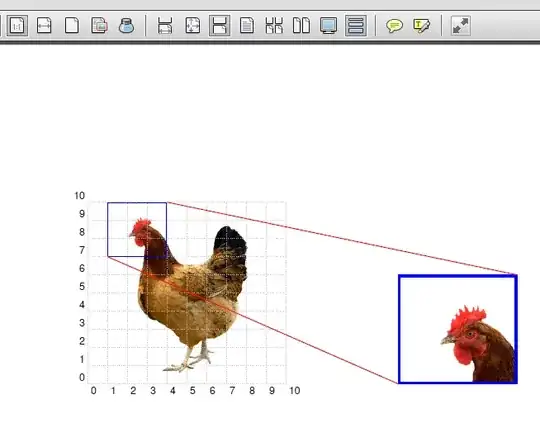
Here's an example of using the spy library that Martin mentioned. I've written a couple of styles that can be used to create an array of magnficiations, with an arbitrary number of rows and columns, placed on any side of the original image, with specifiable gaps. The magnifications will take up the same space as the original image.
The image itself and the magnifications are subcaptionboxes, which requires the subcaption package. They are assigned labels of the form <figurename>-image and <figurename>-zoom, and can be referenced using \ref and \subref. If no figurename is supplied as an option to the tikzpicture, a default name of zoombox will be assumed.
The center points of the magnifications are specified in relative coordinates: \zoombox{0,0} would zoom in on the lower left corner, \zoombox{1,1} on the upper right.
You can specify the zoom factor for the individual zoomboxes using the optional argument: \zoombox[magnification=5]{0.5,0.5} would zoom in on the middle of the image, magnifiying 5x.
Boxes and magnifications can be drawn with a coloured frame using the optional argument [color code=<color>].
To display a grid over the original image to aid in placing the zoom points, use the option help grid in the image node.
Instead of using colors, black and white dash patterns can be used with the option black and white. This overrides color code options. To automatically use a different dash pattern for every box, use black and white=cycle.
Update Fixed an issue with the black and white pattern not being correctly initialised. Thanks, SSilk.

you would use
\begin{figure}\centering
\begin{tikzpicture}[zoomboxarray]
    \node [image node] { \includegraphics[width=0.45\textwidth]{gallery} };
    \zoombox{0.175,0.9}
    \zoombox[magnification=2]{0.7,0.6}
    \zoombox{0.15,0.3}
    \zoombox[magnification=10]{0.86,0.35}
\end{tikzpicture}
\caption{The National Gallery of Canada}
\end{figure}
The same example with colored outlines

\begin{tikzpicture}[zoomboxarray]
    \node [image node] { \includegraphics[width=0.45\textwidth]{gallery} };
    \zoombox[color code=red]{0.175,0.9}
    \zoombox[magnification=2,color code=yellow]{0.7,0.6}
    \zoombox[color code=orange]{0.15,0.3}
    \zoombox[magnification=10,color code=lime]{0.86,0.35}
\end{tikzpicture}
Displaying a grid over the original image:

\begin{tikzpicture}[zoomboxarray]
    \node [image node,help grid] { \includegraphics[width=0.45\textwidth]{gallery} };
    \zoombox[color code=red]{0.175,0.9}
    \zoombox[magnification=2,color code=yellow]{0.7,0.6}
    \zoombox[color code=orange]{0.15,0.3}
    \zoombox[magnification=10,color code=lime]{0.86,0.35}
\end{tikzpicture}
To get three magnifications in a horizontal row below the original image, like this

you would use
\begin{figure}[ht]\centering
\begin{tikzpicture}[zoomboxarray, zoomboxes below, zoomboxarray inner gap=0.5cm, zoomboxarray columns=3, zoomboxarray rows=1]
    \node [image node] { \includegraphics[width=0.45\textwidth]{gallery} };
    \zoombox[magnification=2]{0.175,0.72}
    \zoombox[magnification=2]{0.71,0.5}
    \zoombox[magnification=10]{0.86,0.38}
\end{tikzpicture}
\caption{The National Gallery of Canada}
\end{figure}
Using connect zoomboxes to draw connecting lines to link the zoomboxes to the point in the image, and also changing the line color and thickness using the zoombox paths style:

\begin{tikzpicture}[zoomboxarray,
    zoomboxes below,
    zoomboxarray columns=3,
    zoomboxarray rows=1,
    connect zoomboxes,
    zoombox paths/.append style={ultra thick, red}]
    \node [image node] { \includegraphics[width=0.45\textwidth]{gallery} };
    \zoombox[magnification=2]{0.175,0.72}
    \zoombox[magnification=2]{0.71,0.5}
    \zoombox[magnification=10]{0.86,0.38}
\end{tikzpicture}
Using black and white to draw the boxes as black and white dashed lines:

\begin{tikzpicture}[
    zoomboxarray,
    black and white
]
    \node [image node] { \includegraphics[width=0.45\textwidth]{gallery} };
    \zoombox{0.27,0.9}
    \zoombox[color code=red,magnification=6]{0.4,0.83}
    \zoombox{0.42,0.45}
    \zoombox[magnification=5]{0.95,0.52}
\end{tikzpicture}
Using black and white=cycle to draw each box with a different black and white dash pattern:

\begin{tikzpicture}[
    zoomboxarray,
    black and white=cycle
]
    \node [image node] { \includegraphics[width=0.45\textwidth]{gallery} };
    \zoombox{0.27,0.9}
    \zoombox[color code=red,magnification=6]{0.4,0.83}
    \zoombox{0.42,0.45}
    \zoombox[magnification=5]{0.95,0.52}
\end{tikzpicture}
Here's the complete code:
\documentclass{article}
\usepackage{graphicx}
\usepackage{caption}
\usepackage{subcaption}
\usepackage{tikz}
\usepackage{pgfplots}
\usetikzlibrary{spy,calc}
\usepackage{hyperref}


\newif\ifblackandwhitecycle
\gdef\patternnumber{0}

\pgfkeys{/tikz/.cd,
    zoombox paths/.style={
        draw=orange,
        very thick
    },
    black and white/.is choice,
    black and white/.default=static,
    black and white/static/.style={
        draw=white,
        zoombox paths/.append style={
            draw=white,
            postaction={
                draw=black,
                loosely dashed
            }
        }
    },
    black and white/static/.code={
        \gdef\patternnumber{1}
    },
    black and white/cycle/.code={
        \blackandwhitecycletrue
        \gdef\patternnumber{1}
    },
    black and white pattern/.is choice,
    black and white pattern/0/.style={},
    black and white pattern/1/.style={
            draw=white,
            postaction={
                draw=black,
                dash pattern=on 2pt off 2pt
            }
    },
    black and white pattern/2/.style={
            draw=white,
            postaction={
                draw=black,
                dash pattern=on 4pt off 4pt
            }
    },
    black and white pattern/3/.style={
            draw=white,
            postaction={
                draw=black,
                dash pattern=on 4pt off 4pt on 1pt off 4pt
            }
    },
    black and white pattern/4/.style={
            draw=white,
            postaction={
                draw=black,
                dash pattern=on 4pt off 2pt on 2 pt off 2pt on 2 pt off 2pt
            }
    },
    zoomboxarray inner gap/.initial=5pt,
    zoomboxarray columns/.initial=2,
    zoomboxarray rows/.initial=2,
    subfigurename/.initial={},
    figurename/.initial={zoombox},
    zoomboxarray/.style={
        execute at begin picture={
            \begin{scope}[
                spy using outlines={%
                    zoombox paths,
                    width=\imagewidth / \pgfkeysvalueof{/tikz/zoomboxarray columns} - (\pgfkeysvalueof{/tikz/zoomboxarray columns} - 1) / \pgfkeysvalueof{/tikz/zoomboxarray columns} * \pgfkeysvalueof{/tikz/zoomboxarray inner gap} -\pgflinewidth,
                    height=\imageheight / \pgfkeysvalueof{/tikz/zoomboxarray rows} - (\pgfkeysvalueof{/tikz/zoomboxarray rows} - 1) / \pgfkeysvalueof{/tikz/zoomboxarray rows} * \pgfkeysvalueof{/tikz/zoomboxarray inner gap}-\pgflinewidth,
                    magnification=3,
                    every spy on node/.style={
                        zoombox paths
                    },
                    every spy in node/.style={
                        zoombox paths
                    }
                }
            ]
        },
        execute at end picture={
            \end{scope}
            \node at (image.north) [anchor=north,inner sep=0pt] {\subcaptionbox{\label{\pgfkeysvalueof{/tikz/figurename}-image}}{\phantomimage}};
            \node at (zoomboxes container.north) [anchor=north,inner sep=0pt] {\subcaptionbox{\label{\pgfkeysvalueof{/tikz/figurename}-zoom}}{\phantomimage}};
     \gdef\patternnumber{0}
        },
        spymargin/.initial=0.5em,
        zoomboxes xshift/.initial=1,
        zoomboxes right/.code=\pgfkeys{/tikz/zoomboxes xshift=1},
        zoomboxes left/.code=\pgfkeys{/tikz/zoomboxes xshift=-1},
        zoomboxes yshift/.initial=0,
        zoomboxes above/.code={
            \pgfkeys{/tikz/zoomboxes yshift=1},
            \pgfkeys{/tikz/zoomboxes xshift=0}
        },
        zoomboxes below/.code={
            \pgfkeys{/tikz/zoomboxes yshift=-1},
            \pgfkeys{/tikz/zoomboxes xshift=0}
        },
        caption margin/.initial=4ex,
    },
    adjust caption spacing/.code={},
    image container/.style={
        inner sep=0pt,
        at=(image.north),
        anchor=north,
        adjust caption spacing
    },
    zoomboxes container/.style={
        inner sep=0pt,
        at=(image.north),
        anchor=north,
        name=zoomboxes container,
        xshift=\pgfkeysvalueof{/tikz/zoomboxes xshift}*(\imagewidth+\pgfkeysvalueof{/tikz/spymargin}),
        yshift=\pgfkeysvalueof{/tikz/zoomboxes yshift}*(\imageheight+\pgfkeysvalueof{/tikz/spymargin}+\pgfkeysvalueof{/tikz/caption margin}),
        adjust caption spacing
    },
    calculate dimensions/.code={
        \pgfpointdiff{\pgfpointanchor{image}{south west} }{\pgfpointanchor{image}{north east} }
        \pgfgetlastxy{\imagewidth}{\imageheight}
        \global\let\imagewidth=\imagewidth
        \global\let\imageheight=\imageheight
        \gdef\columncount{1}
        \gdef\rowcount{1}
        \gdef\zoomboxcount{1}
    },
    image node/.style={
        inner sep=0pt,
        name=image,
        anchor=south west,
        append after command={
            [calculate dimensions]
            node [image container,subfigurename=\pgfkeysvalueof{/tikz/figurename}-image] {\phantomimage}
            node [zoomboxes container,subfigurename=\pgfkeysvalueof{/tikz/figurename}-zoom] {\phantomimage}
        }
    },
    color code/.style={
        zoombox paths/.append style={draw=#1}
    },
    connect zoomboxes/.style={
    spy connection path={\draw[draw=none,zoombox paths] (tikzspyonnode) -- (tikzspyinnode);}
    },
    help grid code/.code={
        \begin{scope}[
                x={(image.south east)},
                y={(image.north west)},
                font=\footnotesize,
                help lines,
                overlay
            ]
            \foreach \x in {0,1,...,9} {
                \draw(\x/10,0) -- (\x/10,1);
                \node [anchor=north] at (\x/10,0) {0.\x};
            }
            \foreach \y in {0,1,...,9} {
                \draw(0,\y/10) -- (1,\y/10);                        \node [anchor=east] at (0,\y/10) {0.\y};
            }
        \end{scope}
    },
    help grid/.style={
        append after command={
            [help grid code]
        }
    },
}

\newcommand\phantomimage{%
    \phantom{%
        \rule{\imagewidth}{\imageheight}%
    }%
}
\newcommand\zoombox[2][]{
    \begin{scope}[zoombox paths]
        \pgfmathsetmacro\xpos{
            (\columncount-1)*(\imagewidth / \pgfkeysvalueof{/tikz/zoomboxarray columns} + \pgfkeysvalueof{/tikz/zoomboxarray inner gap} / \pgfkeysvalueof{/tikz/zoomboxarray columns} ) + \pgflinewidth
        }
        \pgfmathsetmacro\ypos{
            (\rowcount-1)*( \imageheight / \pgfkeysvalueof{/tikz/zoomboxarray rows} + \pgfkeysvalueof{/tikz/zoomboxarray inner gap} / \pgfkeysvalueof{/tikz/zoomboxarray rows} ) + 0.5*\pgflinewidth
        }
        \edef\dospy{\noexpand\spy [
            #1,
            zoombox paths/.append style={
                black and white pattern=\patternnumber
            },
            every spy on node/.append style={#1},
            x=\imagewidth,
            y=\imageheight
        ] on (#2) in node [anchor=north west] at ($(zoomboxes container.north west)+(\xpos pt,-\ypos pt)$);}
        \dospy
        \pgfmathtruncatemacro\pgfmathresult{ifthenelse(\columncount==\pgfkeysvalueof{/tikz/zoomboxarray columns},\rowcount+1,\rowcount)}
        \global\let\rowcount=\pgfmathresult
        \pgfmathtruncatemacro\pgfmathresult{ifthenelse(\columncount==\pgfkeysvalueof{/tikz/zoomboxarray columns},1,\columncount+1)}
        \global\let\columncount=\pgfmathresult
        \ifblackandwhitecycle
            \pgfmathtruncatemacro{\newpatternnumber}{\patternnumber+1}
            \global\edef\patternnumber{\newpatternnumber}
        \fi
    \end{scope}
}


\begin{document}

\begin{figure}[ht]\centering
\begin{tikzpicture}[
    zoomboxarray,black and white=cycle,
]
    \node [image node] { \includegraphics[width=0.45\textwidth]{gallery} };
    \zoombox{0.27,0.9}
    \zoombox[color code=red,magnification=6]{0.4,0.83}
    \zoombox{0.42,0.45}
    \zoombox[magnification=5]{0.95,0.52}
\end{tikzpicture}
\caption{The National Gallery of Canada}
\end{figure}

\begin{figure}[ht]\centering
\begin{tikzpicture}[
    zoomboxarray
]
    \node [image node] { \includegraphics[width=0.45\textwidth]{gallery} };
    \zoombox{0.27,0.9}
    \zoombox[color code=red,magnification=6]{0.4,0.83}
    \zoombox{0.42,0.45}
    \zoombox[magnification=5]{0.95,0.52}
\end{tikzpicture}
\caption{The National Gallery of Canada}
\end{figure}

\end{document}




Dimension too largeerrors. Thanks. – SSilk Aug 12 '11 at 00:06subcaptionpackage so I can use\subrefand thehyperrefpackage to get links to the two subfigures? – SSilk Aug 12 '11 at 03:34subcaptionnow. Labelling works fine, but for some reason LaTeX complains about multiply defined labels. Can you see what's wrong? – Jake Aug 12 '11 at 04:25black and whitekey that draws monochrome dash patterns. To automatically use different patterns for each box, useblack and white=cycle. – Jake Aug 14 '11 at 07:46black and white, all following get stuck in B&W mode. Worse yet, if I useblack and white=cycle, then make another set without explicitly using eitherblack and whiteorblack and white=cycle, I get hundred of errors. Appears TIKZ keeps trying to cycle through dash patterns from the last one, but runs out after four patterns, producing errors. Is there a way to update your code so that after the current use, it defaults back to color boxes to avoid these problems? Thanks. – SSilk Aug 22 '11 at 21:09\gdef\patternnumber{0}in theexecute at end pictureoption of thezoomboxarray/.styleto reset the counter at the end of the picture. Glad the code is useful! – Jake Aug 23 '11 at 04:44\documentclass[border=1mm]{standalone}? – Shamina Dec 03 '18 at 14:30! Undefined control sequence. \tikz@atend@picture ...r sep=0pt] {\subcaptionbox {\label {\pgfkeysvalueof {... l.20 \end{tikzpicture}
What is happanning?
– Adriano Dec 12 '19 at 00:03