140

Let me begin by stating that I did google the answers (and I'll reference to them soon). Yet each of the resources I found discussed one particular method, I'm interested in a comparison of the approaches.

So far, I've found three ways to deal with this problem:

  • split the number into two columns (integer and fractional parts), as documented here or here. The LaTeX code is simple, but the approach is a pain when it comes to copying and pasting tables from external sources.

  • use dcolumn manually

  • use Mike Zhang's automatic converter (description). I have yet to test it.

What do most people use? dcolumn? Are there other options?

Mico
  • 506,678

2 Answers2

169

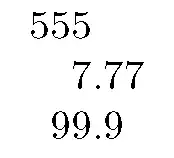
The newest option is using the S column type of the siunitx package.

\documentclass{article}

\usepackage{siunitx}

\begin{document}
\begin{tabular}{S[table-format=3.2]}% syntax for siunitx v2; for v1 use "tabformat"
555 \\
7.77 \\
99.9
\end{tabular}

\end{document}

example

Werner
  • 603,163
lockstep
  • 250,273
  • 4
    Indeed, in version 2 of siunitx you will find that there is an implementation that is ~ the same as the dcolumn one, plus a second approach more similar to rccol. – Joseph Wright Sep 04 '10 at 21:48
  • 1
    This looks great. I can't get it to work though. With pdflatex from texlive 2009 on OSX, I got:
    ``! Package xkeyval Error: `table-format' undefined in families `key'.``
    
    – dank Sep 05 '10 at 13:01
  • 1
    Seems like you're using siunitx v.1.x (the current version is 2). Try tabformat instead of table-format. – lockstep Sep 05 '10 at 13:58
  • @lockstep: I hope you read this. I've found that if the cell value is enclosed within \textbf{}, the decimal point alignment doesn't work any more (everything is flushed left). Is there a way to achieve both? I want to highlight a particular column, hence the bolding. Thanks. – wishihadabettername Sep 05 '10 at 17:04
  • BTW: Newest table package tabu supports siunitx, e.g., S columns inside X columns. – Schweinebacke Nov 08 '11 at 12:57
  • 3
    Just a note: table headers gave me an error, so I had to wrap them in a \multicolumn{1}{c}{name} – daniel kullmann Nov 15 '11 at 10:31
  • 18
    in response to a comment by daniel kullmann Nov 15 '11 at 10:31 The official way of getting siunitx to ignore bits of text, like headers, is to just wrap them in braces; i.e. {name} will work just as well as \multicolumn{1}{c}{name}. See for instance http://tex.stackexchange.com/questions/3709/puzzling-error-while-using-sunitx-in-a-tabular-environment#comment88988_3710 (would still like newbies to be able to post comments!) – Sam Mason Sep 23 '12 at 17:41
  • 1
    I fiddled around with siunitx for this purpose, and it seemed like using an elephant gun to kill a fly. I also couldn't find any way to make it believe that commas weren't decimal-place markers. –  Jan 22 '14 at 20:16
  • what if I want one number to be in bold? it ruins the alignment... – borgr Feb 22 '18 at 10:31
  • I have trouble using this for multi-column tabular and array. Is it possible? – Minh Nghĩa Sep 29 '20 at 08:26
  • I feel like someone should mention what the table-format=3.2 does: The numbers in table-format=X.Y specify the number of digits on each side of the decimal marker. You need to set them to the largest number of digits on each side in the respective column to avoid this problem. – Vegard Gjeldvik Jervell Nov 25 '22 at 09:26
27

Even though it's already been mentioned in the posting, it's worth discussing the dcolumn package in more detail. The package provides a column type called D that performs alignment on the decimal marker. The D column type takes three inputs: the input decimal marker (usually . or ,), the output decimal marker (again, usually . or ,), and the number of digits before and after the decimal marker. If the input and output decimal markers are always the same -- e.g., always . -- it's useful to set up a short-hand as follows:

\newcolumntype{d}[1]{D{.}{.}{#1}}

Here's a full MWE that's based on @lockstep's code -- indeed, with this simple example the outputs of S[table-format=3.2] and D{.}{.}{3.2} are identical :

enter image description here

\documentclass{article}
\usepackage{dcolumn}
\newcolumntype{d}[1]{D{.}{.}{#1}}
\begin{document}
\begin{tabular}{d{3.2}}
555 \\
7.77 \\
99.9
\end{tabular}
\end{document}
Mico
  • 506,678
  • The only difference I see between dcolumn and siunitx is that for column headers composed of text, you can use both \multicolumn{c}{1}{header} or {header} in siunitx whereas in dcolumn, the only option is \multicolumn{c}{1}{header}. This is just a minor thing. – Denis Cousineau Oct 10 '16 at 22:05
  • 2
    @DenisCousineau - In practice, if you find yourself writing a lot of \multicolumn{1}{c}{...} "wrappers", it pays to set up a shortcut macro, say via \newcommand{\mc}[1]{{\multicolumn{1}{c}{#1}}, so one can type \mc{...}. That's only two more keyboard strokes than {...}. :-) – Mico Oct 10 '16 at 22:12
  • 1
    @Mico Exactly the MWE which I was looking for! But then you give a guy a hand, he starts getting ideas and wants two arms: 1. I would like to align signed decimal numbers, and 2. for the next to last line, I would like the standard dotted line that says etc. – schremmer Dec 31 '18 at 19:10
  • 2
    @schremmer - If you want to stay with the dcolumn machinery, you just need to add one extra column for the sign symbol. E.g., to handle numbers such as -1245.56, you'd set d{5.2}. To typeset ... in a d column, just write \multicolumn{1}{c}{\dots} or, using the \mc device I mentioned in a comment above, define the \mc shortcut macro in the preamble and write \mc{\dots} in a table cell. If you need the ultimate in formatting control of numeric data in table cells, do consider using the siunitx package and its S column type, though. – Mico Dec 31 '18 at 23:45
  • @Mico Thanks for a prompt answer which works and that even I can understand. But why do $+1.0$, $+10.0$, etc work but $+0.1$, $0.01$, etc right-align, that is the 1s line up? Just a bit curious. But, again, without $$ everything works fine of course. – schremmer Jan 01 '19 at 04:02
  • @schremmer - The dcolumn package expects the cells to be in math mode. Hence, `$+10.0$ should throw a syntax error. – Mico Jan 01 '19 at 09:54