In plain-tex format at least, \matrix calls \normalbaselines, which resets the (base)lineskip(limit)'s to normal(base)lineskip(limit)'s. Plain also has a macro called \openup<dimen> which increases the (base)lineskip(limit)'s by given <dimen>.
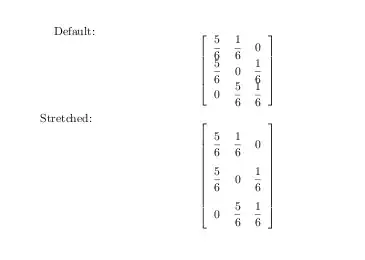
So it would seem logical to define a macro \openupnormal, which would do the same as \openup, only for normal(base)lineskip(limit)'s:
\catcode`@=11
\def\openupnormal{\afterassignment\@penupnormal\dimen@=}
\def\@penupnormal{\advance\normallineskip\dimen@
  \advance\normalbaselineskip\dimen@
  \advance\normallineskiplimit\dimen@}
\catcode`@=12
so that one could do:
$$
  \left[
    \openupnormal1\jot\matrix{ % inside this group, increase the
                               % normal(base)lineskip(limit)'s by 1 jot
      {5\over6} & {1\over6} & 0 \cr
      {5\over6} & 0 & {1\over6} \cr
      0 & {5\over6} & {1\over6} \cr
    } % the group ends here, and so does the effect of \openupnormal
  \right]
  \quad
  \left[
    \matrix{
      {5\over6} & {1\over6} & 0 \cr
      {5\over6} & 0 & {1\over6} \cr
      0 & {5\over6} & {1\over6} \cr
    }
  \right]
$$
\bye

(Note that there is no \displaystyle in effect in the above fractions, unlike in \dfrac)




\documentclassso that those trying to help don't have to recreate it. – Peter Grill Nov 02 '11 at 23:30