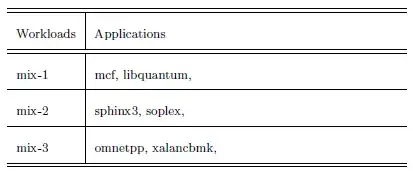
1

I need some table in LaTeX. As you can see, my LaTeX code is following

\setlength{\extrarowheight}{7.6pt}
\begin{footnotesize}
\begin{tabular}{l|m{7cm}}
\hline
\hline
Workloads & Applications  \\
\hline
\hline
mix-1 & mcf, libquantum, \\
\hline
mix-2 & sphinx3, soplex, \\
\hline
mix-3 & omnetpp, xalancbmk, \\
\hline
\hline
\end{tabular}
\end{footnotesize}

Actually, I could not understand array packages. I meant it's m{2.5cm}'s use method. I want to align a text in right side into vertical center like left side.

Can you help me? Some explain in other site make me confused because I'm not expert in LaTeX.

Moriambar
  • 11,466
JHL
  • 701

2 Answers2

4

In terms of vertically centering the content in your tabular cells, you don't need to set \extrarowheight. However, using m{<len>} (where <len> is any recognized TeX length) becomes useful when your right-hand column has a little more substance to it (that is, it is longer).

If you're interested in more vertical padding around the entries, modify \arraystretch instead. It provides a factor with which the rows are stretched/expanded:

enter image description here

\documentclass{article}
\usepackage{array}% http://ctan.org/pkg/array
\begin{document}
\renewcommand{\arraystretch}{2.5}% array stretch factor
\begin{footnotesize}
\begin{tabular}{l|p{7cm}}
  \hline
  \hline
  Workloads & Applications  \\
  \hline
  \hline
  mix-1 & mcf, libquantum, \\
  \hline
  mix-2 & sphinx3, soplex, \\
  \hline
  mix-3 & omnetpp, xalancbmk, \\
  \hline
  \hline
\end{tabular}
\end{footnotesize}
\end{document}

For more information on padding of cell entries with a tabular (both horizontally and vertically), see Column and row padding in tables.

Moriambar
  • 11,466
Werner
  • 603,163
1

I think your issue is your premable. If you include \usepackage{array} this compiles. Also, you should move the \setlength{\extrarowheight}{7.6pt} to be within a group (unless you want this to apply to all tables), you get:

enter image description here

\documentclass{article}
\usepackage{array}
\begin{document}
\begin{footnotesize} \setlength{\extrarowheight}{7.6pt}
\begin{tabular}{l|m{7cm}}
\hline
\hline
Workloads & Applications  \\
\hline
\hline
mix-1 & mcf, libquantum, \\
\hline
mix-2 & sphinx3, soplex, \\
\hline
mix-3 & omnetpp, xalancbmk, \\
\hline
\hline
\end{tabular}
\end{footnotesize}
\end{document}

If you want both columns to be vertically centered then you have to use

\begin{tabular}{m{1.5cm}|m{7cm}}

which yields the following. The extra vertical space above the data is coming from your setting of \extrarowheight.

enter image description here

Moriambar
  • 11,466
Peter Grill
  • 223,288