I would like to put something at the top of the \longrightarrow, something like
\longrightarrow^{k\rightarrow\infty}. However, instead of putting k\rightarrow\infty on the top right corner, I would like to put it in the middle on the top of \longrightarrow. Could someone help me?
Asked
Active
Viewed 9.2k times
51

3 Answers
71
In this instance, I think \xrightarrow would suit you better. Here's an example using the former, and the traditional \overset from amsmath:

\documentclass{article}
\usepackage{amsmath}% http://ctan.org/pkg/amsmath
\begin{document}
\[
  \mathcal{X}\overset{k\rightarrow\infty}{\longrightarrow}\mathcal{Y} \qquad
  \mathcal{X}\xrightarrow{k\rightarrow\infty}\mathcal{Y}
\]
\end{document}
\xrightarrow{<stuff>} is an extensible arrow, which conforms in length to the overset argument <stuff>.

Werner
- 603,163
-
1And what if I want stuff on top and bottom of double/thick arrow: $\Rightarrow$. What if I want some text also below that arrow? Can I make it extensible arrow? (Am new to this site. Isnt this site use MathJax to render equations/Latex text netweem $$. Does content here apply equally to MathJax. I want to use these arrows on math.stackexchange. This tutorial doesnt tell how to do that arrow stuff.) – RajS May 21 '19 at 19:34
-
@anir: In (La)TeX you can try this example. However, MathJax is not (La)TeX, so you'll have to find a different, probably convoluted, way to generate that. – Werner May 22 '19 at 16:32
-
Do \overset and \stackrel do the same thing? – JKEG Aug 15 '20 at 18:48
19
Use
\stackrel{k\rightarrow\infty}{\longrightarrow}

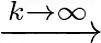
Alternatively, if you want the long arrow to stretch you may prefer
\xrightarrow{k\rightarrow\infty}

qubyte
- 17,299
-
Thank you for your answer. However, I can accept only one answer. Anyway, thank you! – Paul Feb 27 '12 at 06:46
-
For anyone who missed it like me, you need to add reference \usepackage{amsmath} before you can use xrightarrow – user130222 Nov 27 '18 at 18:51
2
There is a great commend that allow you to put something on and under the \longrightarrow:
x \underset{down}{\overset{up}{\longrightarrow}} y
I hope this will be helpful.

Phelype Oleinik
- 70,814

yaser
- 29