10

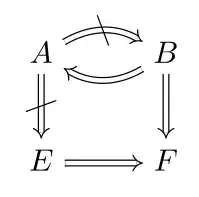
Is there a way to put $\nLeftarrow$ instead of some arrows in TikZ? Specifically, how do I change it to "B does not imply A" in the following code.

\documentclass{article}
\usepackage{tikz-cd}
\begin{document}
\begin{tikzcd}[arrows=Rightarrow]
   A \arrow[out=30,in=150]{r}{}\arrow{d} & B \arrow[out=210,in=330]{l}{}\arrow{d}  \\
   E  \arrow{r}{} & F
\end{tikzcd}
\end{document}

One very primite way is to do something similar to the following, where at the description part in the middle of the arrow, use \Big\backslash.

\documentclass{article}
\usepackage{tikz-cd}
\begin{document}
\begin{tikzpicture}
\matrix (m) [matrix of math nodes, row sep=3em, column sep=3em]
             { A & B \\
          & C \\ }; \path[->,font=\scriptsize] (m-1-1) edge node
   {$\Big\backslash$} (m-1-2) edge node {$\Big\backslash$} (m-2-2);
    \end{tikzpicture}
 \end{document}

But then, how do I put a description in the middle of an arrow in the first code?

David Carlisle
  • 757,742
Derya
  • 215

1 Answers1

13

This is probably the same mechanism for description key in the manual of tikz-cd but more explicit.

\documentclass{article}
\usepackage{tikz-cd}
\usetikzlibrary{decorations.markings}
\tikzset{degil/.style={
            decoration={markings,
            mark= at position 0.5 with {
                  \node[transform shape] (tempnode) {$\backslash$};
                  %\draw[thick] (tempnode.north east) -- (tempnode.south west);
                  }
              },
              postaction={decorate}
}
}
\begin{document}
\begin{tikzcd}[arrows=Rightarrow]
   A \arrow[out=30,in=150,degil]{r}{}\arrow[degil]{d} & B \arrow[out=210,in=330]{l}{}\arrow{d}  \\
   E  \arrow{r}{} & F
\end{tikzcd}
\end{document}

enter image description here

If you want to keep the backslashes upright(unrotated) regardless of the arrow direction, you can remove the transform shape option and give it a try.

percusse
  • 157,807
  • Description works as well,but leaves some space in between. Your way was better,thank you. – Derya Apr 06 '12 at 21:51
  • 2
    @Derya Try also [description,inner sep=0mm,fill=none] and adjust if it works as you wish. – percusse Apr 06 '12 at 22:10
  • Both [description,inner sep=0mm,fill=none] and [description,inner sep=-3mm] works. – Derya Apr 06 '12 at 22:19
  • @Derya Sorry for the follow-up but inner sep=-3mm is not a good idea since you would be defining a node which has a -3mm long padding and that might cause trouble. Only fill=none would remove the space effect since right now it's painting white to act as if there is actually a space there. Change it to fill=yellow and you would see what I mean. – percusse Apr 06 '12 at 22:32
  • Dear percusse, how could I enlarge the distance of the two parallel lines of the implication sign "===>". I have tried modified your source file, but got none hints. – azhi May 23 '13 at 02:23
  • @azhi I don't have access to TeX now but if you look at the tikz-cd manual there are ways to pass options to arrows (page 5). Line width should increase the distance also PGF/TikZ manual has some arrow options. Notice that the arrow is actually a double line. – percusse May 23 '13 at 09:40
  • @percusse: Thanks for a good answer. Could you please explain what '{}' does after you type the \arrow commands – Abhimanyu Arora Aug 13 '14 at 20:17