Remove the \mathclap, whose very purpose is to hide the width of its argument.
\documentclass{article}
\usepackage{mathtools}
\newcommand{\myequ}[1]{\stackrel{\normalfont\mbox{#1}}{=}}
\begin{document}
\[
y \myequ{eq.(3.3.44)} \int_\Omega x\,dx
\]
\end{document}
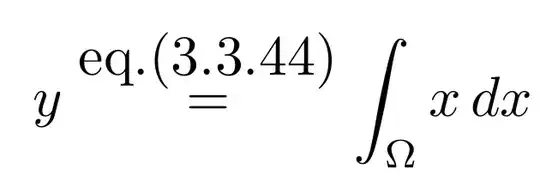
You may also wish to consider using \small or \scriptsize in preference to \normalfont.
Thanks to Bernard for reminding me of \eqmakebox, which can help for cases where align is involved:
\documentclass{article}
\usepackage{mathtools,eqparbox}
\newcommand{\myequ}[1]{\stackrel{\scriptsize\mbox{#1}}{=}}
\begin{document}
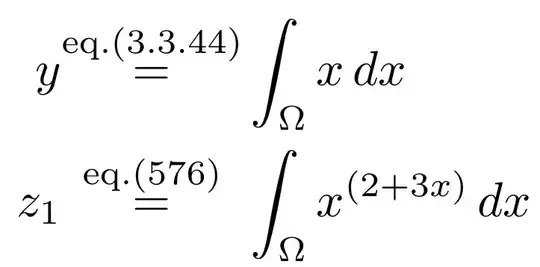
\begin{align}
y \eqmakebox[][c]{$\myequ{eq.(3.3.44)}$}& \int_\Omega x\,dx\\
z_1 \eqmakebox[][c]{$\myequ{eq.(576)}$}& \int_\Omega x^{(2+ 3x)}\,dx
\end{align}
\end{document}


#1's have different lenghts – Olórin Nov 01 '19 at 12:06alignstructures will be affected. – Steven B. Segletes Nov 01 '19 at 12:23=in an\eqmakebox(fromeqparbox) to maintain the alignment. – Bernard Nov 01 '19 at 13:11aligncase can be addressed. – Steven B. Segletes Nov 01 '19 at 13:28