6

I am trying to make a listing float containing 3 subfloats. I have managed to to make the actual float by combining the answers from question1 and question2.

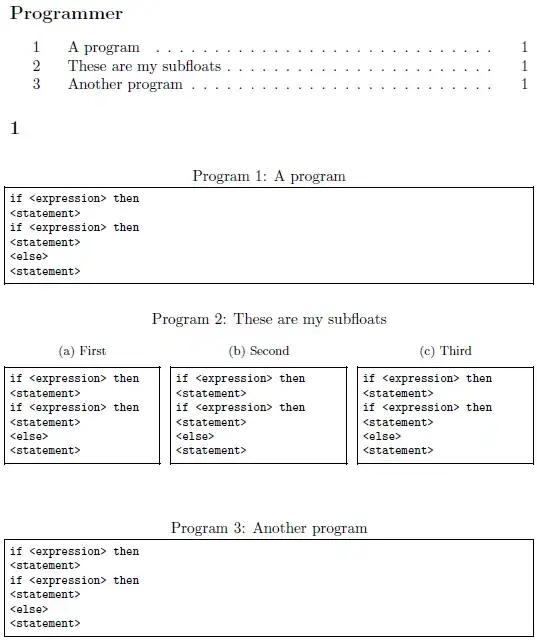
Now I only need to make mylisting use the same counter as listings so the three programs are named Program 1, Program 2 and Program 3.

\documentclass[a4paper,article,oneside]{memoir}
\usepackage{subfig}
\let\newfloat\undefined %for working with memoir

\usepackage{floatrow}
\usepackage{filecontents}
\usepackage{listings}
\lstset{
columns=flexible,
basicstyle=\footnotesize\ttfamily,
showstringspaces=false,
tabsize=3,
numberbychapter=false,
frame=single,
extendedchars=true,
}

%% Declare mylisting
\DeclareNewFloatType{mylisting}{placement=htbp,fileext=lol,name=Program}
\floatsetup[mylisting]{style=Plaintop}

%% Rename "List of listings" to "Programmer"
\floatname{lstlisting}{Program}
\renewcommand{\lstlistoflistings}{ 
  \begingroup 
    \listof{lstlisting}{Programmer} 
  \endgroup 
}

\begin{document}
\lstlistoflistings
\chapter{}

\begin{filecontents*}{dangling.hun}
if <expression> then
<statement>
if <expression> then
<statement>
<else>
<statement>
\end{filecontents*}

\lstinputlisting[caption={A program}]{dangling.hun}

\begin{mylisting}[htbp]
  \caption{These are my subfloats}
  \subfloat[First]{\begin{minipage}{0.28\linewidth}
\lstinputlisting[label=dangling,nolol]{dangling.hun}\end{minipage}}
  \hfill
  \subfloat[Second]{\begin{minipage}{0.32\linewidth}
\lstinputlisting[label=dangling1,nolol]{dangling.hun}\end{minipage}}
  \hfill
  \subfloat[Third]{\begin{minipage}{0.32\linewidth}
\lstinputlisting[label=dangling2,nolol]{dangling.hun}\end{minipage}}
\end{mylisting}

\lstinputlisting[caption={Another program}]{dangling.hun}


\end{document}

Update I have sort of fixed it by using calc by making the following change. However, I'm interested in a cleaner way to do it.

\begin{mylisting}[htbp]
...
\end{mylisting}

to

\begin{mylisting}[htbp]
\setcounter{mylisting}{\value{lstlisting}}
\setcounter{lstlisting}{\value{mylisting}+1}
...
\end{mylisting}
Jonas Nyrup
  • 1,438
  • 10
  • 17
  • It will be nice if you upvote the answers in addition to accepting them @Jonas Nyrup. –  May 23 '12 at 01:15

1 Answers1

6

You're interested in making a slave duplicate counter to that of listings for your mylisting environment. For this you need to issue

\makeatletter
\AtBeginDocument{\let\c@mylisting\c@lstlisting}
\makeatother

This copies the contents of the listings counter \c@lstlisting into the contents of the mylisting counter \c@mylisting. As such, \c@mylisting will reference the same counter register as \c@lstlisting and therefore duplicate it's behaviour. The reason for issuing this \AtBeginDocument, is because \let copies its contents as-is at the time of issue. However, listings delays the creation of its counter until \AtBeginDocument; for reference, the following is taken from listings.sty:

\AtBeginDocument{
  \@ifundefined{thechapter}{\let\lst@ifnumberbychapter\iffalse}{}
  \lst@ifnumberbychapter
      \newcounter{lstlisting}[chapter]
      \gdef\thelstlisting%
           {\ifnum \c@chapter>\z@ \thechapter.\fi \@arabic\c@lstlisting}
  \else
      \newcounter{lstlisting}
      \gdef\thelstlisting{\@arabic\c@lstlisting}
  \fi}

The above suggestion was taken from Slave duplicate counter.

enter image description here

\documentclass[a4paper,article,oneside]{memoir}
\usepackage{subfig}
\let\newfloat\undefined %for working with memoir

\usepackage{floatrow}
\usepackage{filecontents}
\usepackage{listings}
\lstset{
columns=flexible,
basicstyle=\footnotesize\ttfamily,
showstringspaces=false,
tabsize=3,
numberbychapter=false,
frame=single,
extendedchars=true,
}

%% Declare mylisting
\DeclareNewFloatType{mylisting}{placement=htbp,fileext=lol,name=Program}
\makeatletter
\AtBeginDocument{\let\c@mylisting\c@lstlisting}
\makeatother
\floatsetup[mylisting]{style=Plaintop}

%% Rename "List of listings" to "Programmer"
\floatname{lstlisting}{Program}
\renewcommand{\lstlistoflistings}{ 
  \begingroup 
    \listof{lstlisting}{Programmer} 
  \endgroup 
}

\begin{document}
\lstlistoflistings
\chapter{}

\begin{filecontents*}{dangling.hun}
if <expression> then
<statement>
if <expression> then
<statement>
<else>
<statement>
\end{filecontents*}

\lstinputlisting[caption={A program}]{dangling.hun}

\begin{mylisting}[htbp]
  \caption{These are my subfloats}
  \subfloat[First]{\begin{minipage}{0.28\linewidth}
\lstinputlisting[label=dangling,nolol]{dangling.hun}\end{minipage}}
  \hfill
  \subfloat[Second]{\begin{minipage}{0.32\linewidth}
\lstinputlisting[label=dangling1,nolol]{dangling.hun}\end{minipage}}
  \hfill
  \subfloat[Third]{\begin{minipage}{0.32\linewidth}
\lstinputlisting[label=dangling2,nolol]{dangling.hun}\end{minipage}}
\end{mylisting}

\lstinputlisting[caption={Another program}]{dangling.hun}

\end{document}
Werner
  • 603,163