152

This seems like it should be really easy but I can't seem to find it anywhere...

I'd like to be able to fine-tune the positioning of a node label.

I'm aware of the \node[label=above/below/etc:{label}] (x) {}; syntax, but that doesn't seem to give you many options on where the label goes. I'd like to be able to place the label slightly closer or farther away, or maybe in a direction other than the 8 presets available.

\tikz[label distance=x] isn't a good solution because I need it to be node-specific.

Yossi Gil
  • 15,951
Trevor
  • 3,039

5 Answers5

159

You can define the direction of the label by using label=<angle>:<label text>. To specify the distance on a per node distance, you have to supply it to the label options: label={[label distance=<distance>]<angle>:<label text>}

\documentclass{article}
\usepackage{tikz}

\begin{document}
\begin{tikzpicture}[
    every node/.style=draw,
    every label/.style=draw
]
\node [label={[label distance=1cm]30:label}] {Node};
\end{tikzpicture}
\end{document}
Jake
  • 232,450
  • This is perfect, thanks. Does the label text need to be in braces? I found mine did, but that may have been because I was specifying color and size options. – Trevor Jun 07 '12 at 08:44
  • 2
    They only need to be in braces if you supply options using [...], because you need to mask the [ and ]. If you're only supplying angle and text, you can just use label=20:text. – Jake Jun 07 '12 at 08:47
  • What is the default label distance if you only write above, below, right or left? – StrawberryFieldsForever Aug 02 '13 at 04:06
  • 1
    @StrawberryFieldsForever: It's zero, the gap between the node contents only comes from the inner sep and outer sep of the node and label node. You can see this using \node [draw, label={[draw]above:Top}] {Bottom};, for example. – Jake Aug 02 '13 at 04:31
  • 1
    @Jake Is there a way to add a connecting line between the node and the line? This could be helpful in crammed circumstances to make it clear which label belongs to which node. – Janosh Apr 15 '16 at 09:08
  • 4
    @Casimir: Sure, that's what pin is for: pin={[pin distance=1cm]30:label} – Jake Apr 15 '16 at 09:11
  • @Jake Cool! Can the label position w.r.t. to the connecting line be customized? When I use it, the line seems to end well below the label. – Janosh Apr 15 '16 at 09:21
  • @Casimir: This is probably due to the inner sep padding of the pin node. Try setting every pin/.style=draw to see where the space comes from, or every pin/.style={inner sep=0pt} to remove the padding. – Jake Apr 15 '16 at 10:03
  • inner sep=0pt did the trick. Thanks for the tip. – Janosh Apr 15 '16 at 10:27
  • Any hints on how to do so with tkz-euclide (\tkzLabelAngle)? – Martin Thoma Jun 18 '16 at 08:00
  • can distance be negative? – alper Jun 06 '22 at 15:39
71

Good to know all the other ways to do this, but I have always used xshift=<length>, and yshift=<length> to move a node or label.

The blue is the default, and the red is with the option [xshift=1.0cm, yshift=0.3cm], and the green (as suggested by percusse) is using an alternate syntax to specify the x and y shift as a vector [shift={(1.0,0.3)}].

enter image description here

Code:

\documentclass{article}
\usepackage{tikz}

\begin{document} \begin{tikzpicture}[blue] \node [label={Label}] {Node}; \end{tikzpicture} \begin{tikzpicture}[red] \node [label={[xshift=1.0cm, yshift=0.3cm]Label}] {Node}; \end{tikzpicture} \begin{tikzpicture}[green] \node [label={[shift={(1.0,0.3)}]Label}] {Node}; \end{tikzpicture} \end{document}

Peter Grill
  • 223,288
20

The simplest way is to use another node. Like you wrote, the label is a node "label". In \path ... node[⟨options⟩](⟨name⟩)at(⟨coordinate⟩){⟨text⟩} ...;the real label is ⟨text⟩. Now it's easy to add a node and a new label without the label option.

  \documentclass{scrartcl}
  \usepackage{tikz}
  \begin{document} 

   \begin{tikzpicture}
     \node [draw,circle ] (a) { Real label}; 
     \node  at (a.60) {$\bullet$}; 
     \node [draw] at ([shift={(95:1)}]a.60) {Second label};

   \end{tikzpicture}

   \end{document}    

enter image description here

The only problem is that you need to give the name first node but you can do what you want. In the first version of TikZ, without the label option it was the only way.

Alain Matthes
  • 95,075
16

The library "positioning" allows easy positioning of nodes with each other

La librairie "positioning" permet un positionnement facile et rapide des noeuds les uns par rapport aux autres

\documentclass{article}
\usepackage{tikz}
\usetikzlibrary{positioning}

\begin{document} \begin{tikzpicture}[ every node/.style=draw, every label/.style=draw ] \node (node) {Node}; \foreach \xx/\yy in {1/2,-1/3,5/0,-3/-2,0/0}{ \node above right = \xx cm and \yy cm of node{Label\xx\yy}; } \end{tikzpicture} \end{document}

Image displaying the positioned labels in code

[fr] je complète la réponse pour répondre pour préciser le positionnement d'un label et pas seulement d'un noeud

[en] I complete the answer to answer to clarify the positioning of a label and not just a node

\documentclass{article}
\usepackage{tikz}
\usetikzlibrary{positioning}

\begin{document} \begin{tikzpicture}[ every node/.style=draw, every label/.style=draw ] \foreach \xx/\yy in {1/2,-1/3,5/0,-3/-2,0/0}{ \node [label={[above right = \xx cm and \yy cm of node]:label\xx\yy}] (node) {Node}; } \end{tikzpicture} \end{document}
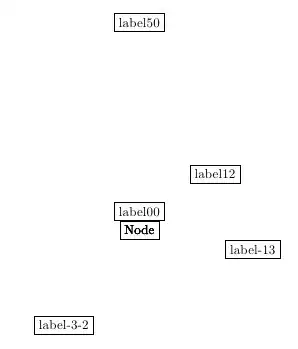
Screenshot showing the result of the second code snippet

[fr] on remarque que l'origine du positionnement n'est pas le même que pour les noeuds

[en] we note that the origin of the Positioning is not the same as for nodes

Wouter
  • 125
rpapa
  • 12,350
9

This pattern is also quite useful:

\node at ($(R) + (0.03,0.4)$)    {Your label!};

This way you can position the label relative to the coordinates of R.

Note that you need \usetikzlibrary{calc} for this way.

A similar solution that does not require calc (thanks Paul Gaborit!) is

\path (R) ++(0.03,0.4) node {Your label!};
Martin Thoma
  • 18,799