0

Here is MWE: I have MacOS with Monterey and TeXLive 2020

\documentclass[a4paper, 10pt ]{article}
\usepackage[no-math]{fontspec}
\setmainfont{Lucida Grande}
\newfontfamily{\He}{Corsiva Hebrew}
\usepackage{bidi}

\begin{document} \RL{יהוה} \end{document}

Mensch
  • 65,388
  • 1
    Welcome to TeX.SX! You probably first need to select the newly defined font before the Hebrew part in the document body. – Jasper Habicht Dec 09 '21 at 15:16
  • you have specified the font \newfontfamily{\He} but not used \He anywhere your log file is presumably showing warnings that the Lucida font does not have those characters – David Carlisle Dec 09 '21 at 15:16
  • On my machine (MacOS,TexLive2020) it does work and produce a correct PDF, as long as I compile with XeLatex (and not Latex). In any case, from my past experience with Hebrew writing in tex, I'd recommend using the polyglossia package. – Ran G. Dec 09 '21 at 15:48
  • My problem remains – Rasolof Henri Dec 11 '21 at 17:53
  • I'd bet it is an installation problem. Maybe fonts are not installed? maybe liveTex needs an update? Is there any hint in the logs? – Ran G. Jan 12 '22 at 11:08

1 Answers1

2

here's a MWE with XeLatex/Polyglossia

%!TEX TS-program = xelatex
%!TEX encoding = UTF-8 Unicode
\documentclass{article}
\usepackage{fontspec} 
\setmainfont{Times New Roman} 
\setsansfont{Arial}
\usepackage{polyglossia} 
\setdefaultlanguage{hebrew} 
\setotherlanguage{english}
\begin{document}

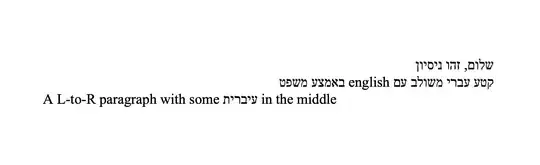
שלום, זהו ניסיון

קטע עברי משולב עם \RL{english} באמצע משפט

\begin{english} A L-to-R paragraph with some \RL{עיברית} in the middle \end{english}

\end{document}

which gives the pdf pdf file (if it doesn't show, see link)

Ran G.
  • 1,648