
This was the result of my original answer. Since the OP asked if the pic element could be used in a recursive construction, see Drawing recursive polygons in Tikz, I indicate one possibility below.
 Using the recursive pic element
 p rec which takes three arguments: recursion step, end, angle.
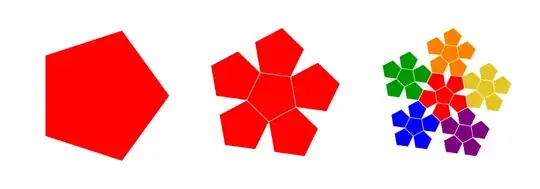 Using the recursive pic element
 p* rec which takes three arguments: recursion step, end, angle.

end = 3, 4, and 5 respectively

end = 3 and color mixing = 2, 4, and 6 respectively
Remark. There are two global parameters, the radius of the initial pentagon, the degree of color mixing inside an elementary pentagon (the initial drawing corresponds to a maximal color mixing, indCM=6), and a counter, pCnt.
New version of the answer
\documentclass[11pt, border=.8cm]{article}
\usepackage{ifthen}
\usepackage{tikz}
\usetikzlibrary{calc, math}
\begin{document}
\newcounter{pCnt}
\newcommand{\chooseRGB}[1]{%
  \ifthenelse{\equal{#1}{0}}{\colorlet{RGB}{red}}{}

  \ifthenelse{\equal{#1}{1}}{\colorlet{RGB}{yellow!90!red!90!blue}}{}
  \ifthenelse{\equal{#1}{2}}{\colorlet{RGB}{orange}}{}
  \ifthenelse{\equal{#1}{3}}{\colorlet{RGB}{green!60!black}}{}
  \ifthenelse{\equal{#1}{4}}{\colorlet{RGB}{blue}}{}
  \ifthenelse{\equal{#1}{5}}{\colorlet{RGB}{violet}}{}
}
\pgfkeys{/tikz/.cd,
  indexColorMixing/.store in=\indCM,
  indexColorMixing = 1
}
\pgfkeys{/tikz/.cd,
  pentagonRadius/.store in=\pentagonR,
  pentagonRadius = 2
}
\tikzset{
  pentagons/.style={%
    evaluate={%
      real \pentagonAngle, \pentagonCst, \pentagonCstRecursion;
      \pentagonAngle = 72;
      \pentagonCst = {2cos(\pentagonAngle/2)};
      \pentagonCstRecursion = {1/(1 +\pentagonCst))};
    }
  },
  pics/pentagon/.style 2 args={%
    code={%
      \draw[#1, ultra thick, fill=#2] (0: \pentagonR)
      \foreach \i in {1, ..., 4}{%
        -- (\i\pentagonAngle: \pentagonR)
      } -- cycle;
    }
  },
  pics/p rec/.style n args={3}{% recursion step, end, angle
    code={%
      \tikzmath{
        integer \i;
        \i = #1+1;
        if \i<#2 then {%
          \tmp = {\pentagonRpow(\pentagonCstRecursion, \i)\pentagonCst};
          {
            \path pic {p rec={\i}{#2}{#3 +180}};
          };
          for \j in {0, ..., 4}{%
            {
              \path (#3 +\j\pentagonAngle: \tmp)
              pic {p rec={\i}{#2}{#3 +\j\pentagonAngle}};
            };
          };
        } else {%
          \tmp = {\pentagonRpow(\pentagonCstRecursion, \i-1)};
          {%
            \draw (#3: \tmp)
            \foreach \k in {1, ..., 4}{%
              -- (#3 +\k\pentagonAngle: \tmp)
            } -- cycle;
          };
        };
      }
    }
  },
  pics/p* rec/.style n args={3}{% recursion step, end, angle
    code={%
      \tikzmath{
        integer \i, \rgb;
        \i = #1+1;
        if \i<#2 then {%
          \tmp = {\pentagonRpow(\pentagonCstRecursion, \i)\pentagonCst};
          {
            \path pic {p* rec={\i}{#2}{#3 +180}};
          };
          for \j in {0, ..., 4}{%
            {
              \path (#3 +\j\pentagonAngle: \tmp)
              pic {p rec={\i}{#2}{#3 +\j\pentagonAngle}};
            };
          };
        } else {%
          \tmp = {\pentagonRpow(\pentagonCstRecursion, \i-1)};
          \rgb = int(mod(int(\thepCnt/(7 -\indCM)), 6));
          {%
            \chooseRGB{\rgb}
            \draw[white, fill=RGB] (#3: \tmp)
            \foreach \k in {1, ..., 4}{%
              -- (#3 +\k*\pentagonAngle: \tmp)
            } -- cycle;
            \stepcounter{pCnt}
          };
        };
      }
    }
  }
}
\begin{tikzpicture}[pentagons, pentagonRadius=1.3,
  evaluate={%
    \t=\pentagonAngle;
    \d = \pentagonCst\pentagonR;
    \tini=30;}]
  \foreach \j/\rgb in
  {0/violet, 1/red, 2/orange, 3/green!70!black, 4/cyan!70!black}{%
    \path (\tini +\j\t +\t/2: \d) pic[rotate={\tini +\t/2}]
    {pentagon={\rgb}{\rgb!30}};
  }
  \path (0, 0) pic[rotate=\tini] {pentagon={blue}{blue!35}};
  \path (7, 0) node[scale=1.3, text width=15ex]
  {Elementary drawing using a {\color{blue}pic} element};
\end{tikzpicture}
\begin{tikzpicture}[pentagons, evaluate={\r=2;}]
  \path (0, 0) pic[blue] {p rec={0}{1}{0}};
  \path (5, 0) pic[blue] {p rec={0}{2}{20}};
  \path (10, 0) pic[blue] {p rec={0}{3}{-20}};
\end{tikzpicture}
\begin{tikzpicture}[pentagons]
  \setcounter{pCnt}{0}
  \path (0, 0) pic {p* rec={0}{1}{0}};
  \setcounter{pCnt}{0}
  \path (5, 0) pic {p* rec={0}{2}{10}};
  \setcounter{pCnt}{0}
  \path (10, 0) pic {p* rec={0}{3}{10}};
\end{tikzpicture}
\begin{tikzpicture}[pentagons]
  \setcounter{pCnt}{0}
  \path (0, 0) pic {p* rec={0}{3}{0}};
  \setcounter{pCnt}{0}
  \path (5, 0) pic {p* rec={0}{4}{0}};
  \setcounter{pCnt}{0}
  \path (10, 0) pic {p* rec={0}{5}{10}};
\end{tikzpicture}
\begin{tikzpicture}[pentagons]
  \setcounter{pCnt}{0}
  \path[indexColorMixing=2] (0, 0) pic {p* rec={0}{3}{0}};
  \setcounter{pCnt}{0}
  \path[indexColorMixing=4] (5, 0) pic {p* rec={0}{3}{0}};
  \setcounter{pCnt}{0}
  \path[indexColorMixing=6] (10, 0) pic {p* rec={0}{3}{10}};
\end{tikzpicture}
\end{document}
Original answer
One way would be to draw the pentagons directly; I tried to use a pic element and a loop. The pic element named pentagon takes two arguments, the edge color and the inner color. By default, it has a vertex on the Ox axis.
The size of the pentagons is controlled by the variable \a defined at the beginning.
The code
\documentclass[11pt, border=.8cm]{standalone}
\usepackage{tikz}
\usetikzlibrary{calc, math}
\begin{document}
\tikzmath{
  real \a, \d, \t, \tini;
  \a = 2;  % radius
  \t = 72;
  \d = {2\acos(\t/2)};  % distance between two centers
  \tini = -90;  % initial angle
}
\tikzset{
  pics/pentagon/.style 2 args={%
    code={%
      \draw[#1, ultra thick, fill=#2] (0: \a)
      \foreach \i in {1, ..., 4}{ -- (\i*\t: \a) } -- cycle;
    }
  }
}
\begin{tikzpicture}
  \foreach \j/\rgb in
  {0/violet, 1/red, 2/orange, 3/green!70!black, 4/cyan!70!black}{%
    \path (\tini +\j*\t +\t/2: \d) pic[rotate={\t/4}]
    {pentagon={\rgb}{\rgb!30}};
  }
  \path (0, 0) pic[rotate=\tini] {pentagon={blue}{blue!35}};
\end{tikzpicture}
\end{document}


