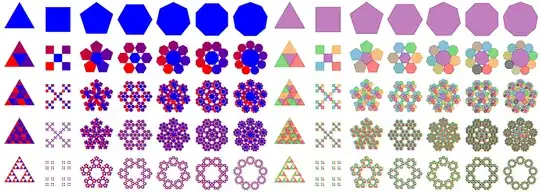
Okay, this is a generalization of my TikZ/PGFKeys answer on the Sierpinski carpet. Instead of doing everything on one path (which allows for shading and clipping across the whole construct) this places a separate path for each thing.
This is also a recursive approach instead of .scoped/.list (which is just an ordinary \foreach I've realized) I'm using a .foreach handler which just loops through the given list and uses each value with the key.
Instead of \pgfkeys{<key>/.foreach={<list>}} we could have written \foreach \item in {<list>}{\pgfkeys{<key>=\item}}.
The first part only defines the algorithm, the looping and the recursion.
For each level a new drawing and shifting distance will be evaluated.
By default, nothing in the first part actually uses those.
It's your job to define /tikz/flakes/stlying and /tikz/flakes/before do in a way that uses the values /tikz/flakes/drawDist and /tikz/flakes/shiftDist.
Since your examples uses polygons, the drawDist is the radius of the circumference (i.e. the distance of each corner from the center). The shiftDist is the distance between the center of level i to the center of level i−1.
The ratio between two drawDists is basically the scale factor for each recursion and needs to configures in the draw to draw key (which will be used by PGFmath down the line).
The function draw to shift is used to evaluate the previous drawDist to the next shiftDist.
For the polygons, I've added a second part that has some math figured out, in this case I'm defining the whole configuration for each polygon:
- the function
draw to draw and draw to shift,
- the needed rotation for the center part and
- the needed shifting function.
Some of these can probably be generalized (think of functions isodd and iseven), maybe even the scaling factor.
Though, I see now that you have examples where the center has a different size than the satellites around it. I don't know how to approach this right now.
Notice however, that before do gets the item number given as #1 (it's also available in /tikz/flakes/item if necessary). So you can make the scaling dependent on #1: If it's 0 then use scaling a, otherwise b.
The value /tikz/flakes/level is counting down (each thing will be drawn at level = 0), the value /tikz/flakes/level' is counting up.
You could just empty the before split style and use those levels and the item number to calculate, well, everything, on-the-fly.
I'm using my ext.pgfkeys-plus library (needs uptodate TikZ and tikz-ext) for a few PGFKeys “goodies”.
I'd recommend externalizing these graphics since this is not an efficient solution (starting with relying on heavy use of PGFKeys).
The size of the flakes are determined by the initial drawDist (here 1), this value is used with the xyz coordinate system and is effected by any scaling but also by the vectors x and y.
I've also added a \flakescreate macro that groups its content and automatically issues start so that all values remain the same afterwards. (The first iteration isn't grouped.)
For applying different colors, I've added a color i where i stands for an integer number between 0 and 7 which apply a draw as well as a fill color:
\tikzset{
  /utils/temp/.style args={#1/#2}{color #1/.style={draw=#2, fill=#2!50}},
  /utils/temp/.list={0/violet, 1/red, 2/orange, 3/green!70!black,
                     4/cyan!70!black, 5/brown!70!black, 6/teal, 7/olive}}
You could almost the same by defining new colors (via \colorlet) where i is part of the name.
As commented, I've added a start item value that determines first item to be done, setting it to start item = 1 skips the center piece. By swapping end item and start item the drawing order can be changed so that the middle piece is placed on top of all the others.
For more complex cases, the value item list can be set manually.
In this latest update, I've added the needed calculations for hexagons, septagons, octogons and nonagons where the last three use a custom and guesstimated scaling factor for the center piece.
Code
\documentclass[tikz]{standalone}
\usepgfkeyslibrary{ext.pgfkeys-plus}
\makeatletter
\pgfqkeys{/handlers}{
  .foreach/.code={\let\pgfkeys@exp@call@\pgfkeys@exp@call
    \foreach\pgf@keys@temp in{#1}{\expandafter\pgfkeys@exp@call@\expandafter{\pgf@keys@temp}}}}
\makeatother
\newcommand*\flakesset{\pgfqkeys{/tikz/flakes}}
\pgfmathdeclarefunction{flakesDTS}{1}{%
  \pgfmathparse{\pgfkeysvalueof{/tikz/flakes/draw to shift/.@cmd}#1\pgfeov}}
\pgfmathdeclarefunction{flakesDTD}{1}{%
  \pgfmathparse{\pgfkeysvalueof{/tikz/flakes/draw to draw/.@cmd}#1\pgfeov}}
\newcommand*\flakescreate[1][]{\begingroup\flakesset{#1,start}\endgroup}
\flakesset{
  .code=\flakesset{#1}, tikz/.code=\tikzset{#1},
  draw to shift/.code={#1/2}, draw to draw/.code ={#1/2},
  drawDist/.initial=1, shiftDist/.initial=1,
  level/.initial=0, level'/.initial=0, item/.initial=0,
  start item/.initial=0, end item/.initial=3,
  item list/.initial={\pgfkeysvalueof{/tikz/flakes/start item},...,\pgfkeysvalueof{/tikz/flakes/end item}},
  start/.style={level'=0, item=0, tikz=flakes/at start/.try, __do=0},
  __do/.style={
    /utils/TeX/ifnum={\pgfkeysvalueof{/tikz/flakes/level}=0}{__place={#1}}{
      level/.--, level'/.++, before split={#1},
      __split/.foreach/.expanded={\pgfkeysvalueof{/tikz/flakes/item list}}}},
  __split/.code={%
    \pgfkeyssetevalue{/tikz/flakes/item}{#1}%
    \tikzset{flakes/before do={#1}}%
    \flakesset{__do={#1}}%
    \tikzset{flakes/after do/.try={#1}}},
  __place/.code={\path[flakes/styling={#1}](0,0)to[flakes/path={#1}](0,0);},
  before split/.style={
    shiftDist/.evaluated=flakesDTS(\pgfkeysvalueof{/tikz/flakes/drawDist}),
    drawDist/.evaluated =flakesDTD(\pgfkeysvalueof{/tikz/flakes/drawDist}),
    level \pgfkeysvalueof{/tikz/flakes/level}/.try={#1},
    level \pgfkeysvalueof{/tikz/flakes/level'}'/.try={#1}}}
\tikzset{
  polygon path/.style 2 args={to path={
      plot[sharp cycle, samples at={1,...,#1}] (\x*360/#1:#2)}},
  polygon path*/.style 2 args={to path={
      plot[sharp cycle, samples at={1,...,#1}] ([shift={(\x*360/#1:{-.5*\pgflinewidth/sin((#1-2)/#1*90)})}]\x*360/#1:#2)}}}
\flakesset{
  poly shift/.style={shift=({#1}:\pgfkeysvalueof{/tikz/flakes/shiftDist})},
  if center/.style 2 args={/utils/TeX/ifnum={\pgfkeysvalueof{/tikz/flakes/item}=0}{#1}{#2}},
  set d2s and d2d/.style={draw to shift/.code={##1-#1}, draw to draw/.code={#1}},
  %
  polygon*/.style={polygon={#1}, path/.append style={polygon path*={#1}{\pgfkeysvalueof{/tikz/flakes/drawDist}}}},
  polygon/.style={
    start item = 0, end item/.pgfmath int = {#1},
    path/.style={polygon path={#1}{\pgfkeysvalueof{/tikz/flakes/drawDist}}},
    polygon calculation #1, at start/.append style={rotate=-90-180/#1},
    /utils/exec=\pgfmathsetmacro\valA{360/(#1)}\pgfmathsetmacro\valB{\valA/2},
    before do/.append style/.expanded={
      flakes/if center={\ifodd#1 rotate=\valB\fi}{flakes/poly shift=\valA*####1}}},
  polygon calculation 3/.style={set d2s and d2d = ##1/2},
  polygon calculation 4/.style={set d2s and d2d = ##1/3},
  polygon calculation 5/.style={set d2s and d2d = 0.3819660112501051*##1},
  polygon calculation 6/.style={set d2s and d2d = ##1/3},
  polygon calculation 7/.style={set d2s and d2d = 0.3079785283699041*##1, before do/.append style={flakes/if center={scale=1.5}{}}},
  polygon calculation 8/.style={set d2s and d2d = 0.2928932188134525*##1, before do/.append style={flakes/if center={scale=1.42}{}}},
  polygon calculation 9/.style={set d2s and d2d = 0.2577728010314408*##1, before do/.append style={flakes/if center={scale=2.07}{}}},
  Sierpinski carpet/.style={
    start item = 0, end item = 8,
    path/.style={to path={
                (-\pgfkeysvalueof{/tikz/flakes/drawDist},-\pgfkeysvalueof{/tikz/flakes/drawDist})
      rectangle ( \pgfkeysvalueof{/tikz/flakes/drawDist}, \pgfkeysvalueof{/tikz/flakes/drawDist})}},
    set d2s and d2d = ##1/3, before do/.append style={flakes/Sierpinski carpet/do ##1}},
  Sierpinski carpet/shift/.style 2 args={shift={(#1*\pgfkeysvalueof{/tikz/flakes/shiftDist},#2*\pgfkeysvalueof{/tikz/flakes/shiftDist})}},
  Sierpinski carpet/do 0/.code=,
  Sierpinski carpet/do 1/.style={flakes/Sierpinski carpet/shift=11},       Sierpinski carpet/do 2/.style={flakes/Sierpinski carpet/shift=01},
  Sierpinski carpet/do 3/.style={flakes/Sierpinski carpet/shift={-1}1},    Sierpinski carpet/do 4/.style={flakes/Sierpinski carpet/shift={-1}0},
  Sierpinski carpet/do 5/.style={flakes/Sierpinski carpet/shift={-1}{-1}}, Sierpinski carpet/do 6/.style={flakes/Sierpinski carpet/shift=0{-1}},
  Sierpinski carpet/do 7/.style={flakes/Sierpinski carpet/shift=1{-1}},    Sierpinski carpet/do 8/.style={flakes/Sierpinski carpet/shift=10},
}
\tikzset{
  /utils/temp/.style args={#1/#2}{color #1/.style={draw=#2, fill=#2!50}},
  /utils/temp/.list={0/violet, 1/red, 2/orange, 3/green!70!black,
                     4/cyan!70!black, 5/brown!70!black, 6/teal,
                     7/olive, 8/black, 9/yellow!50!black}}
\begin{document}
\begin{tikzpicture}[
  row sep=+2mm, column sep=+2mm,
  row 5/.style={flakes={level=3, start item=1}},
  cells={
    /utils/exec={\useasboundingbox (-1,-1) rectangle (1,1);},
    flakes={level/.pgfmath int=\the\pgfmatrixcurrentrow-1,
          polygon/.pgfmath int=\the\pgfmatrixcurrentcolumn+2}}]
\matrix (m1) [flakes/styling/.style={fill/.pgfmath wrap={red!##1!blue}{#1/\pgfkeysvalueof{/tikz/flakes/end item}*100}}]{
  \flakescreate & \flakescreate & \flakescreate & \flakescreate & \flakescreate & \flakescreate & \flakescreate \\
  \flakescreate & \flakescreate & \flakescreate & \flakescreate & \flakescreate & \flakescreate & \flakescreate \\
  \flakescreate & \flakescreate & \flakescreate & \flakescreate & \flakescreate & \flakescreate & \flakescreate \\
  \flakescreate & \flakescreate & \flakescreate & \flakescreate & \flakescreate & \flakescreate & \flakescreate \\
  \flakescreate & \flakescreate & \flakescreate & \flakescreate & \flakescreate & \flakescreate & \flakescreate \\
};
\matrix[flakes/styling/.style={color #1}, matrix anchor=west] at (m1.east){
  \flakescreate & \flakescreate & \flakescreate & \flakescreate & \flakescreate & \flakescreate & \flakescreate \\
  \flakescreate & \flakescreate & \flakescreate & \flakescreate & \flakescreate & \flakescreate & \flakescreate \\
  \flakescreate & \flakescreate & \flakescreate & \flakescreate & \flakescreate & \flakescreate & \flakescreate \\
  \flakescreate & \flakescreate & \flakescreate & \flakescreate & \flakescreate & \flakescreate & \flakescreate \\
  \flakescreate & \flakescreate & \flakescreate & \flakescreate & \flakescreate & \flakescreate & \flakescreate \\
};
\end{tikzpicture}
\tikz[x=+2cm, y=+2cm, flakes/styling/.style={color #1, draw=none}, row sep=+2mm, column sep=+2mm]\matrix{
  \flakescreate[Sierpinski carpet, level = 3] &
  \flakescreate[Sierpinski carpet, level = 3, start item = 1] &
  \flakescreate[Sierpinski carpet, level = 3, start item = 1, styling/.style={draw=black, fill=gray}] \\
  \flakescreate[level = 3, level 1/.append style={styling/.style=color #1}, polygon = 5] &
  \flakescreate[styling/.append style={draw, ultra thick, line join=round}, level = 1, polygon  = 3, start item = 3, end item = 0] &
  \flakescreate[styling/.append style={draw, ultra thick}, level = 1, polygon* = 3]
  \\};
\end{document}
Output