0

I created a table for some characteristic quantities.

\begin{table}[ht]
\centering
\caption{Characteristic values}
\begin{tabular}[t]{lcc}
\toprule
&Values\\
\midrule
EntryA&$A \sim 10$\\
EntryB&$B \sim 15$\\
Entry C, a lot of text\\Second line of text &$C \sim 19$\\
EntryD&$D \sim 10$\\
\bottomrule
\end{tabular}
\end{table}%

How can I manually increase the width of the left column as well as the space between each row? Secondly, It is possible to omit the top line?

Thanks!

EDIT

\begin{table}[ht]
\centering
\caption{Characteristic values}
\begin{tabular}[t]{lc}
\midrule
EntryA&$A \sim \num{10}$\\
EntryB&$B \sim \num{15}$\\
Entry C, a lot of text\\Second line of text &$C \sim \num{19}$\\
EntryD&$D \sim \num{10}$\\
\bottomrule
\end{tabular}
\end{table}%
Sylvia
  • 485
  • 7
  • 1
    By how much should the width of the first column be increased? About your second question: Is something stopping you from deleting the \toprule instruction? And, why do you specify the table to have three columns ("lcc") when there are only two columns to typeset? – Mico Nov 08 '23 at 17:54
  • Thanks a lot, it is the first table I create. I don't know - the longest line consists of 60 characters. The entries are too close to each other. Which commands could I try? – Sylvia Nov 08 '23 at 18:06

2 Answers2

1

I suggest you switch from a tabular to a tabularx environment, set the table's target width to, say, 0.6\textwidth, and change the column type of the left-hand column from l to X. If 0.6\textwidth is still too narrow for your taste, feel free to choose a larger target width (but, naturally, no more than 1\textwidth).

If you don't want to print the line generated by \toprule, then just delete that instruction (or, if you prefer, comment it out).

The framelines at the edges of the following image are drawn because the showframe package is loaded. Don't load this package in your real document.

If you want to increase the default spacing between rows, you issue an instruction such as \renewcommand\arraystretch{1.5}. (The default value of this parameter is 1.)
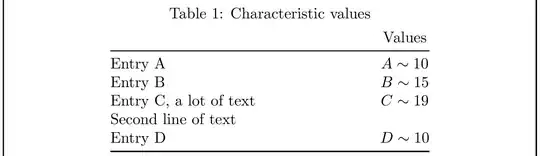
enter image description here

A final comment: If you want the second and further lines of a cell to have hanging indentation, just change X to >{\hangafter=1\hangindent=1em}X. (If you don't know what the preceding sentence means, just ignore it.)

\documentclass{article} % or some other suitable document class
\usepackage{booktabs} % for well-spaced horizontal rules
\usepackage{tabularx} % for 'tabularx' env. and 'X' column type
\usepackage{showframe} % draw framelines around text block (omit in real doc.)

\begin{document}

\begin{table}[ht] \centering \caption{Characteristic values}

\medskip %insert some vertical whitespace \begin{tabularx}{0.6\textwidth}{@{} X c @{}} %%\toprule % <-- comment out (or just delete) & Values \ \midrule Entry A & $A \sim 10$ \ Entry B & $B \sim 15$ \ Entry C, a lot of text \newline Second line of text & $C \sim 19$ \ Entry D & $D \sim 10$ \ \bottomrule \end{tabularx} \end{table}

\end{document}

Mico
  • 506,678
1

Your table can be written as tblr (defined in tabularray package) table:

\documentclass{article}     
\usepackage{tabularray} 
\UseTblrLibrary{booktabs}

\usepackage[skip=1ex, font=small]{caption}

\begin{document} \begin{table}[ht] \centering \caption{Characteristic values} \label{tab:?} \begin{tblr}{width = 0.5\textwidth, colspec = {X[l] Q[c, mode=math]}, row{1} = {mode=text} } \toprule % <-- comment out (or just delete), if you not like to have & Values \ \midrule Entry A & A \sim 10 \ Entry B & B \sim 15 \ {Entry C,\ which has text in two or more lines} & C \sim 19 \ Entry D & D \sim 10 \ \bottomrule \end{tblr} \end{table} \end{document}

enter image description here

Zarko
  • 296,517