How can I center a TikZ node exactly between two others?
Hypothetically,
\node (a) {a}
\node (c) [right of=c] {c}
\node (b) [between={a,c}] {b}
How can I center a TikZ node exactly between two others?
Hypothetically,
\node (a) {a}
\node (c) [right of=c] {c}
\node (b) [between={a,c}] {b}

My suggestion is to use the calc library (see the pgfmanual 13.5 Coordinate Calculations - version October 25, 2010).
An example:
\documentclass{article}
\usepackage{tikz}
\usetikzlibrary{calc}

\begin{document}
\scalebox{4}{
\begin{tikzpicture}[text height=2ex]
\node (a) {a};
\node (c) [right of=a] {c};
\node (b) at ($(a)!0.5!(c)$) {b};
\end{tikzpicture}
}
\end{document}
The result:

Notice that the syntax you used is wrong: each node should end with ; and the node c can not be positioned at its right.
Notice that without specifying the text height, the nodes are not vertically aligned:
\documentclass{article}
\usepackage{tikz}
\usetikzlibrary{calc}

\begin{document}
\scalebox{4}{
\begin{tikzpicture}
\node (a) {a};
\node (c) [right of=a] {c};
\node (b) at ($(a)!0.5!(c)$) {b};
\end{tikzpicture}
}
\end{document}
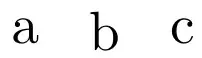
See as reference Problem with TikZ and vertical alignment of text inside nodes.
The calc library, however, is not the only way to proceed. In his comment percusse suggested another approach:
\documentclass{article}
\usepackage{tikz}

\begin{document}
\scalebox{4}{
\begin{tikzpicture}[text height=2ex]
\node (a) {a};
\node (c) [right of=a] {c};
\path (a) -- (c) node[midway] (b) {b};
\end{tikzpicture}
}
\end{document}
and I see even one more (ok, is not so convenient, but I report it for the sake of completness). Suppose you are using the positioning library and nodes are placed on grid; then for sure the node distance is set in some way so one could go as follows:
\documentclass{article}
\usepackage{tikz}
\usetikzlibrary{positioning}
\pgfmathtruncatemacro\distance{1}

\begin{document}
\scalebox{4}{
\begin{tikzpicture}[text height=2ex, on grid]
\node (a) {a};
\node (c) [right=\distance cm of a] {c};
\node (b) [right=0.5\distance cm of a]{b};
\end{tikzpicture}
}
\end{document}
Both approaches lead to the result shown in the first example picture.
In addition to @Claudio's detailed answer here's a more concise solution which also aligns the nodes with respect to the text's baseline without requiring an explicit specification of the text height.
The following does not require calc and only requires positioning because of the use of base right which is included to be faithful to the example in the question. Otherwise, absolute positioning (i.e. with at) would work as expected.
\begin{tikzpicture}[anchor=base]
    \node (a) {a};
    \node (c) [base right=of a] {c};
    \path (a.base) -- node (b) {b} (c.base);
\end{tikzpicture}
Setting the anchor to base globally makes the code more concise but you can apply it to each node individually.
The third line creates the node (b) midway the line connecting the baselines of the other two nodes.
Also note that the key right of is deprecated in favour of right=of ... (see this answer).
between keyHere's a way to actually provide the syntax proposed in the question.
\tikzset{
    between/.style args={#1 and #2}{
         at = ($(#1)!0.5!(#2)$)
    }
}
Then you can write something like \node[between=a and c] (b) {b};.
Again, if you want the baseline alignment you have to write between=a.base and c.base or write an abbreviation as
\tikzset{
    between base/.style args={#1 and #2}{
        between=#1.base and #2.base
    }
}
so you can just write between base=a and c.
This however requires the calc library.


\path (a) -- (c) node[midway] (b) {b};to the list. – percusse Sep 15 '12 at 11:04anchor=base. – Bordaigorl Oct 14 '13 at 12:46\begin{tikzpicture} \node[anchor=base] (a) {a}; \node[anchor=base] (c) [right of=a] {c}; \node[anchor=base] (b) at ($(a)!0.5!(c)$) {b}; \end{tikzpicture}won't vertically align a, b and c. Anyway, feel free to edit the answer with your example. :) – Claudio Fiandrino Oct 14 '13 at 13:05\node[anchor=base] (a) {at}; \node[anchor=base] (c) [base right=of a] {cg}; \node[anchor=base] (b) at ($(a.base)!0.5!(c.base)$) {b}; \draw (a.base) -- (c.base);would do. Similarly you can use a\path (a.base) -- (c.base) node[midway] (b) {b}. Shall I edit the answer? Post another? – Bordaigorl Oct 14 '13 at 15:18betweenkey. If you know better solutions, comments are welcome! – Bordaigorl Oct 14 '13 at 17:30betweenkey :) – Claudio Fiandrino Oct 14 '13 at 19:28.5*\distancein the last example. Otherwise you produce.51cminstead of.5*1cm. (Just use2as distance.) Instead of having three examples each with one solution, why don’t you add one example with all solutions, also showing the difference between them. (The one at the path places the new nodes between the borders of the other nodes (as long as you don’t specify an anchor or use a coordinate anyway), here betweena.eastandc.west, whilecalc’s syntax (again without anchors) places the new node between the centers.) – Qrrbrbirlbel Oct 15 '13 at 02:10barycentric cswhich you can use to place a node “between” more than two nodes (it works for two, too).calc’s not even needed.:)– Qrrbrbirlbel Oct 15 '13 at 02:17bbetween text in nodesaandc, the anchorseastandwestare very helpful. – Chris Chudzicki Aug 02 '14 at 17:27drawoption to the nodes in the example where they're not aligned. You will discover that they have different heights. Hence, under such an hypothesis, it is not guarantee that the positioning via.eastand.westanchors really achieves vertical alignment. – Claudio Fiandrino Aug 03 '14 at 07:45(a)has text {A} and node(c)has much wider text, e.g.,{cccc}. In such a case you probably don't want the horizontal centering to be with respect to the center ofAand the center ofcccc, but rather with the right edge and left edge, respectively. I used this method yesterday and it worked very well (and I did vertical centering with\strut). – Chris Chudzicki Aug 03 '14 at 10:30