50

If you're using beamer you can do some nice text boxes using:

\begin{block}{block title}content of block\end{block}

Which gives a text box something like this (the box with the header Esimerkki):

enter image description here

How can I do the same thing in a regular latex document (I really like the look of the beamer text boxes and would like as close to this as possible).

Minimal reproducible example:

\documentclass{scrartcl}
\begin{document}
I wish I were inside of a really super cool text box so all the word would stop and look at me and say wow that text is pretty.  But alas I am just ordinary \LaTeX{} text.  I am sad.
\end{document} 
Tyler Rinker
  • 1,093
  • 4
  • 13
  • 25

2 Answers2

72

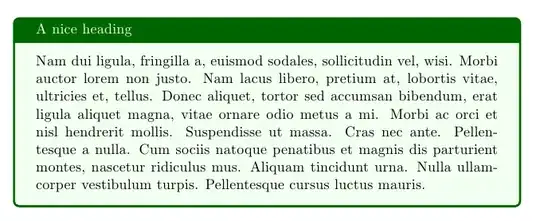
Try the tcolorbox package. A little example

\documentclass{article}
\usepackage{tcolorbox}
\usepackage{lipsum}

\begin{document}

\begin{tcolorbox}[colback=green!5,colframe=green!40!black,title=A nice heading]
\lipsum[2]
\end{tcolorbox}

\end{document}

enter image description here

The mdframed package can also be an option:

\documentclass{article}
\usepackage{xcolor}
\usepackage[framemethod=tikz]{mdframed}
\usepackage{lipsum}

\mdfdefinestyle{mystyle}{%
linecolor=green!40!black,outerlinewidth=1pt,%
frametitlerule=true,frametitlefont=\sffamily\bfseries\color{white},%
frametitlerulewidth=1pt,frametitlerulecolor=green!40!black,%
frametitlebackgroundcolor=green!40!black,
backgroundcolor=green!5,
innertopmargin=\topskip,
roundcorner=5pt
}
\newmdenv[style=mystyle]{exa}
\newenvironment{example}[1]
  {\begin{exa}[frametitle=#1]}
  {\end{exa}}

\begin{document}

\begin{example}{The Title}
\lipsum[1]
\end{example}

\end{document}

enter image description here

Gonzalo Medina
  • 505,128
6

For the record, there is also the bclogo package. Can use PsTricks or Tikz as graphics engine. It has nice features, but unfortunatly, documentation is in french only. See code example and ouput below. (sorry for the poor colors choice, I am not good at that!)

enter image description here

\documentclass{article}
\usepackage{lipsum}

\usepackage[tikz]{bclogo}
\presetkeys{bclogo}{
ombre=true,
epBord=3,
couleur = blue!15!white,
couleurBord = red,
arrondi = 0.2,
logo=\bctrombone
}{}
\begin{document}

\begin{bclogo}{The title}
\lipsum[1]
\end{bclogo}

\end{document}
kebs
  • 859