After learning bits and pieces of Maya, 3DS Max, IMAGINE and XSI I noticed that they all have Y-up worlds with Z being used for depth (naturally).
is there a way to make Blender a Y-up world? and does anyone know why isnt it Y-up in the first place?
After learning bits and pieces of Maya, 3DS Max, IMAGINE and XSI I noticed that they all have Y-up worlds with Z being used for depth (naturally).
is there a way to make Blender a Y-up world? and does anyone know why isnt it Y-up in the first place?
As far as I know, cannot be changed. .
Blender uses the right hand coordinate system with the Z axis pointing upwards. This is common with the coordinate systems used by most common 3D CAD packages and 3Ds max:

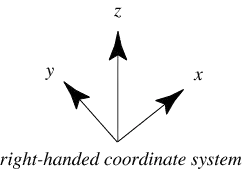
Another reasoning for this is that a common convention for real world applications for engineering and science is that X and Y axes define a flat ground plane while the Z axis defines up and down
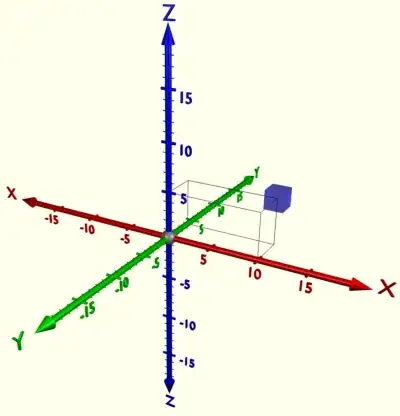
However, if you work between these software that you mention above, one way you could maintain consistency is to export the object(s) as a .obj or .fbx (or any other similar format, most if not all exporters in Blender have this option) to the other application with the 'up' axis being Y etc.
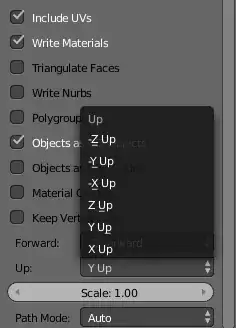
It's obviously not perfect, but here are a few things that will make Blender "act" like Y is up.
Navigation
You could change all the shortcut keys so that Y was sort of the top.
Gravity
Change Gravity to Y direction:
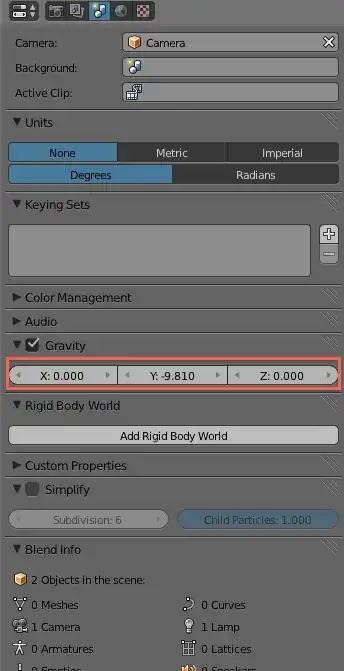
Grid
Finally, remove the grid floor and only show the x and z axis when rotating the view.


Blender is based on Cartesian right handed system, which is Z-up. From what I've read it's not possible to change that since it's pretty much hardcoded among Blender's various features, but I may be wrong.

You may "correct" the vision (on your screen) by rotating the camera, but the more important thing is the calculation of transformations and rotation in particular. They all use coordinate system as Z -up. For example for rotation it uses XYZ as default. I am not sure if you can use XZY and watch your transformations accordingly.
Yes there are Y-up systems, but they are more related to computer graphics histoy rather than maths. When there was only 2D on computer screens, X was the horizontal, and Y was the UP axis. When the third D was added, computer people chose to continue with this and added Z forward, off the screen. But they use their transformation matrices accordingly.


