40

I have a complex mesh with only vertices and edges that I want to solidify.

The problem is I just want to solidify edges (not any faces) to have some kind of fat wireframe model (i.e. just every edges being cylinders). Not a classic solidify.

How can I achieve that?

Here is my mesh: Solidify Edges

Binary Brain
  • 503
  • 1
  • 4
  • 11

4 Answers4

40

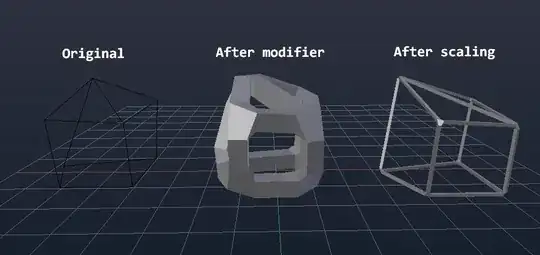
You could use the Skin Modifier. After adding it to the object, it might appear fat and blobby, so to adjust the thickness you can Tab into Edit mode and use CtrlA to affect the thickness.

enter image description here

Another way is to just fill in the faces of your model and make use of the Wireframe modifier.

iKlsR
  • 43,379
  • 12
  • 156
  • 189
  • How do you add a skin modifier in Blender 2.8? Both of the links you posted are dead. – Aaron Franke Jan 12 '20 at 06:25
  • @AaronFranke updated the link. See https://docs.blender.org/manual/en/latest/modeling/modifiers/introduction.html – iKlsR Jan 12 '20 at 23:28
  • 1
    I tried the skin modifier to an object with only 448 edges (64 selected), but the Ctrl+A scaling was unusably slow. Can't I type a value instead of dragging the mouse to set the thickness? – Damn Vegetables Jan 20 '20 at 23:58
29

Beveling a Curve

Another way you can achieve your goal is to convert your Mesh composed of edges and vetices into a Curve. Then you could add a Bevel to the Curve and have your result. Here are the steps:

  1. Select your wireframe mesh
  2. Convert the mesh to a curve by either of these methods:

    • ALTC -> Curve from Mesh/Text
    • 3D Viewport Header -> Object -> Convert To -> Curve from Mesh/Text

    enter image description here

  3. Next, since you said you want to have every edge be a cylinder, you should Add a circle curve: SHIFTA -> Curve -> Circle

    enter image description here

  4. Now select your wireframe and in the Object Properties window, click on the Curve tab, scroll down to the Geometry section and set Bevel Object to the circle you added in step 3 -- this circle will then define the shape of the edges:

    enter image description here

  5. Now adjust the size of the circle curve so your mesh looks the way you want it to:

    enter image description here

Thom Blair III
  • 16,535
  • 20
  • 75
  • 112
4

Blender 2.9

In Blender 2.9+ (presumably already since 2.8) it works similar as described in Thom Blair III's answer, except that the extra step of adding a cicular curve is no longer necessary. A tube radius for the convered Curve can now be added directly in the Curve Tab under Geometry > Bevel > Depth. Works pretty well and fast.

0

You can also automate @thom-blair-iii's answer using Geometry Nodes :

  1. mesh to curve
  2. curve to mesh + profile curve to give it a thickness.

https://blender.stackexchange.com/a/249070/14306

gordie
  • 2,510
  • 3
  • 25
  • 47