4

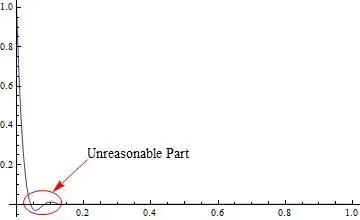
Here I use a one-dimensional heat conduction equation as the example. I found that when the thermal diffusion coefficient is small enough, Mathematica will give a result against the second law of thermodynamics:

fun[k_] := (a = NDSolve[{D[tes[t, x], t] == k D[tes[t, x], x, x], 
                tes[t, 0] == t, tes[t, 1] == 0, tes[0, x] == 0}, 
               {tes[t, x]}, {t, 0, 1}, {x, 0, 1}]; 
      Plot[(tes[t, x] /. a) /. t -> 1, {x, 0, 1}, PlotRange -> All]);
fun[1]
fun[10^-3]
fun[10^-6]

Here's the result:

Graph 1

Graph 1

Graph 2

Graph 2

Graph 3

Graph 3

The circled part in Graph 3 is the crux: this wave is unreasonable in the view of physics. So, how to avoid this if I have to use this kind of parameters?

xzczd
  • 65,995
  • 9
  • 163
  • 468

2 Answers2

10

It looks you need to use other NDSolve options to control the spatial grid size to help NDSolve a little.

Trying things, found that by increasing the grid size, now this effect you showed goes away.

Grid size needs to be much smaller when the diffusion coefficient is very small since you are effectively in $\lim{k \to 0}$ now solving $\frac{\partial u}{\partial t} = k \left( \frac{\partial^2 u}{\partial x^2} \right)$ as $ \frac{\partial u(x,t)}{\partial t}=0$.

Using NDSolve with "MethodOfLines" options and increasing the "MaxPoints" helped get rid of this problem. There might be other and better options to try.

This function below takes the number of spatial grid points you want to use. The smaller $k$ is, the larger the number of grid points need to be (i.e smaller grid size) to get rid of that kink near the left boundary you had.

 Manipulate[
 fun[k, lim, grid],
 {{k, 1, "k"}, 0.000001, 1, 0.000001, Appearance -> "Labeled"},
 {{grid, 39, "grid points"}, 39, 999, 2, Appearance -> "Labeled"},
 {{lim, 1, "plot x limit"}, 0.01, 1, 0.01, Appearance -> "Labeled"},

 SynchronousUpdating -> False,
 ContinuousAction -> False,
 SynchronousInitialization -> True,
 Initialization :>
  {
   fun[k_, lim_, nPoints_] := Module[{u, t, x, sol, ic, bc},
     bc = {u[t, 0] == t, u[t, 1] == 0};
     ic = u[0, x] == 0;

     sol = 
      First@NDSolve[
        Flatten[{D[u[t, x], t] == k D[u[t, x], x, x], ic, bc}],
        {u[t, x]}, {t, 0, 1}, {x, 0, lim},
        Method -> {"MethodOfLines",              
          "SpatialDiscretization" -> {"TensorProductGrid", 
            "MaxPoints" -> nPoints, "MinPoints" -> nPoints},
          Method -> "Adams"}, MaxSteps -> Infinity];

     Plot[(u[t, x] /. sol) /. t -> 1, {x, 0, lim},
      PlotRange -> All, ImageSize -> 300, Frame -> True, 
      ImageMargins -> {{30, 10}, {20, 20}}]
     ]
   }
 ]

which gives

enter image description here

enter image description here

Nasser
  • 143,286
  • 11
  • 154
  • 359
  • It is interesting though that mathematica produces happily such a wrong solution. – chris Aug 30 '12 at 08:57
  • @NasserM.Abbasi I tried to take off the Module in the code and nothing seems to be changed, is it unnecessary? – xzczd Aug 30 '12 at 15:54
  • @ruebenko Oh, you remind me, the k in the equation should not be called coefficient of thermal conductivity, its name is actually thermal diffusion coefficient, let me correct it. – xzczd Aug 30 '12 at 16:03
  • It seems that Nasser didn't notice my comment…well, it doesn't matter! so, this question and this question are solved, great! – xzczd Sep 03 '12 at 03:09
  • 2
    @xzczd: It might be of interest that while the effect is described and solved correctly with the above solution/comments the error is actually too small to be visually resolved in such a plot: If you evaluate the function just on the gridpoints where the solution was calculated, the minimal value is in the order of -10^-5 which I think is within the limits of accuracy you can expect. What you do see is supposedly another error from creating an interpolating function from the discrete solution. I don't know how the interpolating function with order 3 is generated from the discrete result... – Albert Retey Sep 03 '12 at 12:45
  • 2
    ... but it looks to me as the interpolation doesn't make use of the (correct?) discrete spatial derivatives which were used to calculate the solution. You should also note that even the solutions with much larger grids might have tiny negative values for tes at certain points -- but that's the price of doing numerics. If crossing such "physical" limits will cause problems in your equations you might have to take special care as you often can't guarantee it won't happen when using a numerical algorithm... – Albert Retey Sep 03 '12 at 12:55
  • @AlbertRetey So the crux is that something is wrong with the generation of the interpolating function? OK, this gives me some inspiration, by the way, this question combined with this question really inspire me a lot: the effect of numeric error in some case may be much greater than I expect, perhaps I will raise other questions about it if I succeed in making related toy code later… – xzczd Sep 07 '12 at 04:49
  • @xzczd: please see my answer for more details... – Albert Retey Sep 07 '12 at 10:38
3

This is not meant to be an alternative answer but rather a reminder about another potential source of such overshootings: as mentioned in my comment I believe that the interpolating function with order 3 that is created from the numerical solution calculated at the gridpoints is a potential source of such overshootings. It looks to me that much of the "wrong" behaviour that can be seen in the plot doesn't come from an error or inaccuracy from NDSolve but is just an artifact of the interpolation. As I have no insight in the code that does the interpolation and no time for a deep investigation that's just a guess. But I would strongly recomment to keep this in mind as a potential source of such errors when trying to understand results you get from NDSolve. I usually start with extracting the values at the gridpoints in such cases, e.g. as shown here:

With[{k = 10^-6},
  res = tes /. NDSolve[{
       D[tes[t, x], t] == k D[tes[t, x], x, x],
       tes[t, 0] == t,
       tes[t, 1] == 0,
       tes[0, x] == 0
       },
      {tes}, {t, 0, 1}, {x, 0, 1}
      ][[1]]
  ];

Show[
 Plot[res[1, x], {x, 0, 1}, Frame -> True, PlotRange -> All], 
 ListPlot[{#, res[1, #]} & /@ (res@"Coordinates")[[2]], 
  PlotRange -> All, Frame -> True, Mesh -> True, PlotStyle -> Red]
 ]

Mathematica graphics

It might also be instructive to look at explicit values on the gridpoints, e.g.:

Min[res[1, #] & /@ (res@"Coordinates")[[2]]]

(*
==> -0.0000239294
*)

I've seen a comment of ruebenko and think he might be able to share some insight about whether my guess is reasonable or completely off, so I hope he is following this and will make a comment...

Albert Retey
  • 23,585
  • 60
  • 104