8

Is it possible to find or construct a RegionPlot out of KnotData? My motivation is to Texture the knots as per here.

After much searching and playing around, I found this, which frustratingly doesn't give the equations for the inTinftube and onTinftube functions.

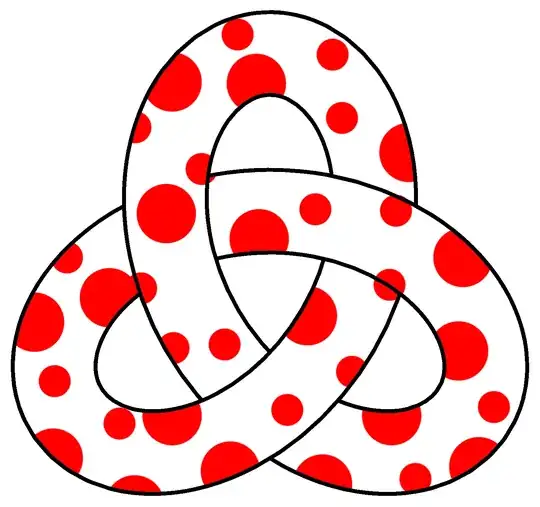
Desired output is something like this (but in 3D):

J. M.'s missing motivation
  • 124,525
  • 11
  • 401
  • 574
martin
  • 8,678
  • 4
  • 23
  • 70

4 Answers4

9

Edit

n = 15;
vor = VoronoiMesh[
   RandomPoint[Rectangle[{0, 0}, {2 π, 2 π}], 
    n], {{0, 2 π}, {0, 2 π}}];
polys = MeshPrimitives[vor, 2];
g = Show[Table[{Red, 
      Disk[x /. Last[#], Abs@First[#]] &@
       NMinimize[SignedRegionDistance[poly][x], 
        x ∈ poly]}, {poly, polys}] // Graphics];
curve3 = KnotData["Trefoil", "SpaceCurve"];
basis = Last[FrenetSerretSystem[curve3[t], t]];
{tangent, normal, binormal} = basis;
ParametricPlot3D[
 curve3[t] + .6 (Cos[u]*normal + Sin[u]*binormal), {u, 0, 
  2 π}, {t, 0, 2 π}, PlotPoints -> 80, Mesh -> None, 
 Boxed -> False, Axes -> False, PlotStyle -> Texture[g], 
 TextureCoordinateScaling -> True, 
 TextureCoordinateFunction -> Function[{x, y, z, u, t}, {u, 9 t}], 
 ViewPoint -> {0.2, -0.3, 3.3}]

enter image description here

Original

A starting point.

curve3 = KnotData["Trefoil", "SpaceCurve"];
basis = Last[FrenetSerretSystem[curve3[t], t]];
{tangent, normal, binormal} = basis;
g = Graphics[{Red, Disk[{0, 0}, .5]}, PlotRangePadding -> .5];
ParametricPlot3D[
 curve3[t] + .6 (Cos[u]*normal + Sin[u]*binormal), {u, 0, 
  2 π}, {t, 0, 2 π}, PlotPoints -> 80, Mesh -> None, 
 Boxed -> False, Axes -> False, PlotStyle -> Texture[g], 
 TextureCoordinateScaling -> False, 
 TextureCoordinateFunction -> Function[{x, y, z, t, u}, {x, y}], 
 ViewPoint -> {0.2, -0.3, 3.3}]

enter image description here

cvgmt
  • 72,231
  • 4
  • 75
  • 133
8

You can feed the BoundaryMeshRegion[] you can obtain from KnotData[] into RegionPlot3D[]. For example:

trefBMR = KnotData["Trefoil", "BoundaryMeshRegion"];
RegionPlot3D[RegionMember[trefBMR, {x, y, z}],
             {x, -7/2, 7/2}, {y, -7/2, 7/2}, {z, -3/2, 3/2},
             BoxRatios -> Automatic, Lighting -> "Neutral",
             Mesh -> None, PlotPoints -> 35, 
             PlotStyle -> Directive[Texture[ExampleData[{"ColorTexture",
                                                         "WhiteMarble"}]]]]

marbled knot

J. M.'s missing motivation
  • 124,525
  • 11
  • 401
  • 574
7

enter image description here

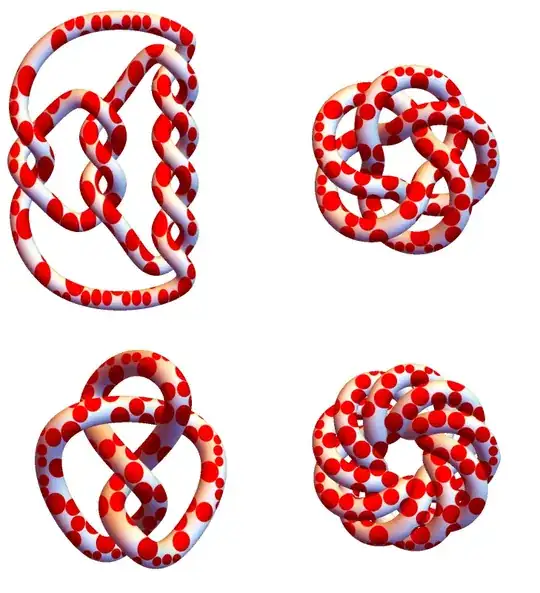
Multicolumn[Graphics3D[{SurfaceAppearance["TextureShading", Texture[disks]], 
     Tube[BSplineCurve[KnotData[#, "SpaceCurve"] /@ Subdivide[0, 2 Pi, 100], 
       SplineClosed -> True], .4]}, 
    Boxed -> False, ImageSize -> Medium, ViewPoint -> {0, 0, 5}] & /@ 
 {{"PretzelKnot", {5, 3, 2}}, "FigureEight",
  {"TorusKnot", {3, 5}}, {"TorusKnot", {4, 9}}}, 2] 

Update: In versions 12.1+, we can use the directive SurfaceAppearance["TextureShading", Texture[img]] to texturize any surface with img:

reg = TriangulateMesh[BoundaryDiscretizeRegion[Rectangle[]], MaxCellMeasure -> .02];

disks = Graphics[{Red, MeshPrimitives[reg, 2] /. Polygon -> (Apply[Disk] @* Insphere)}];

Graphics3D[{SurfaceAppearance["TextureShading", Texture[disks]], KnotData["Trefoil", "ImageData"]}, Boxed -> False, ImageSize -> Large]

enter image description here

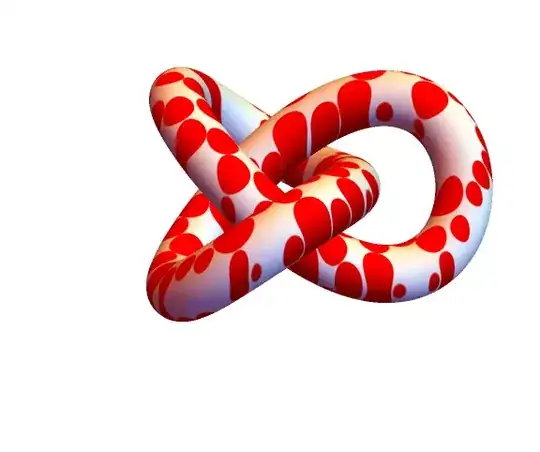
We can construct a Tube with the desired radius using KnotData["Trefoil", "SpaceCurve"]:

Graphics3D[{SurfaceAppearance["TextureShading", Texture[disks]], 
  Tube[BSplineCurve[KnotData["Trefoil", "SpaceCurve"] /@ Subdivide[0, 2 Pi, 100], 
    SplineClosed -> True], .5]}, 
 Boxed -> False, ImageSize -> Large] 
enter image description here

Alternatively, we can use SurfaceAppearance["TextureShading", Texture[disks]] as the setting for PlotStyle in ParametricPlot3D in cvgmt's answer:

ParametricPlot3D[curve3[t] + .6 (Cos[u] normal + Sin[u] binormal), 
 {u, 0, 2 π}, {t, 0, 2 π}, PlotPoints -> 80, Mesh -> None, 
 Boxed -> False, Axes -> False, 
 PlotStyle -> SurfaceAppearance["TextureShading", Texture[disks]], 
 ViewPoint -> {0.2, -0.3, 3.3}, Lighting->"Neutral"]

enter image description here

Original answer:

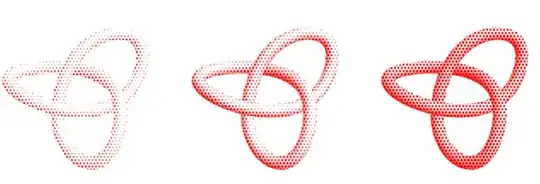
We can use the new-in-12.1 directive HalfToneShading:

Graphics3D[{HalftoneShading[#, Red], KnotData["Trefoil", "ImageData"]}, 
 Lighting -> "Neutral", ImageSize -> 250, Boxed -> False, 
    ViewPoint -> {1.5, -1.5, 4.}] & /@ {.3, .5, .7} // Row 
enter image description here

Needless to say, this approach is not match for cvgmt's approach in terms of flexibility and beauty of the pictures produced.

To get some flexibility in controlling the density of shapes, we can use the options of SurfaceAppearance to define a directive with options:

Options[surfaceAppearance] = {"StepCount" -> 1, "Tiling" -> {5, 5}, 
   "FeatureColor" -> Red, "UseScreenSpace" -> 0, "IsTwoTone" -> 1, 
   "LuminanceModifier" -> 0.0, "Shape" -> "Disk"};

surfaceAppearance[opts : OptionsPattern[surfaceAppearance]] := SurfaceAppearance["RampShading", Sequence @@ FilterRules[{opts, Options[surfaceAppearance]}, Except["Shape"]], "Arguments" -> {"HalftoneShading", 0.5, Red, OptionValue["Shape"]}, EdgeForm[], Texture["HalftoneShading" <> OptionValue["Shape"]]]

Examples:

Graphics3D[{surfaceAppearance[], KnotData["Trefoil", "ImageData"]},
  Lighting -> "Accent", Boxed -> False, ViewPoint -> {1.5, -1.5, 4.}]

enter image description here

Use surfaceAppearance["Tiling" -> {15, 15}] to get:

enter image description here

Use surfaceAppearance["UseScreenSpace" -> 1, "StepCount" -> 2, "Tiling" -> {7, 7}] to get:

enter image description here

Use surfaceAppearance["Tiling" -> {15, 15}, "Shape"->"Triangle"] to get:
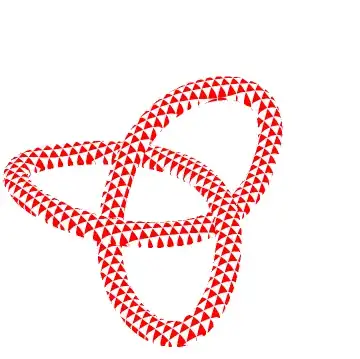
enter image description here

Use surfaceAppearance["StepCount" -> 3,"Tiling" -> {10,10},"Shape" -> "Hexagon"] to get:

enter image description here

kglr
  • 394,356
  • 18
  • 477
  • 896
5
SliceContourPlot3D[Sin[5 x] Sin[6 y] Sin[4 z], 
 KnotData["Trefoil", "Region"],
 {x, -Pi, Pi}, {y, -Pi, Pi}, {z, -Pi, Pi}, 
 Contours -> {-1/6, 1/6}, ContourStyle -> None, 
 ContourShading -> {White, Red}, 
 Boxed -> False, ImageSize -> Large, Axes -> False, PlotPoints -> 90]

enter image description here

kglr
  • 394,356
  • 18
  • 477
  • 896