14

Bug introduced in 10.0.0 and fixed in 10.0.1


The Plot option GridLines can be specified either as a list of explicit values at which to draw the lines, or as a function that calculates the grid lines based on the maximum and minimum values along each axis. In Mathematica version 8, I was able to specify this function for GridLines in two equivalent ways:

Clear[gridLineFunction];
gridLineFunction[xmin_, xmax_] := {.1, .2, .5};

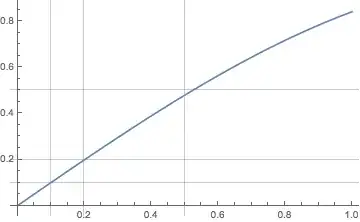
Plot[Sin[x], {x, 0, 1}, GridLines -> gridLineFunction]

lines

This follows the example in the documentation, but for simplicity it returns a fixed list of numbers without doing any calculations at all. However, now I rewrite the above by passing it directly to GridLines as a Function:

Plot[Sin[x], {x, 0, 1}, 
 GridLines -> Function[{xmin, xmax}, {.1, .2, .5}]]

no lines

This last line is what I get in version 10 on OS X. It used to work in version 8. And the equivalent construct still works for the Ticks option:

Plot[Sin[x], {x, 0, 1}, Ticks -> Function[{xmin, xmax}, {.1, .2, .5}]]

ticks

Is there any reason I'm overlooking why this Function approach no longer works in GridLines, or is this a bug?

Mr.Wizard
  • 271,378
  • 34
  • 587
  • 1,371
Jens
  • 97,245
  • 7
  • 213
  • 499

1 Answers1

6

In the meantime, here is a way to repair the gridlines

fixGridLines[plot : _Graphics | _Legended] :=
  Module[{xmin, xmax, ymin, ymax},
   {{xmin, xmax}, {ymin, ymax}} = 
    Through[{Min, Max}[#]] & /@ 
     Transpose@Cases[plot, {_Real, _Real}, Infinity];
   With[{p = plot}, MakeBoxes[p, StandardForm]] /. 
    pat : (GridLines -> {Charting`ScaledTickValues[_, xf_[_]] &, 
         Charting`ScaledTickValues[_, yf_[_]] &}) :> 
     GridLines -> {xf[xmin, xmax], yf[ymin, ymax]}
   ] // ToExpression

Example:

plot = Plot[Sin[x], {x, 0, 1}, 
   GridLines -> Function[{xmin, xmax}, {.1, .2, .5}]];
fixGridLines[plot]

Mathematica graphics

You can examine the box form of the plot to see where the GridLines functions got stored.


Edit: Other ways to get the plot range.

This includes PlotRangePadding in the computation (might be best of all):

{{xmin, xmax}, {ymin, ymax}} = 
  Charting`get2DPlotRange[Replace[plot, p_Legended :> First@p]];

This does not include PlotRangePadding:

{{xmin, xmax}, {ymin, ymax}} = With[{p = plot},
   PlotRange /. Cases[MakeBoxes[p, StandardForm], pat : (PlotRange -> _), Infinity]
   ]
Michael E2
  • 235,386
  • 17
  • 334
  • 747
  • Yes, this is a work-around. I would just include Legended as an allowed Head for the plot argument, because otherwise it won't work with the PlotLegends options. – Jens Aug 06 '14 at 21:00
  • 1
    @Jens Thanks for the tip. Legended now included. – Michael E2 Aug 06 '14 at 22:32
  • I accepted this because that's probably the best we can do - after all, it's still a bug... but now it's clearer what caused it. – Jens Aug 06 '14 at 22:36
  • @Jens Thanks, I realize it is not a complete explanation. I just thought it might be helpful for others. – Michael E2 Aug 07 '14 at 00:42