Toady I want to build geometry as shown below:

I know the Mathematica owns the built-in like Cylinder[], Sphere[] and so on, but it lacks of a function that could construct user-defined geometry, so I have a trial as below:
TengentLine
 lineCofficient[x1_, y1_, r1_, x2_, y2_, r2_, style_] := Block[
 {},
   First@Solve[
   {(k x1 - y1 + b)/Sqrt[1 + k^2] == r1  style,
    (k x2 - y2 + b)/Sqrt[1 + k^2] == r2 style},
   {k, b}]
 ]
tangentPoint
 tangentPoint[x1_, y1_, r1_, x2_, y2_, r2_, style_] := Block[
  {k, b},
 {
   Solve[
    {y == k x + b /.lineCofficient[x1, y1, r1, x2, y2, r2,style],
    (x - x1)^2 + (y - y1)^2 == r1^2}, {x, y}],
   Solve
    [{y == k x + b /. lineCofficient[x1, y1, r1, x2, y2,r2,style],
    (x - x2)^2 + (y - y2)^2 == r2^2}, {x, y}]
 } // Flatten[#, 1] &
]
My geometry
  FinalGeometry[x1_, y1_, z1_, r1_, x2_, y2_, z2_, r2_, h_] := Block[
  {x, y, one, two, three, four},
  Graphics3D[
  {Cylinder[{{x1, y1, z1}, {x1, y1, h}}, r1],
   Cylinder[{{x2, y2, z2}, {x2, y2, h}}, r2],

  one = Flatten[
    List[
      Join[{x, y} /.tangentPoint[x1, y1, r1, x2, y2, r2, -1], {{z1}, {z1}}, 2],
     Join[{x, y} /.tangentPoint[x1, y1, r1, x2, y2, r2, -1], {{h}, {h}}, 2]], 1];

  two = Flatten[
     List[
     Join[{x, y} /.tangentPoint[x1, y1, r1, x2, y2, r2, 1], {{z1}, {z1}}, 2],
     Join[{x, y} /. tangentPoint[x1, y1, r1, x2, y2, r2, 1], {{h}, {h}}, 2]], 1];

  three = Flatten[
    List[
     Join[{x, y} /.tangentPoint[x1, y1, r1, x2, y2, r2, -1], {{z1}, {z1}}, 2],
     Join[{x, y} /.tangentPoint[x1, y1, r1, x2, y2, r2, 1], {{z1}, {z1}}, 2]], 1];

  four = Flatten[
    List[
      Join[{x, y} /.tangentPoint[x1, y1, r1, x2, y2, r2, -1], {{h}, {h}}, 2],
      Join[{x, y} /.tangentPoint[x1, y1, r1, x2, y2, r2, 1], {{h}, {h}}, 2]], 1];

  Sequence @@
    (Polygon /@
      Flatten[{Partition[one, 3, 1], Partition[two, 3, 1],
       Partition[three, 3, 1], Partition[four, 3, 1]}, 1])
  },
    BoxRatios -> Automatic
  ]
 ]
Using my function:
FinalGeometry[0, 0, 0, 3, 12, 0, 0, 2, 2]
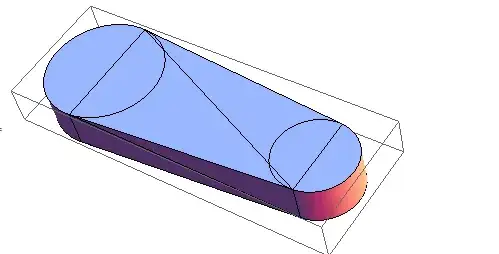
However, I felt my method is tedious and ingeneral. In addition, there are many other geometry "by extruding a section" like 3D software Autodesk Inventor.
So my question is:
Is there a good and easy method to realize my function
FinalGeometry[]?Is there possible to construct a function that can generate a geometry that can rotate freely (not a static image) by extruding a section?

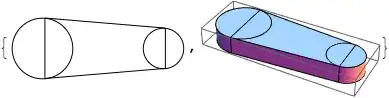

isn't duplicte,because (6206) isjust a image,not a geomatry that can rotate. – xyz Jul 21 '14 at 12:58ColorReplace and Raster3Dis not in V8,in addition,halirutan's solution takes many time to calculate and it is hard to rotate. – xyz Jul 21 '14 at 14:39extrude = {0, 0, 1}; rule2Dto3D = {x_?AtomQ, y_?AtomQ} :> {x, y, 0}; ruleLine2Polygon = Line[{p_?VectorQ, q_?VectorQ}] :> Polygon[{p, q, q + extrude, p + extrude}]; ruleCircle2Cylinder = Circle[p_?VectorQ, r_?AtomQ] :> Cylinder[{p, p + extrude}, r]; object2D = {Line[{{0, 0}, {8, 0}}], Circle[{0, 0}, 2], Circle[{8, 0}, 1]}; object3D = object2D /. rule2Dto3D /. {ruleLine2Polygon, ruleCircle2Cylinder}; {Graphics@object2D, Graphics3D@object3D}. It is limited to extruding line segments and circles, but extra 2D to 3D rules could be added. – Stephen Luttrell Jul 21 '14 at 14:53