I would like to create a 3D shape from extrusion and scaling of a 2D contour. The 2D contour that I have looks like this:
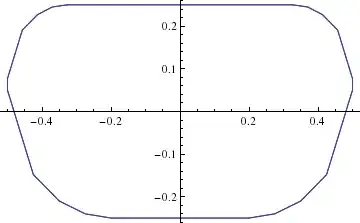
and it consists of a bunch of points (here plotted with ListPlot with Joined->True).
I have looked at a bunch of questions and answers here on Mathematica.SE, notably this one and this one, but I don't see how to apply those to my problem in any straightforward manner.
For the sake of a MWE I will switch to a circle from this point on:
xdata = Table[x, {x, -1, 1, 0.05}];
ydata = Table[Sqrt[1 - x^2], {x, -1, 1, 0.05}];
circData = {Transpose[{xdata, ydata}], Transpose[{xdata, -ydata}]};
ListPlot[circData, Joined -> True, AspectRatio -> Automatic]
The extruded shape that I would like to make then looks like this:

It is a shape consisting of slices of the contour with constant radius $r_0$ over some range let's say $-1 < z < 1$ and decrease in radius with $z$ at the tips according to $r(z)=r_0\sqrt{1-(z-1)^2}$ and $r(z)=r_0\sqrt{1-(z+1)^2}$ (depending on which tip).
My question is: how can I do this extrusion for the set of listdata that I have?
Just to be clear, to create the 3D shape for the circle I cheated and used the formula for a circle and a sphere like this:
p = Plot3D[{1 + Sqrt[1 - y^2 - x^2 ], -1 -
     Sqrt[1 - y^2 - x^2 ]}, {x, -2, 2}, {y, -2, 2},
   PlotStyle -> {Orange}, Lighting -> Automatic, Mesh -> Automatic,
   BoxRatios -> Automatic, Boxed -> False, Axes -> None];
q = RegionPlot3D[
   Sqrt[x^2 + y^2] < 1, {x, -1, 1}, {y, -1, 1}, {z, -1, 1},
   PlotStyle -> {Orange}, Lighting -> Automatic, Mesh -> Automatic,
   BoxRatios -> Automatic, Boxed -> False, Axes -> None];
Show[p, q]
Is there a way to achieve the same with the data from a list?
[Adaptation to thicknessFunc by @Halirutan and accompanying re-scaling]
To make the thicknessFunc more generic I adapted it to:
thicknessFunc[z_, body_,
  b_] := (HeavisideTheta[z] - HeavisideTheta[z - b])*
   Sqrt[b^2 - (z - b)^2] +
  b (HeavisideTheta[z - b] -
     HeavisideTheta[z - body - b]) + (HeavisideTheta[z - body - b] -
     HeavisideTheta[z - body - 2 b])*Sqrt[b^2 - (z - body - b)^2]
such that you can set the radius of the circular parts by setting $b$. A consequence of this is that you have to rescale the thicknessFunc in append with $1/b$ like
Append[1/b thicknessFunc[u,2]*fdata[t], u]
I don't fully understand why, but I guess it has to do with the fact that fdata is multiplied by thicknessFunc and therefore needs the straight ends of thicknessFunc to be at 1


thicknessFunc? When looking at the answer I was somehow expectedthicknessFunc[u, 4]to give a rectangular shape.. :) – Öskå Jul 25 '14 at 17:36bodyreally gives the length of the constant middle part and the round corners are always added. You have to changethicknessFuncto make the shape more rectangular, but I'm not sure howParametricPlot3Dwill handle such an abrupt jumpg. – halirutan Jul 25 '14 at 23:16Append[2*thicknessFunc[u,2]*fdata[t], u]) then it is fixed, but I really don't understand. I will add this to my question in an edit – Michiel Jul 26 '14 at 07:37