16

I'd like to be able to place points on a plot using Graphics[{Point[{a,b}],....}] but have the plot symbol be an unfilled circle. I've looked around but can't find any way of doing this. Is there one? Thanks.

After reading the first response, perhaps I should add a bit more. I'd like to be able to do the following:

p1 = Plot[x^2,{x,-3,3}]
p2 = Graphics[Style[Point[{0,0}],PointSize[Large]]
Show[p1,p2]

but with an unfilled circle instead of a dot.

The solution proposed in the first answer falls short in two ways: first, the unfilled circle does not properly hide graphics elements underneath it; second, the circle will appear as an ellipse, not a circle, in the (likely) event that the underlying graphic does not have aspect ratio 1.

The application here is for plotting piecewise discontinuous functions and showing clearly which endpoint at a jump discontinuity holds the value at the point.

Brett Champion
  • 20,779
  • 2
  • 64
  • 121
rogerl
  • 4,209
  • 3
  • 27
  • 42

4 Answers4

16

The purpose of the circles is to mark discontinuities, but if I understand you correctly you don't want exactly the same as in this linked question where the ExclusionsStyle option is discussed. You want the circles to sit only on one side of a discontinuity to indicate which side holds the value.

I'll compare that to the ExclusionsStyle method here. If you do use that option, it is possible to replace the default Point markers by anything you want using a replacement rule after the plot has been drawn:

With[{pointSize = .1},
 Plot[
   Floor[x], {x, -3, 3}, Background -> LightGray,
   ExclusionsStyle -> {None, {}}] /. Point[x_] :> Map[
    Inset[
      Graphics[
       {EdgeForm[Black], Cyan, Disk[]}
       ],
      #, Automatic, pointSize] &,
    x
    ]
 ]

ExclusionsStyle

So what I did here is to specify a dummy ExclusionsStyle with an empty list {} where the point style directive would normally go, just to make Mathematica draw Points at the discontinuities in the first place.

Then I replace every occurrence of Point by an Inset containing the desired outlined disk (I colored it cyan for clarity here). The Inset is positioned where the Point coordinates would have been. The Map is used to take into account the fact that Point has a whole list of coordinates as its argument, and a new Inset has to replace each of these.

As I said, this may not be what you need because it marks both sides of the discontinuity equally.

An alternative would be to not use ExclusionsStyle, as you already suggest in the question. But instead of using Graphics to make the points, I would suggest to use ListPlot. Not only is it specially designed to do just such point sets, but moreover it is relatively straightforward to pass it arbitrary symbols or graphics as markers for the points:

With[{markerSize = .03},
 Show[
  Plot[Floor[x], {x, -3, 3},
   PlotStyle -> Thick],
  ListPlot[
   Table[{i, i}, {i, -3, 3}],
   PlotMarkers -> {
     Graphics[
      {EdgeForm[Black],
       Yellow, Disk[]}
      ], markerSize
     }
   ],
  Background -> LightGray
  ]
 ]

ListPlot

Here, the Table contains the points I want to mark, and that allows me to exclude one side of each discontinuity. Here I chose a yellow disk for clarity.

Edit

By using ListPlot with the points collected in a Table, one also has the flexibility to add differently styled points to mark the two sides of a discontinuity separately - something which is much harder to do within the framework of ExclusionsStyle:

With[{markerSize = .03}, Show[
  Plot[Floor[x], {x, -3, 3}, PlotStyle -> Thick],
  ListPlot[{
    Table[{i, i}, {i, -3, 3}],
    Table[{i + 1, i}, {i, -3, 3}]},
   PlotMarkers -> {
     {Graphics[{EdgeForm[Black], Yellow, Disk[]}], markerSize},
     {Graphics[{EdgeForm[Black], Red, Disk[]}], markerSize}
     }
   ],
  Background -> LightGray]
 ]

Better exclusion marking

Jens
  • 97,245
  • 7
  • 213
  • 499
15

You could do this by drawing the point twice, with different styles and sizes:

p1 = Plot[x^2, {x, -3, 3}];
p2 = Graphics[{{PointSize[Large], Point[{0, 0}]}, White, 
    PointSize[Medium], Point[{0, 0}]}];
Show[p1, p2, Method -> {"AxesInFront" -> False}]

enter image description here

(I also moved the axes to the back, since they were drawing on top of the point.)

If you have several points, you can replace {0,0} with a list of them.

Brett Champion
  • 20,779
  • 2
  • 64
  • 121
  • 1
    this works great! But where is the Method-> option documented? I can't find it, nor can I find any reference to "AxesInFront" in the in-product docs. – rogerl May 19 '12 at 02:13
  • I don't think AxesInFront is documented anywhere, although it has been discussed on MathGroup in the past. – Brett Champion May 19 '12 at 03:07
11

[Update regarding edit: As Brian B points out, the center of the SmallCircle is not exactly where one would expect it, so, for accuracy, one needs to Offset the text. Compare

Graphics[{Black, Table[Text[Style["\[SmallCircle]", 48], Offset[{0, -4}, {0, 0}]], {50}]}, AspectRatio -> 1, Axes -> True, PlotRange -> 1]

with

Graphics[{Black, Table[Text[Style["\[SmallCircle]", 48], {0, 0}], {50}]}, AspectRatio -> 1, Axes -> True, PlotRange -> 1]. ]

This "solution" is admittedly a bit sloppy, given that the value of the offset will depend on the font size in question.


Edit: use Text["\[SmallCircle], {a,b}] for Point[{a,b}]

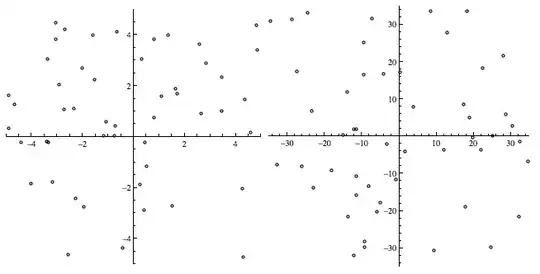
Here's another try altogether, with different AspectRatios. (Use a smaller font size than 28, if you find the circles too large.)

Graphics[{Black, Table[Text[
   Style["\[SmallCircle]", 28], {RandomReal[{-35, 35}], 
    RandomReal[{-35, 35}]}], {50}]}, AspectRatio -> 1, Axes -> True,
    PlotRange -> 35]
Graphics[{Black, Table[Text[
   Style["\[SmallCircle]", 28], {RandomReal[{-35, 35}], 
   RandomReal[{-35, 35}]}], {50}]}, AspectRatio -> 1/2, 
   Axes -> True, PlotRange -> 35]

aspect ratios


Earlier answer (possibly to be erased later?)

Scaled will keep the circles to the size you set, regardless of the PlotRange.

Graphics[Table[
 Circle[{RandomReal[{-5, 5}], RandomReal[{-5, 5}]}, Scaled[.005]], {50}], 
 Axes -> True,      PlotRange -> 5]
Graphics[Table[Circle[{RandomReal[{-35, 35}], RandomReal[{-35, 35}]}, Scaled[.005]],    
  {50}], Axes -> True, PlotRange -> 35]

two plots

DavidC
  • 16,724
  • 1
  • 42
  • 94
  • Sure, but that places a circle, and then I have to worry about scaling the thing properly, and the circle gets scaled according to the aspect ratio, which looks silly. Isn't there a style for points that says to use an empty circle? – rogerl May 19 '12 at 01:08
  • Use the radius to set the size. See the picture. – DavidC May 19 '12 at 01:08
  • I didn't know about Scaled. Thanks. However, I don't think this addresses the issues I [now, after an edit] raise in the original post. I guess the simple answer to my original question is "no, there's not", which is unfortunate. – rogerl May 19 '12 at 01:33
  • You could also use Offset to create circles with a fixed radius, that doesn't scale with the graphic. – Brett Champion May 19 '12 at 01:47
  • @rogerl The update handles the AspectRatio issue you raised. – DavidC May 19 '12 at 01:48
  • One could use Inset[] instead of Text[] as well. – J. M.'s missing motivation Oct 31 '12 at 23:56
  • @J.M. Yes. For some reason, I never think to use Inset. – DavidC Nov 01 '12 at 11:54
  • Note that with Text["\[SmallCircle]",...] the center of the circle is not the proper point position. – Brian B Dec 01 '12 at 16:57
  • @BrianB You are absolutely right. I hadn't noticed this. With Offset this can be corrected but the workaround will likely depend on the font size being used. See update. – DavidC Dec 01 '12 at 17:21
  • @BrianB - you can see this point displacement here too: Show[ListPlot[{{{8, 8}}, {{10, 10}}}, PlotMarkers -> {Automatic, 40}], ListPlot[{{{8, 8}}, {{10, 10}}}, PlotStyle -> Directive[White]], AspectRatio -> 0.5, AxesOrigin -> {9, 9}, PlotRange -> {{9, 13}, {9, 13}}, ImageSize -> 200] – Chris Degnen Dec 01 '12 at 20:56
  • One could also use \[EmptyCircle] as a marker, which is a bit larger. – J. M.'s missing motivation Jun 07 '13 at 03:15
0

One can use the CirclePoint primitive from David Park's Presentations add-on, http://home.comcast.net/~djmpark/DrawGraphicsPage.html. For the original example:

Draw2D[{Draw[x^2, {x, -3, 3}],
        Thick, CirclePoint[{0,0}, 5, Black, White]},
       AspectRatio -> 1/GoldenRatio, Axes -> True]
Michael E2
  • 235,386
  • 17
  • 334
  • 747
murray
  • 11,888
  • 2
  • 26
  • 50