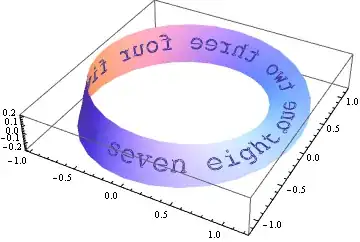
I am trying to make a GIF which will be a rotating Möbius strip, with some text printed along its (one!) side. I am trying to (obviously) do this in Mathematica.
After some diligent searching and a previous question I asked, I realize it is almost impossible to get text to behave well when it comes to opacity, rotations, etc. So instead I decided to make a rectangular image of the text, and then import it into Mathematica. But I'm getting stuck on putting all the pieces together.
Do I want to use this image as a texture on the Möbius strip (which I'm getting from a ParametricPlot3D)? Or is there some other way to "wrap" this image exactly once around the Möbius strip?
Also, would it be better to use an Animate to rotate the image - keeping the Möbius strip fixed - or is it better to simply rotate the whole thing? (I mean "better" as in "easier to do / better-looking").
I would actually prefer to eventually figure all this out on my own, but maybe some hints as to how I might proceed would be awesome.
EDIT: After Heike's helpful comment, I've come up with the following:
text = Style["Hello!", 200];
ParametricPlot3D[{4 Cos[a] + r Cos[a] Cos[a/2],
4 Sin[a] + r Sin[a] Cos[a/2], r Sin[a/2]}, {a, 0, 2 Pi},
{r, -(3/2), 3/2}, Boxed -> False, Axes -> False,
Mesh -> False, PlotStyle -> {Directive[Texture[text]], Opacity[.5]},
TextureCoordinateFunction -> ({#4, #5} &)]
This of course doesn't rotate. But perhaps something can be done with ViewVector or this esoteric TextureCoordinateFunction? I don't know, because my Mathematica is having a very hard time drawing this correctly.


Rasterizecan rasterize text as well. – Heike May 19 '12 at 08:23ViewVector; in the latter you could adjustTextureCoordinateFunction. You could use something like{#4 - t, #4}&. – Heike May 19 '12 at 09:14