8

Is it possible to create a 3D rotating text like this:
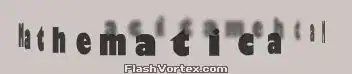
enter image description here

animation here.

Here is my try so far:

text = Style["Mathematica  Mathematica ", 128];
g = ParametricPlot3D[{Cos[theta], Sin[theta], rho}, {theta, -π, 
    π}, {rho, 0, 1}, PlotStyle -> Texture[text], 
   Lighting -> "Neutral", Mesh -> None, PlotRange -> All, 
   TextureCoordinateScaling -> True, Boxed -> False, Axes -> False, 
   SphericalRegion -> True];

Animate[Show[g, ViewPoint -> {2 Cos[x], 2 Sin[x], 0}], {x, 0, 2 π}]

my attempt

The problem is that the text is a texture, and one can't look through it. We can use Simon Woods's nice filledCurveToPolygons3D function here to change the text into polygons, but wrapping the polygon to a cylinder seems to require non-geometric transformation, which I don't know how to do. 3D text

possible related questions:

J. M.'s missing motivation
  • 124,525
  • 11
  • 401
  • 574
xslittlegrass
  • 27,549
  • 9
  • 97
  • 186

2 Answers2

9

As I was going to post this, I saw cormullion's comment. Anyway, as the linked answer by Heike shows, this works:

r = Rasterize[Pane[Style["Mathematica  Mathematica ", 128],2100]];

text = SetAlphaChannel[r, ColorNegate[r]];

g = ParametricPlot3D[{Cos[theta], Sin[theta], rho}, {theta, -Pi, 
   Pi}, {rho, 0, 1}, PlotStyle -> Texture[ImageData@text], 
  Lighting -> "Neutral", Mesh -> None, MeshShading -> None, 
  PlotRange -> All, TextureCoordinateScaling -> True, Boxed -> False, 
  Axes -> False, SphericalRegion -> True, 
  Background -> Lighter[Orange]]

imagedata

The main point is that you have to precede the Texture argument by ImageData. This is a bug that is also discussed in this answer and the link I included there.

Instead of Background -> None as Heike used, I use SetAlphaChannel to choose where the transparent regions show up. To control the width of the text label, I added a Pane wrapper.

Jens
  • 97,245
  • 7
  • 213
  • 499
  • I can't test it properly, as transparent textures don't work on my system, but to get closer to the original you could try using PlotStyle -> FaceForm[Texture1, Texture2] with Texture2 being a blurred version of Texture1. – Simon Woods May 11 '13 at 21:57
  • @SimonWoods Ah yes, I didn't think of the blur effect. I'll try it. – Jens May 11 '13 at 22:00
  • @SimonWoods It stopped being fun when I encountered a new bug just now. It reproducibly crashes with front and back textures when one of them is transparent and the other isn't (it seems). Simplest example: edit my code to Texture[ImageData/@{text,r}] (save session first). I don't think I want to mess with that right now... – Jens May 11 '13 at 22:17
  • yep - another one for the "how to crash Mathematica" list... – Simon Woods May 12 '13 at 13:41
  • @Jens Ah, so that's what was crashing it! I played a little but with it but gave up without figuring out what was crashing – Szabolcs May 12 '13 at 18:21
8

This question is closely related to the Möbius strip 3D text question. Since the extraction of font curves through "PDF" export of text is not well-known and it is the specific transformation you're having problems with, let me give you the code for creating this:

text spins around

It is possible to get the outline of a font by ex- and importing a text as "PDF". With this, you get FilledCurve's for your text which you then can simply transform to a Graphics3D.

The transformation from 2D text to 3D is {x_Real, y_Real} :> {Cos[x], Sin[x], y} and can be found at the end in the code. The rotation is done by creating a list of images where I add dphi to the angles of the above transformation.

As result you have in out a list of graphics which can be used for instance in ListAnimate

With[{text = 
    First[First[
      ImportString[
       ExportString[
        Style["Ah, gravity, thou art a heartless bitch -", Italic, 
         FontSize -> 24, FontFamily -> "Helvetica"], "PDF"], "PDF", 
       "TextMode" -> "Outlines"]]]}, 
  Block[{allx, ally, meany, minmax}, {allx, ally} = 
    Transpose[Cases[text, {_Real, _Real}, Infinity]];
   minmax = {Min[allx], Max[allx]};
   meany = ((Max[#1] - Min[#1])/2. &)[
     Rescale[ally, minmax, {0, 2*Pi}]];
   out = Table[
     Graphics3D[
      text /. FilledCurve[_, pts_] :> 
        With[{scaledPts = 
           Rescale[pts, minmax, {0, 2*Pi}]}, {ColorData[
           "IslandColors", scaledPts[[1, 1, 1]]/(2.*Pi)], 
          Tube[scaledPts /. {x_Real, y_Real} :> 
             2 {Cos[x - dphi], Sin[x - dphi], 2 y}
           ]}], Boxed -> False, ViewPoint -> {1.5, 0, 0.2}, 
      ViewCenter -> {0.5, 0.5, 0.5}],
     {dphi, 0, 2 Pi, .2}]
   ]];
halirutan
  • 112,764
  • 7
  • 263
  • 474