31

When I use Export to export Plot3D to PDF format, I get different behaviour in Mathematica 10.1 compared to 10.0. In particular, version 10.1 Rasterizes the graphics by default:

myFigure = Plot3D[x y, {x, 0, 1}, {y, 0, 1}]
Export["Figure.pdf", myFigure]

How can I turn off this rasterization? Can I set the default back to vector images?

Alexey Popkov
  • 61,809
  • 7
  • 149
  • 368
LBogaardt
  • 1,595
  • 1
  • 11
  • 21
  • Specify the file format: Export["\\Figure.pdf", myFigure, "PDF"] – David G. Stork Jul 07 '15 at 18:37
  • @DavidG.Stork That doesn't seem to help: the PDF format is implicit from the extension in the file name. If you don't specify it and try to export a 2D plot to PDF, it will be exported as a vector graphic. On the other hand, even if you do specify it, and export a 3D plot, it will be rasterized, at least on my system (v.10.1 Win764bit). – MarcoB Jul 07 '15 at 18:48
  • I am actually surprised to hear that v.10 was exporting the 3D plots as vector graphics though. I don't have v.10 to test with, but I don't recall that being the case: I thought that 3D plots were rasterized upon export no matter what. I'd love to be corrected on this one, as it would be great to have a way to export infinitely resizable 3D graphics. – MarcoB Jul 07 '15 at 18:49
  • I get a rasterized image in both 10.0 and 10.1. Do you get vector in 10.0? The doc page on the PDF format mentions the "AllowRasterization" option. Take a look. Unfortunately in v10.0 and v10.1 it has no effect when I try it. In v9 it works as described. Bug maybe? I would ask WRI support about this. – Szabolcs Jul 07 '15 at 19:39
  • 1
    I believe that PDF export functionality was rewritten for v10, so they might tell you that this is intentional and the bug is that "AllowRasterization" is still in the docs ... let us know what they say, I'm curious! – Szabolcs Jul 07 '15 at 19:39
  • @MarcoB I exported LBogaardt's Plot3D figure using Export["\\Figure.pdf", myFigure, "PDF"] and got a true vector graphics PDF figure (which, alas, StackExchange will not allow us to load). [Mathematica v. 10.1.0.0 Mac OS X v. 10.7.4 on a Mac Pro] – David G. Stork Jul 07 '15 at 20:18
  • I still get a rasterized image using DavidG.Stork's solution. Note there are 3 versions of 10.0, namely 10.0.0, 10.0.1 and 10.0.2. I wonder if this also makes a difference (?). I am using 10.0.0 versus 10.1. – LBogaardt Jul 07 '15 at 20:23
  • @DavidG.Stork The plot thickens... I am also on v. 10.1.0, but on Win7-64 instead, and I get a rasterized graphic using your method. I would love to find a way to get the vector format instead! This would simplify my life immensely in preparing figures for publication. Thank you for checking though. – MarcoB Jul 07 '15 at 20:51
  • @LBogaardt I tried 10.1.0 and 10.0.2. Both gave the rasterized version. I only tried Export, not Save As... . These two methods sometimes give different results. – Szabolcs Jul 08 '15 at 10:34
  • What's the status of this in version 12? None of the tricks suggested here seem to work. – Mohammed AlQuraishi Jul 12 '20 at 15:36
  • 1
    none of these options work in version 13 – elbOlita Nov 09 '22 at 17:49

2 Answers2

25

Indeed, 3D plots like this were exported as vector graphics with generally huge numbers of polygons in version 8. But even then, the export was automatically rasterized whenever there were VertexColors present in the plot. I described this as a trick for getting smaller PDF files here, and also used it e.g. here.

So in general, I think it's actually a good thing that PDFs generated from 3D graphics are rasterized, provided it's done at a resolution appropriate for the desired device. However, despite this change in version 10, the developers haven't gotten this automatic rasterization quite right yet. For example, here is an issue that didn't get fixed, but which still can be repaired by artificially inserting a texture with VertexColors in the plot (that's what I do in my answer to the linked question).

So now we apparently have mandatory rasterization. While this makes exported files smaller, it can also backfire when you just have a Graphics3D with simple objects such as lines and a few polygons. Then there may not be any disk space savings at all from rasterization, but you pay the price of lower quality without reaping any rewards.

As a workaround for this lack of choice in Export, you could manually Print a selected Graphics3D as I do in this screen shot:
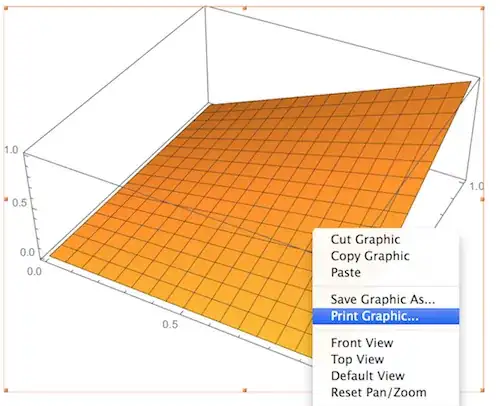
screen shot

I right-clicked on the graphic and selected Print Graphic... from the context menu. Then I used the print dialog to save as PDF instead of printing. The result is a PDF file that maintains everything in vector graphics form (at least under Mac OS X). I think the printing route works because it assumes that the proper rasterization is going to be done by the printer driver, so Mathematica doesn't have to worry about it (since it's not meant to be a stored file). Of course, they may just have overlooked this loophole (let's hope they keep it open, then one could even consider making a palette for it).

Rasterization can also be avoided by exporting to EPS, but that format is outdated and can't handle opacity.

Edit

Another way to get the exported file as vector graphics is this:

Export["myFig2.pdf", 
 Graphics[Inset[myFigure, Automatic, Automatic, Scaled[1]]]]

Here, I actually export a 2D graphic into which the 3D figure has been placed as an inset.

Jens
  • 97,245
  • 7
  • 213
  • 499
  • If it can be done by menu command, wouldn't you think it could be done by code? But it may be so well hidden that it's hard to discover how. – Michael E2 Jul 08 '15 at 04:18
  • @MichaelE2 This question was the first time I became aware of the change, since I was (and am) using version 8 a lot more than 10. So I haven't been able to find any other programmatic solution... I hope you're right, though. Couldn't find anything in the Advanced Options... – Jens Jul 08 '15 at 04:29
  • didn't work for Mathematica10.0.2 on win7 – Harry Jul 11 '16 at 04:27
  • @Harry Sorry to hear that. Still works fine for me on Mac. Did you try both methods? – Jens Jul 11 '16 at 04:43
  • @Jens I now know the problem. I used a .png file for texture in one Sphere[] which may trig rasterize. When I removed png texture it works fine. – Harry Jul 11 '16 at 14:27
  • @Harry yes - textures do indeed trigger that. I actually exploited this on purpose to get the opposite of what this Q asks in this thread... – Jens Jul 11 '16 at 14:54
  • @Jens Hi, for the print graphic approach, is there a way to shrink the paper size to be just around the image? – user64620 Aug 30 '16 at 17:55
  • @user64620 Not automatically, but you can play around with the scale, orientation and paper format in Printing Settings in Mathematica's Edit menu. – Jens Aug 30 '16 at 19:31
  • Anyone know what the status is with Mathematica 11.3? – Mohammed AlQuraishi May 31 '18 at 22:44
8

Unfortunately, on version 10.3 the solutions proposed by Jens do not seem to work in at least some situations (see edit on this other question).

A workaround that I found to work well in my case is simply using GraphicsRow, which seems to automatically correctly tweak the options of Inset in a way that produces the expected result. If the 3D graphics to export is plot, just use

Export["out.pdf", GraphicsRow[{plot}, ImageSize -> 1000]]

Another workaround proposed by Alexey Popkov in a comment is using

Export["out.pdf",Graphics[Inset[plot], ImageSize -> 1000]]

These are of course simply slight variations of the solution with Inset given by Jens, but they're probably good to know for someone (like me) not knowing how to properly handle the options of Inset.

glS
  • 7,623
  • 1
  • 21
  • 61
  • The key improvement as compared to original Jens' workaround is explicit ImageSize specification moved from Graphics3D into enclosing Graphics. More generally it can be written as Graphics[Inset[plot], Options[plot, ImageSize]] and as GraphicsRow[{plot}, First@Options[plot, ImageSize]]. – Alexey Popkov Nov 24 '15 at 12:25
  • didn't work for Mathematica10.0.2 on win7 – Harry Jul 11 '16 at 04:29