Questions tagged [noobs]

Questions involving the New Out Of Box Software (NOOBS). Use this tag if you are having trouble using NOOBS to boot your Pi, having trouble with using NOOBS to install an OS, or your question involves NOOBS, such as how to configure an installation from within NOOBS.

New Out Of Box Software (Recommended)

We recommend that first-time Pi users start by downloading and installing our New Out of Box Software (NOOBS) onto a 4GB (or larger) SD card. On first boot, this presents you with a choice of operating systems to install, including Raspbian, Pidora and two flavours of XBMC. Once you have installed an operating system, you can return to the NOOBS interface by holding down shift during boot; this allows you to switch to a different operating system, or overwrite a corrupted card with a fresh install of the current one.

By default, NOOBS will output over HDMI at your display’s preferred resolution, even if no HDMI display is connected. If you do not see any output on your HDMI display or are using the composite output, press 1, 2, 3 or 4 on your keyboard to select HDMI preferred mode, HDMI safe mode, composite PAL mode or composite NTSC mode respectively.

Full instructions can be found in our quick start guide, but in summary you will need to:

Format your SD card using the SD Card Association’s formatting tool.

<p>Download and unpack the NOOBS zip file onto the SD card</p>

-Taken from Raspberry Pi Downloads page

If you’re a beginner with a Raspberry Pi, things just got a whole lot easier.

We started this project with the premise that throwing people in at the deep end and making them jump hurdles, to mix my sporting metaphors, is a good way to get them to learn stuff. It is: but it can also put some people off, sometimes terminally. And we don’t want people to put their Raspberry Pi down in horror after five minutes. So with this in mind, we’d like to introduce you to NOOBS.

NOOBS is a way to make setting up a Raspberry Pi for the first time much, much easier. You won’t need network access, and you won’t need to download any special imaging software. Just head to the downloads page, grab a copy of the NOOBS zip file, and unpack it onto a freshly formatted 4GB (or larger) SD card. When you boot up for the first time, you’ll see a menu prompting you to install one of several operating systems into the free space on the card. The choice means you can boot the Pi with a regular operating system like Raspbian, or with a media-centre specific OS like RaspBMC.
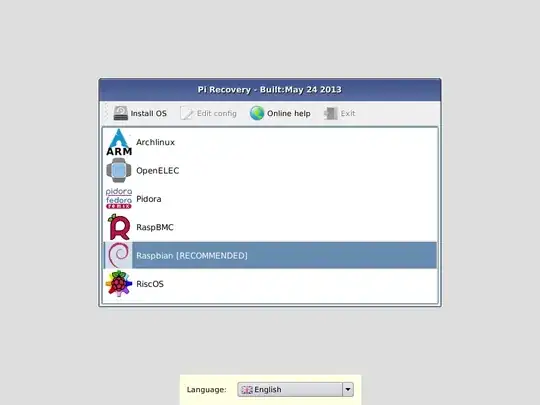
The main OS selection menu.

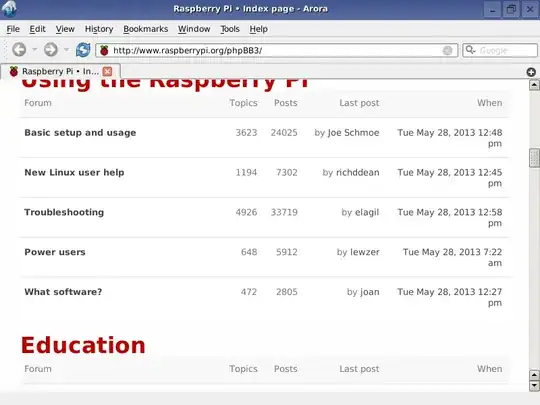
Once you’ve installed an operating system, your Pi will boot as normal. However, NOOBS stays resident on your card, so by holding shift down during boot you can return to the recovery interface. This allows you to switch to a different operating system, or overwrite a corrupted card with a fresh install of the current one; it also provides a handy tool to let you edit the config.txt configuration file for the currently installed operating system, and even a web browser so you can visit the forums or Google for pointers if you get stuck.
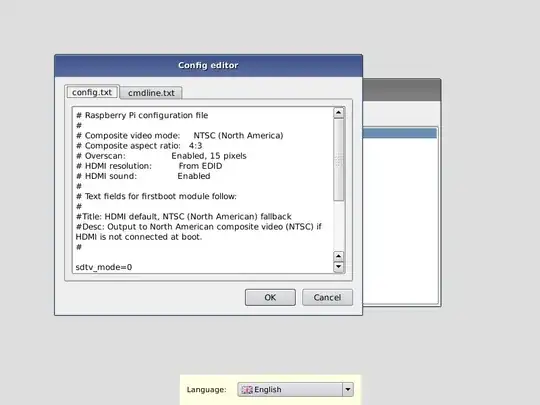
Editing config.txt.

Viewing the forums in the Arora browser.

Thanks to Rob, Gordon, Dom and Floris (of BerryBoot fame), who together developed NOOBS from scratch in less than a month. Also, thanks to our army of volunteer translators for the localisation; and to the operating system maintainers, most notably Alex, for producing updated images in time for integration into the final zip file.

Our partners will be offering SD cards pre-installed with NOOBS in the near future, but until then please download, have a play, and let us know what you think.

Update, June 4: Carrie Anne Philbin from Geek Gurl Diaries has recorded a Tutorial video showing you how to set up your own installation of NOOBS. Thanks Carrie Anne!

(Video Link: http://www.youtube.com/watch?feature=player_embedded&v=TyFDaMpdh2c)

Taken from NOOBS introduction post on Raspberry Pi Blog: http://www.raspberrypi.org/archives/4100

EDIT: January 1, 2014 - RPi Awesomeness

The current version of NOOBS available on the Raspberry Pi site is NOOBS 1.3.3, as per this blog post. It includes the newest versions of Raspbian, Arch Linux, and two flavours of XBMC, as well as several new features, as seen in the blog post.

320 questions
4
votes
0 answers

Restart NOOBS downloading process?

I was at university with NOOBS in SD card and my Raspberry. I need to install OpenELEC which is downloaded from Internet. However, it seems that university cable network doesn't provide DHCP or something, and I need to set an static IP manually. So,…
whitenoisedb
  • 367
  • 1
  • 5
  • 13
3
votes
4 answers

How to update NOOBS using a Raspberry Pi without removing the NOOBS sd card

I have an old version of NOOBS (1.4) installed on my Raspberry Pi, and I want to update to a newer version. I don't have a way to plug my micro SD card into a computer to install the new version of NOOBS on it, so I was wondering if there was a way…
kungfushark
  • 31
  • 1
  • 1
  • 2
3
votes
3 answers

Re-configure Raspberry Pi as if it was new

Was going through a tutorial, and I forgot to enable I2C interface and load the I2C kernal module, as well as a few other things. I just want to get it back to the point as if I didn't configure anything, and I had just pulled it out of the box.
Mark
  • 31
  • 1
3
votes
1 answer

Is it possible to create a script that runs after a NOOBS installation?

Is it possible to create a script as part of the NOOBS installation files in the FAT32 partition on the SD card, so this script runs automatically after the installation of NOOBS? I need this in order to modify the default installation files, in…
2
votes
1 answer

autostart chromium fullscreen NOT kiosk

I want chromium to start up fullscreen with the default startup pages but I don't want it to start in kiosk mode. I've tried a desktop entry and running it from ...LXDE-pi autostart by just leaving the -kiosk out of the command but it does not…
user99180
  • 21
  • 1
  • 2
2
votes
1 answer

Need a password to decompress NOOBS ZIP file

I downloaded the NOOBS program at the Raspberry Pi download page. I next was ready to decompress the file and get the message NOOBS_v1_4_0.zip is password protected. What do I use as a password?
2
votes
1 answer

Raspberry Pi NOOBS kit doesn't show operating systems at first boot

I just bought the Raspberry Pi NOOBS kit, and at boot I got an error screen saying that it isn't connected to the Internet and so it can't load the OS images. I can't press on Quit or Install. How do I install the OS offline? And how do I quit? So I…
sangino
  • 21
  • 1
2
votes
3 answers

Getting started with Pico Pi controlling 5V PTC heating element 100C

I have just started with the Pico Pi and have no idea where to get info on how to power 5V 3A PTC heating element using the Pico and a MOSFET. Would there be anyone who could give me a pointer as I have been going in circles.
2
votes
2 answers

I need to troubleshoot a re-install of NOOBS

I had been using my Raspberry Pi as a desktop computer, and I wanted to reset it so that I could use it for a project, so I moved my personal files to a newer computer, and formatted the sd card, before installing NOOBS on it again. I was a bit…
Sam
  • 21
  • 1
2
votes
1 answer

Boot error - don't find NOOBS files

i buy RPi4 and tried to install raspbian with NOOBS, but didn't work :-( It displayed MSGBOX: Files not found with the message "Cannot find the drive with NOOBS file." And then on CLI... [0.982514] print_req_error: I/O error, dev mmcblk0, sector…
mr. sad
  • 21
  • 1
1
vote
2 answers

Black Screen after Changing NOOBS Skin

I installed NOOBS on my Raspberry Pi 3 and it worked fine until I decided to change the skin, which caused a system crash. After restarting, the only thing visible is a black screen. However, I can still see and move the mouse cursor around the…
1
vote
2 answers

Why does NOOBS only list two operating systems to install?

So I downloaded NOOBS on my 32 GB SD card, but I only have Raspbian and some movie watching OS to choose from. When I look at other people's NOOBS online, they have a whole list—why is that? Do I have to manually add new operating systems to NOOBS?
cmd
  • 19
  • 1
1
vote
1 answer

Error trying to download NOOBS

I have been trying to download NOOBS. But the downloads keep failing. Not on my RPI. But on my computer. I've tried so many things. But it keeps failing. Is there another way i can download it?
Zach R
  • 13
  • 3
1
vote
0 answers

Why is NOOBS not showing me all the operating systems?

A week or two ago I dropped NOOBS 2.3 on to a 32 GB SD card, booted it in my Raspberry Pi Zero W, configured the network, and was then presented with a nice long list of OSes that I could install, including RISC OS, a couple of different media…
cjs
  • 843
  • 1
  • 6
  • 15
1
vote
1 answer

Windows 10 IoT and other OSes on NOOBS install list

Can I install Windows 10 IoT on PI 3, and also retain NOOBS install list? If I press Shift, NOOBS seems to be missing. These is no option to install another distro.
mikef2
  • 11
  • 1
1
2 3