For fans of tikzstyles, here are a bunch of styles that might help in made visible elements as draw, fill and shade upon providing overlay specifications.
The code:
\documentclass{beamer}
\usepackage{lmodern}
\usepackage{tikz}
\usetikzlibrary{shapes.geometric}

\tikzset{
    invisible/.style={opacity=0,text opacity=0},
    visible on/.style={alt=#1{}{invisible}},
    alt/.code args={<#1>#2#3}{%
      \alt<#1>{\pgfkeysalso{#2}}{\pgfkeysalso{#3}}
    },
}

\tikzset{
  background fill/.style={fill=#1},
  background fill/.default={white},
  fill on/.style={alt=#1{}{background fill}},
}

\tikzset{
  background draw/.style={draw=#1},
  background draw/.default={white},
  draw on/.style={alt=#1{}{background draw}},
}

\tikzset{
  background filldraw/.style 2 args={draw=#1, fill=#2},
  background filldraw/.default={white}{white},
  filldraw on/.style={alt=#1{}{background filldraw}},
}

\tikzset{
  background shade/.style={#1},
  background shade/.default={top color=white, bottom color=white},
  shade on/.style={alt=#1{}{background shade}},
}

\tikzset{
  background shadedraw/.style 2 args={draw=#1, #2},
  background shadedraw/.default={white}{top color=white, bottom color=white},
  shadedraw on/.style={alt=#1{}{background shadedraw}},
}

\begin{document}
\begin{frame}{Title}
\begin{columns}[T]
\begin{column}{0.2\textwidth}
\centering
Fill draw\\[2ex]
\tikz[baseline=(A.base)] \node[background fill=red!50,fill on=<2>,anchor=base,rounded corners,visible on=<1->] (A) {ABCD};

\tikz[baseline=(A.base)] \node[background fill=blue!50,fill on=<{1,3}>,anchor=base,rounded corners,visible on=<1->] (A) {EFGH};

\tikz[baseline=(A.base)] \node[background draw=red,draw on=<2>,anchor=base,rounded corners,visible on=<1->] (A) {IJKL};

\tikz[baseline=(A.base)] \node[background draw=blue,draw on=<{1,3}>,anchor=base,rounded corners,visible on=<1->] (A) {MNOP};

\tikz[baseline=(A.base)] \node[background filldraw={red}{blue!10},filldraw on=<2>,anchor=base,rounded corners,visible on=<1->] (A) {QRST};
\end{column}
\begin{column}{0.2\textwidth}
\centering
Shadings\\[2ex]
\tikz[baseline=(A.base)] \node[background shade={top color=red!50, bottom color=white},shade on=<2>,anchor=base,rounded corners,visible on=<1->] (A) {ABCD};

\tikz[baseline=(A.base)] \node[background shade={inner color=red!50, outer color=white},shade on=<{1,3}>,anchor=base,rounded corners,visible on=<1->] (A) {EFGH};

\tikz[baseline=(A.base)] \node[background shade={left color=orange!50, right color=white},shade on=<2>,anchor=base,rounded corners,visible on=<1->] (A) {IJKL};

\tikz[baseline=(A.base)] \node[background shadedraw={blue}{top color=white, bottom color=cyan!30},shadedraw on=<{1,3}>,anchor=base,rounded corners,visible on=<1->] (A) {MNOP};

\tikz[baseline=(A.base)] \node[background shadedraw={green!50!black}{inner color=white, outer color=green!30},shadedraw on=<2>,anchor=base,rounded corners,visible on=<1->] (A) {QRST};
\end{column}
\begin{column}{0.55\textwidth}
\centering
Node application\\[2ex]
\begin{tikzpicture}
\tikzset{visibility 1/.style={background draw=red, draw on=<{1,4}>,
        background shade={top color=white,bottom color=red!30}, shade on=<{2,3}>,
    }
}
\tikzset{visibility 2/.style={
        background shadedraw={green!50!black}{inner color=white,outer color=green!30}, shadedraw on=<{2,3}>,
    }
}
\tikzset{visibility 3/.style={  background draw=orange, draw on=<1->,
        background fill={orange!30}, fill on=<{2,3}>,
    }
}
\tikzset{visibility 4/.style={  background draw=purple, draw on=<2->,
        background shade={left color=purple!30, right color=cyan!30}, shade on=<{3,4}>,
    }
}
\node[visible on=<1->,trapezium,visibility 1] (A) {Text};
\node[visible on=<1->,trapezium,visibility 2, below of=A] (B) {Text};
\node[visible on=<1->,trapezium,visibility 3, below of=B] (C) {Text};
\node[visible on=<1->,trapezium,visibility 4, below of=C] (D) {Text};
\end{tikzpicture}
\end{column}
\end{columns}
\end{frame}
\end{document}
The result:

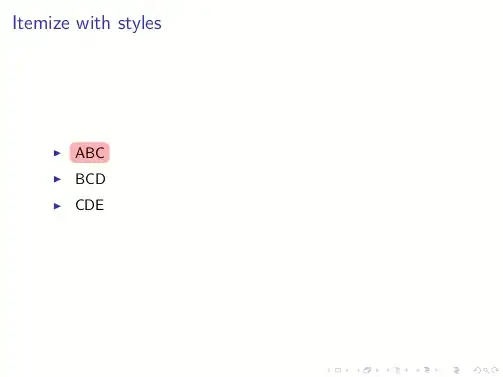
Applied to the itemize environment:
\documentclass{beamer}
\usepackage{lmodern}
\usepackage{tikz}
\usetikzlibrary{shapes.geometric}

\tikzset{
    invisible/.style={opacity=0,text opacity=0},
    visible on/.style={alt=#1{}{invisible}},
    alt/.code args={<#1>#2#3}{%
      \alt<#1>{\pgfkeysalso{#2}}{\pgfkeysalso{#3}}
    },
}

\tikzset{
  background fill/.style={fill=#1},
  background fill/.default={white},
  fill on/.style={alt=#1{}{background fill}},
}

\tikzset{
  background draw/.style={draw=#1},
  background draw/.default={white},
  draw on/.style={alt=#1{}{background draw}},
}

\tikzset{
  background filldraw/.style 2 args={draw=#1, fill=#2},
  background filldraw/.default={white}{white},
  filldraw on/.style={alt=#1{}{background filldraw}},
}

\tikzset{
  background shade/.style={#1},
  background shade/.default={top color=white, bottom color=white},
  shade on/.style={alt=#1{}{background shade}},
}

\tikzset{
  background shadedraw/.style 2 args={draw=#1, #2},
  background shadedraw/.default={white}{top color=white, bottom color=white},
  shadedraw on/.style={alt=#1{}{background shadedraw}},
}

% Command for sequentially fill the items
\newcommand{\itemfill}[1]{\tikz[baseline=(A.base)] \node[background fill=red!30,fill on=<+>,anchor=base,rounded corners,visible on=<1->] (A) {#1};}

\begin{document}

\begin{frame}{Itemize with styles}
\begin{itemize}
\item \itemfill{ABC}
\item \itemfill{BCD}
\item \itemfill{CDE}
\end{itemize}
\end{frame}

\end{document}
gives:


\node[alt=<2>{fill=red!30,rounded corners}{},anchor=base] (A) {ABCD};2. Are you thinking of something like\foreach \i in {1,...,4} \tikz[remember picture,baseline] \node[alt=<\i>{fill=red!30,rounded corners}{},anchor=base] (A) {ABCD};? In the last example<\i>can be substituted by<+>.\begin{itemize}\item abc\item cde\item fgh\item ijk\end{itemize}such that on all slides all items are visible but item i is highlighted by a node as before on slide i only. Not sure whether that's what you had in mind ...(?)